VX600 All-in-One Controller User Manual
Step 2 Press an input source button in the INPUTS area to quickly select an input source for the layer.
Menu Operations
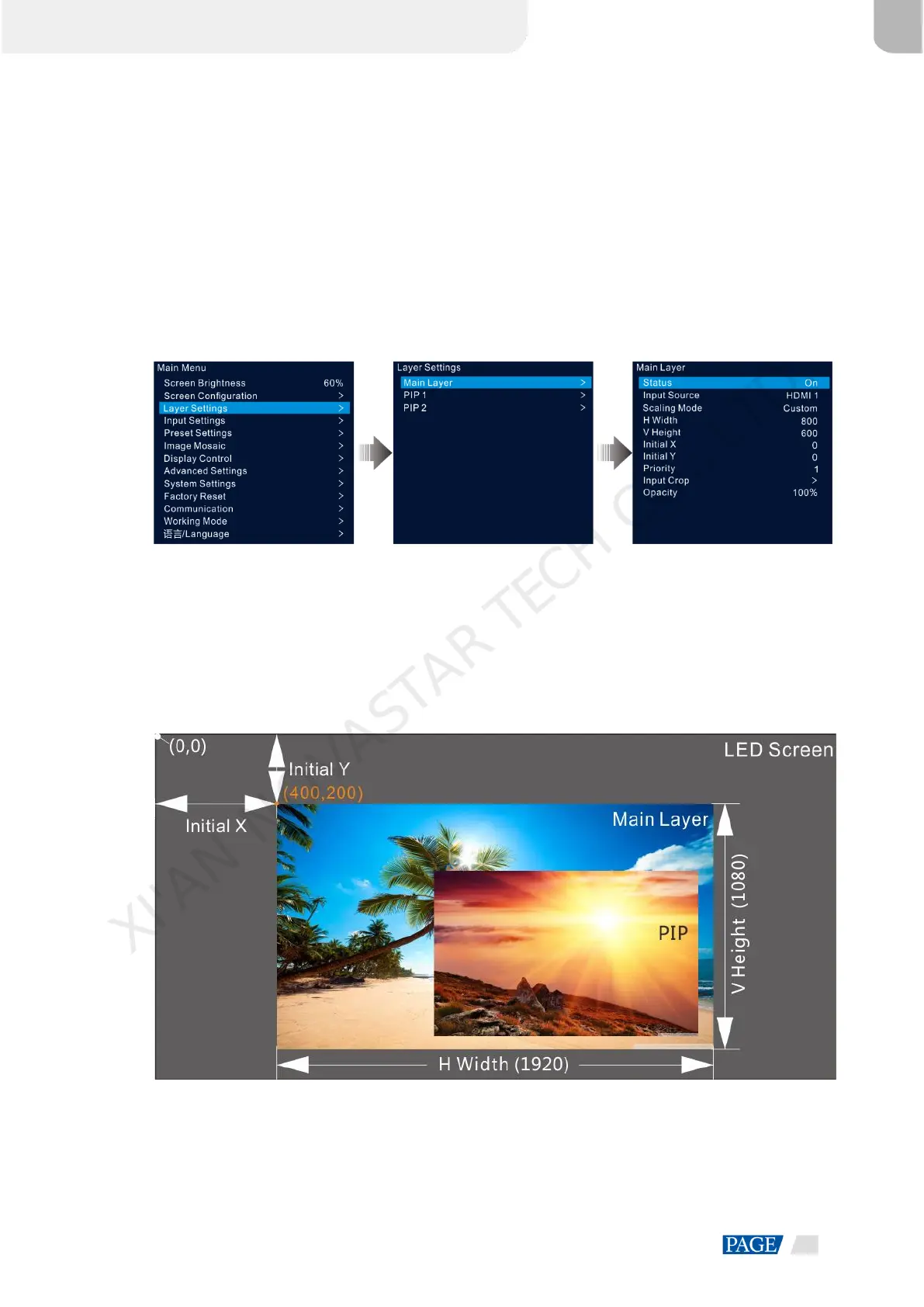
Step 1 On the home screen, press the knob to enter the main menu screen.
Step 2 Rotate the knob to select Layer Settings and press the knob to enter the layer settings screen.
Step 3 Rotate the knob to select Main Layer, PIP 1 or PIP 2 and press the knob to enter the corresponding settings
screen.
Figure 5-10 Layer settings
Step 4 Select Status and press the knob to confirm. Rotate the knob again to select On and press the knob to
confirm.
Step 5 Rotate the knob to select Input Source and select the desired input source for the layer.
Step 6 Rotate the knob to select other layer parameters and set them if needed. The layer parameter descriptions are
shown in Table 5-2 and Figure 5-11.
Figure 5-11 Layer parameter descriptions
Step 7 Rotate the knob to select Priority and set the layer z-order.
XI'AN NOVASTAR TECH CO., LTD.



 To Next Page