RS232 of ECR connected to NTS printer
9PIN
Port A: 9pin-2 to 25pin-3
9pin-3 to 25pin-2
9pin-5 to 25pin-7
GND RXD TXD RTS GND - - - -
25PIN
1 2 3 4 5 6 7 8 9 10 11
GND T XD RX D - - DSR G ND - - - -
1 2 3 4 5 6 7 8 9
- TXD R XD - GN D - - - -
Port B: 9pin-1 to 25pin-1
9pin-2 to 25pin-2
9pin-3 to 25pin-3
9pin-4 to 25pin-6
9pin-5 to 25pin-7
1.3 Preparations before sales work begins
1.3.1 Installing and wiring the machine
Never install or wire the machine when it is powered.
Note:
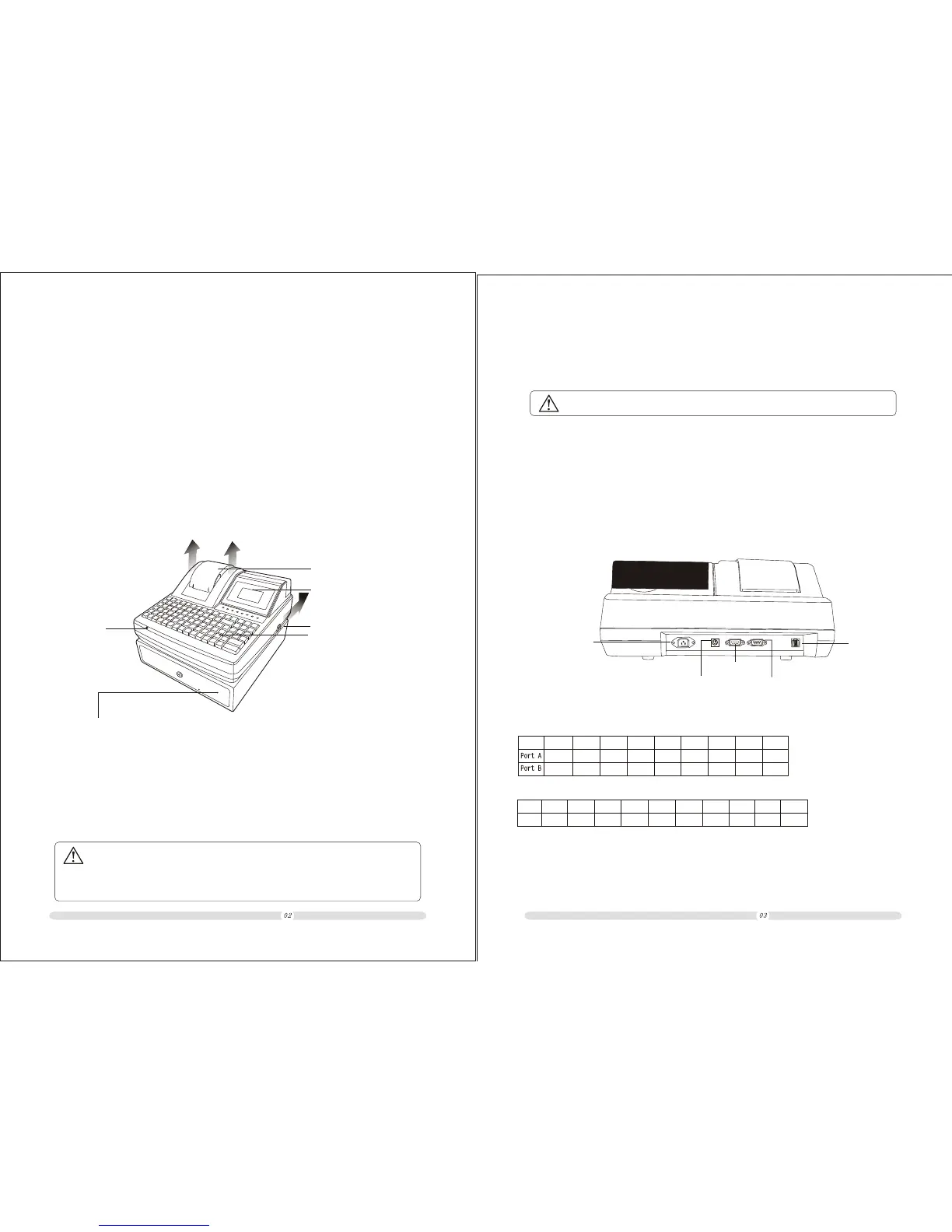
1.Power switch: “O” for switch off; “-” for switch on;
2.Power port: a 220V, 50Hz power cord already furnished for connection to a commercial power
supply. Please install the power cord firmly;
3.PS/2 communications port: for connection to an external keyboard or a bar code scanner with a
PS/2 port;
4.RS232 communications port: a data line already furnished for connection to a computer or a kithcen
Printer;
5.Cash drawer port: for connection to and establishing a control line to the cash drawer.
1.2 Brief introduction to the host machine
Note:
There are cash drawer's keys inside the cash drawer. The aforementioned three methods cannot
be used to open the cash drawer once it is locked with such a key.
Please place the cash drawer on a level plane.
Note:Printer can be connected to ECR’s Serial port .But the cable have to change
according to printer’s port function pins.
ECR User`s Manual ECR User`s Manual
1.Printer cover, which can be opened by pulling it gently upward in the direction of the arrow;
2.Customer display, which can be pulled up in the direction of the arrow and of which the angle
can be adjusted;
3.Operator display, of which the angle can be adjusted;
4.The host machine and the cash drawer are joined together through a bayonet-socket connection.
The two can be separated for independent placement by gently moving one in the direction of
the arrow.
Printer cover
Host machine
Keyboard
This keyboard is a programmable
keyboard and can be used to
program any of its department
keys. It can be used to set a special
function or shortcut key. It is also
possible to take down a key cover
for putting in a paper sheet with a
written prompt for ease of use.
Cash drawer
There are three ways to open the cash drawer:
a)The cash drawer automatically opens when sales
work completes for the current day;
b)It can be opened by pressing the [# / Cash Drawer]
key during a sale;
c)It can be opened by pulling the metal rod on the
bottom of the cash drawer in case of a power failure
emergency.
3
3
Power switch
2
2
1
Customer Display
Power port
PS/2
communications port
Rs232
communications port
Cash drawer port
RS232
communications port



 To Next Page