C - 4 en-938821/2
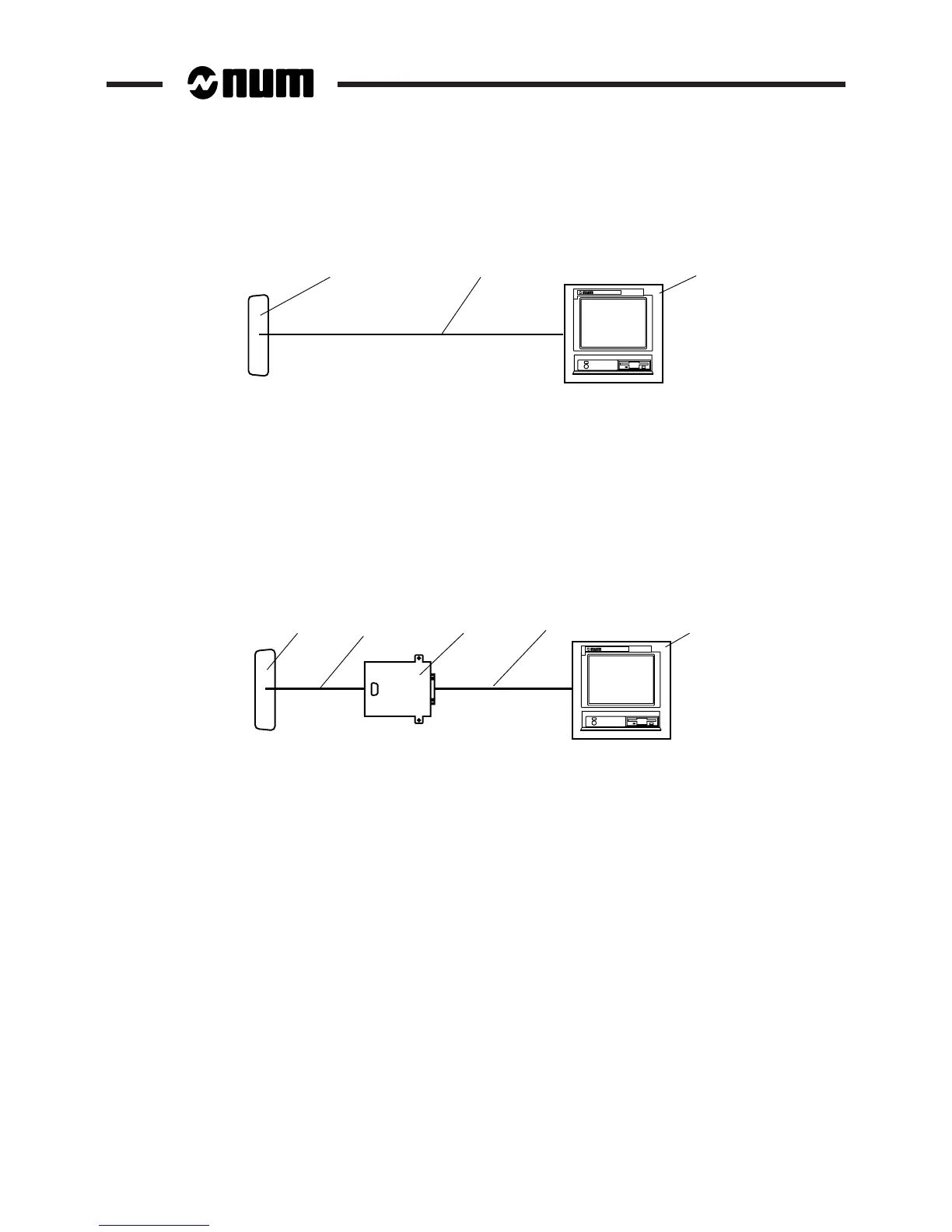
C.1.1.2 Connection of a Peripheral to an RS 232 Serial Line
1 2
3
1 - RS 232 line:
• 25 contacts on machine or CNC processors or UC SII CPU
• 15 contacts on IT/serial line card
• 9 contacts on V2 machine processor, V2 CNC and UC SII, 1020, 1040 and 1050 CNCs
2 - Peripheral RS 232 serial link cable (See C.1.2.1)
3 - Peripheral or NUM PC panel (example)
REMARK Configure the serial lines using the serial line parameters utility (See 8.3).
C.1.1.3 Connection of a Peripheral to a TTL Line
1 4 5
2
3
1 - TTL line
2 - TTL output/adapter connecting cable (See C.1.2.2)
3 - RS 232 adapter (P/N 205201338)
4 - Adapter RS 232 serial connecting cable (See C.1.2.3)
5 - Peripheral or NUM PC panel (example).
REMARK Configure the serial lines using the serial line parameters utility (See 8.3).



 To Next Page