68
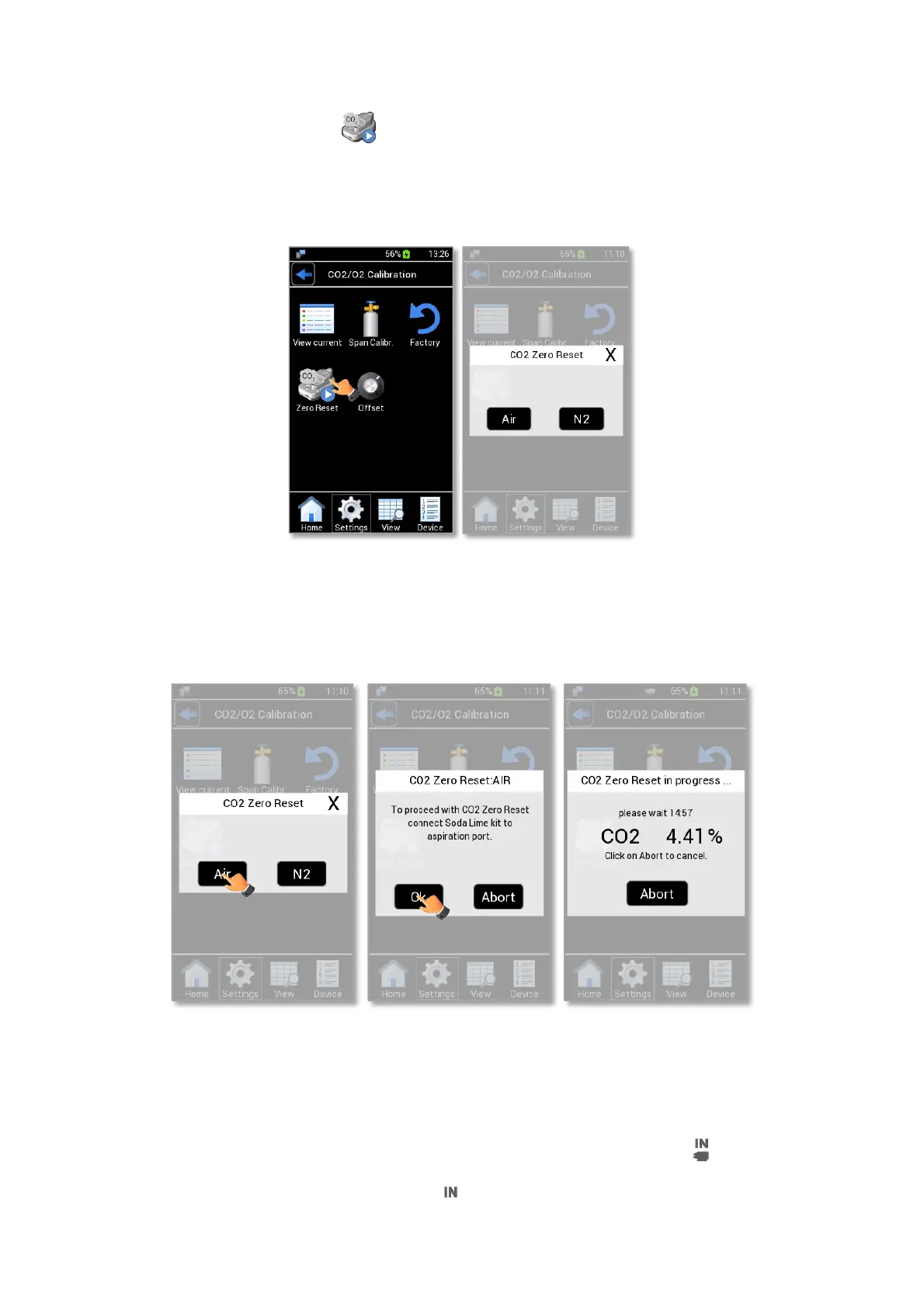
Press on CO2 Zero Reset icon (see Figure 91) to correct the zero of the CO2 sensor, the pop-up in
Figure 91 b appears.
You can decide to use Air or N2 for the CO2 Zero Reset procedure.
Tip ►Okolab suggests to start the CO2 Zero Reset using N2, use Air only if N2 is not available.
Figure 91. CO2 Zero Reset (a – b).
13.4.1 CO2 Zero Reset with Air
Press on Air to start the CO2 Zero Reset if you are using air. See Figure 92 a.
Figure 92. CO2 Zero Reset with Air (a – b - c).
Pressing on Air, LEO reminds you to connect the Soda Lime kit, Figure 92 b.
To connect the Soda Lime Kit to LEO follow the instructions below:
1. Connect the clear connector of Tube-A to LEO gas inlet port labeled with icon (1 in Figure 94).
2. Put the cap on LEO gas inlet port labeled (2 in Figure 94).



 To Next Page