Home
Olivetti
Printer
PR4 SLIP
Page 46 (Adjusting the Clearance of the Document Insertion Slot)
Olivetti PR4 SLIP - Adjusting the Clearance of the Document Insertion Slot
56 pages
Manual
Save Page as PDF
To Next Page
To Next Page
To Previous Page
To Previous Page
Loading...
XYAA6338 Service Manual
6-3
6.5
ADJUSTING THE CLEARANCE OF
THE DOCUMENT INSERTION SLOT
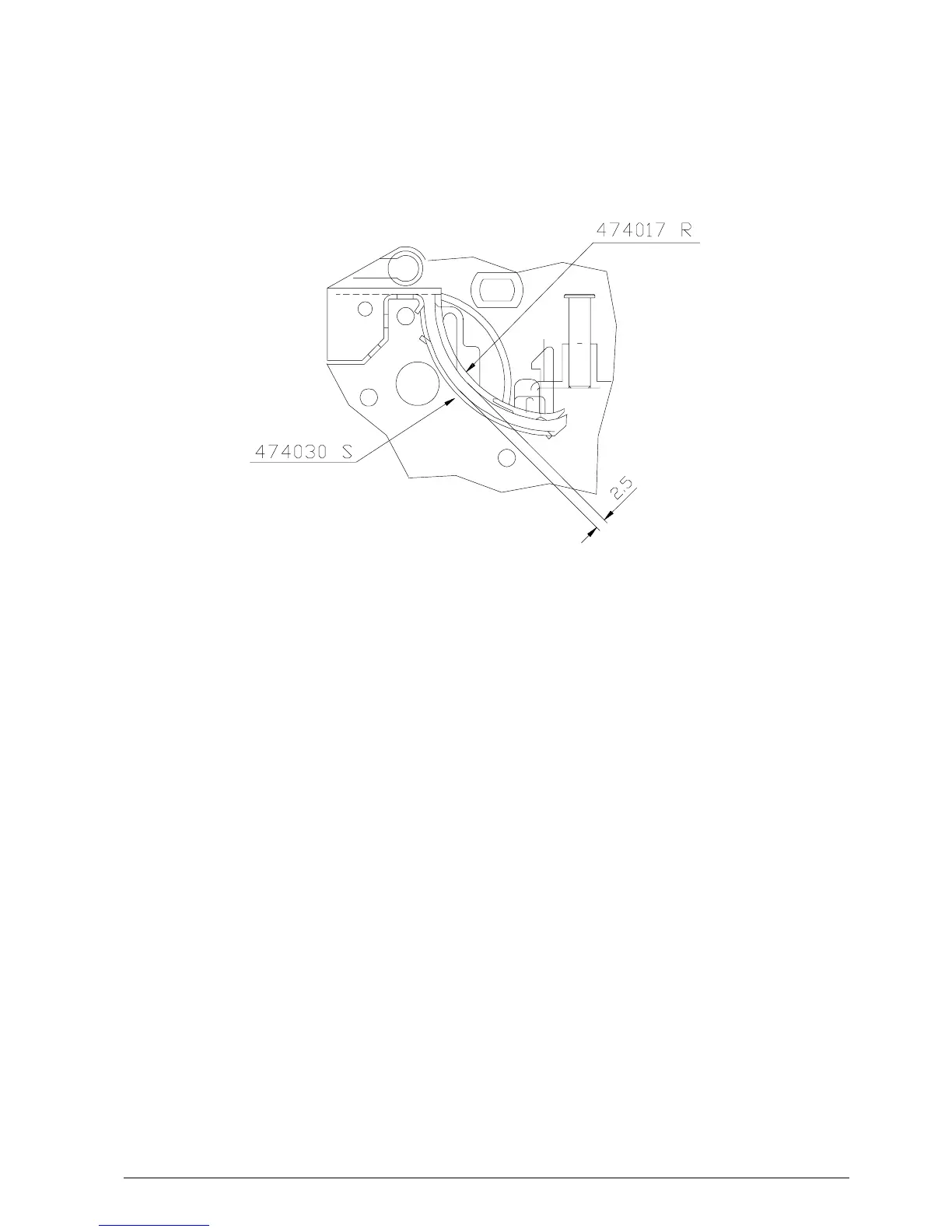
Using a specific probe, make sure that there is a
clearance of 2.5 mm between the frame shield code
474030S and the frame in zama code 474017R.
Fig. 6-5
45
47
Table of Contents
Main Page
Default Chapter
4
Table of Contents
4
1 Overview
5
Introduction
5
Overall View of the Printer
6
Block Diagram
7
Interconnections
8
Power Supply Characteristics
9
Layout of the Drawer and Display Connectors
10
Interfaces
11
Serial Interface Connector Layout
11
IEE 1284 Parallel Interface Connector Layout
12
2 Installation
13
Unpacking the Printer
13
Checking the Packaging Contents
14
Removing the Blockages Used for Transportation
15
Inserting the External Transformer
16
Connections
17
3 Functional Checks
18
Leds
18
Console Indications
19
Slip Test
21
4 Setup and Adjustments
22
Operator Test
23
Setup from the Console
23
Accessing this Setup Mode
23
Selectable Parameters
24
Selecting the Parameters
25
SET-UP Diagram (Olivetti Serial Port Emulation)
26
SET-UP Diagram
26
(EPSON Serial Port Emulation)
27
SET-UP Diagram (EPSON Parallel Port Emulation)
28
5 Disassembly/Reassembly Procedures
29
Overview
29
Removing the Case
29
Locating the Components on the Electronic Board
31
Main Board
31
MICR Board
33
Removing the Print Assembly
35
Removing the Print Head
36
Removing the Platen
37
Removing the Carriage Motor
38
Removing the Ribbon Movement Pin
39
Removing the Document
40
Detection Photosensors
40
Removing the Slip Detection
41
Photosensors
41
Removing the Line Feed Motor
42
Basic Printer Version
42
MICR Version
42
Removing the Boards
43
Main Board
43
Micr Board
43
Drawer and Display Card
43
6 Adjustments
44
Adjusting the Platen on the Basic Structure
44
Adjusting the Parallelism and Print Head-Platen Distance
45
Adjusting the Tension of the Carriage Transport Belt
45
Mounting the Snap Rings on the Carriage Transport Assembly
45
Adjusting the Clearance of the Document Insertion Slot
46
Adjusting the Paper Detection Photosensor
47
Adjustment Menu
48
Photosensor Adjustments
49
Adjusting the Carriage
51
MICR Adjustment
53
7 Installing the Drawer Card Option
56
Related product manuals
Olivetti PR4 SL
8 pages
Olivetti PR4 SR
79 pages
Olivetti PR2
179 pages
Olivetti PR 4
105 pages
Olivetti PR2 E
149 pages
Olivetti PR2 plus
24 pages
Olivetti PGL2545
355 pages
Olivetti PG L2140
313 pages
Olivetti PG L2130
112 pages
Olivetti PG L2145
313 pages
Olivetti d-Color P20W
95 pages
Olivetti PG L26 Special
93 pages



 To Next Page