EasyManua.ls Logo

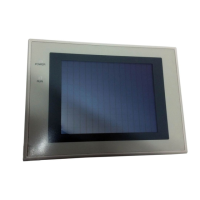
Omron NT31 - User Manual

Omron NT31
707 pages
Print Icon
To Next Page IconTo Next Page
Loading...
Cat.No. V043–E1–2
Programmable Terminal
NT31/31C
OPERATION MANUAL

Table of Contents

Other manuals for Omron NT31

Questions and Answers

  • A
    Andrew BryantSep 12, 2025
    What does '[Incorrect Screen Data] Screen Data in Screen Memory do not match with the System Program' mean on Omron NT31 Touch terminals?
    • T
      Tiffany GeorgeSep 12, 2025
      If your Omron Touch terminal displays the message '[Incorrect Screen Data] Screen Data in Screen Memory do not match with the System Program', it means the type of registered screen data does not match that at the NT31/NT31C. Initialize the screen data memory, then transmit the correct screen data.
  • B
    Brian ReynoldsSep 13, 2025
    What does '[Touch Panel is disconnected]' mean on Omron NT31 Touch terminals?
    • S
      Sherry CopelandSep 13, 2025
      If your Omron Touch terminal displays the message '[Touch Panel is disconnected]', it means the touch panel cable (film cable) inside the NT31/NT31C is disconnected. Contact your OMRON service center.
  • L
    Lance KingSep 13, 2025
    What does '[Memory Switch Corrupted] Because Memory Switch setting was last' mean on Omron NT31 Touch terminals?
    • D
      David WellsSep 13, 2025
      If your Omron Touch terminal displays the message '[Memory Switch Corrupted] Because Memory Switch setting was last', it means the memory switches have been initialized due to discovery of an error in the memory switch settings. Set the memory switches again using the System Menu and the System settings under PT Configuration at the Support Tool. If the problem recurs, contact your OMRON service center.
  • N
    Nicholas PerezSep 13, 2025
    What does '[Backup Data Error] Memory table and History data was initialized by backup failure' mean on Omron Touch terminals?
    • C
      Charles Allen DVMSep 13, 2025
      If your Omron Touch terminal displays the message '[Backup Data Error] Memory table and History data was initialized by backup failure', it means initialization has been executed because of an error in the backup data area. Check the battery voltage by checking the color of the RUN LED and with the battery check in the System Menu; if the voltage is low, replace the battery with a new one. Re-transmit the memory table data from the Support Tool. If the voltage is normal and the problem recurs, contact your OMRON service center.
  • R
    rhallSep 13, 2025
    What does '[With memory switch setting screen] Invalid Comm. Method' mean on Omron NT31 Touch terminals?
    • C
      Caroline PayneSep 14, 2025
      If your Omron Touch terminal displays the message '[With memory switch setting screen] Invalid Comm. Method', it indicates that protocol settings for serial port A and serial port B are mismatched. Refer to Possible Combinations of Communication Method Settings and set the protocol of serial port A and serial port B so that their settings are matched. Set serial port A to None when connecting the Support Tool and the host at the same time.
  • J
    Jessica GonzalesSep 14, 2025
    What does '[Address Setting Error] Addressing Error exists in the Screen' mean on Omron NT31 Touch terminals?
    • L
      laurahayesSep 14, 2025
      If your Omron Touch terminal displays the message '[Address Setting Error] Addressing Error exists in the Screen', it means that the host side allocated words and bits set with the Support Tool are incorrect. Set correct words and bits after checking the area used at the host side.
  • S
    Stacie DonovanSep 14, 2025
    What does '[Memory Table No. Error] Memory table No. is out of limit' mean on Omron NT31 Touch terminals?
    • B
      Brian LaneSep 14, 2025
      If your Omron Touch terminal displays the message '[Memory Table No. Error] Memory table No. is out of limit', it means the memory table number set with the Support Tool is outside the range for the number of memory tables set in the system memory. Either increase the number of memory tables in the System settings under PT Configuration at the Support Tool, or set the memory table number again within the established range.
  • J
    Jennifer PerrySep 14, 2025
    What does '[Programming Console Error] Setting of Programming Console Function is inadequate' mean on Omron Touch terminals?
    • A
      Alexa HartSep 14, 2025
      If your Omron Touch terminal displays the message '[Programming Console Error] Setting of Programming Console Function is inadequate', it means the communication settings are incorrect. Set the communication method/communication port as follows when using the Programming Console function: With C-series PLCs:1:1 NT Link; With CS-series PLCs: 1:N NT Link (standard or high-speed).
  • A
    andreawilliamsSep 15, 2025
    What does '[Programming Console Error] Programming Console Function does not RUN' mean on Omron NT31 Touch terminals?
    • S
      Susan SavageSep 15, 2025
      If your Omron Touch terminal displays the message '[Programming Console Error] Programming Console Function does not RUN', it could be due to several reasons. The connecting cable might be defective, so check the cable connection and perform a conductivity test, replacing the cable if there's a fault. Malfunction due to external noise is another possibility, so carry out grounding work. Also, it's not possible to use a Programming Console and the Programming Console function simultaneously, so disconnect the Programming Console if it's connected. Finally, the communication conditions at the PLC might have been changed in accordance with the NT31/NT31C Programming Console function; set the communication conditions at the PLC to match the conditions set in the System Menu.
  • T
    tara46Sep 15, 2025
    What does '[Flash Memory Error] Flash Memory I/O Error' mean on Omron NT31 Touch terminals?
    • A
      Amber HernandezSep 15, 2025
      If your Omron Touch terminal displays the message '[Flash Memory Error] Flash Memory I/O Error', it indicates a hardware fault, or the flash memory (memory for storing screen data) has reached the end of its service life. If the same message is displayed even after clearing the screen data or transmitting screen data several times, contact your OMRON service center.

Omron NT31 Specifications

General IconGeneral
Display TypeSTN LCD
Touch PanelAnalog resistive
Communication InterfaceRS-232C, RS-422/485
Power Supply24 VDC
Operating Temperature0 to 50 °C
Storage Temperature-20 to 60 °C
Display Size5.7 inch
Resolution320 x 240 pixels
CPU32-bit RISC
Humidity10 to 90% RH (non-condensing)
Shock Resistance15 G for 11 ms
Protection classIP65 (front panel)

Related product manuals