165
Appendix G
Using the C200H-NC112 with CS1-series PCs
Differences in Memory Allocation
Note the following differences in the memory areas when using the C200H-NC112 with a CS1-series PC.
IR (CIO) Area and DM Area Allocation
• The beginning word, n, of the IR Area allocated to the C200H-NC112 will change as follows:
n = IR 100 + unit number × 10 → n = CIO 2000 + unit number × 10.
• The beginning word of the DM Area allocated to the C200H-NC112 will change as follows:
m = DM 1000 + unit number × 100 → m = D20000 + unit number × 100.
Transferring Data Using the CIO Area
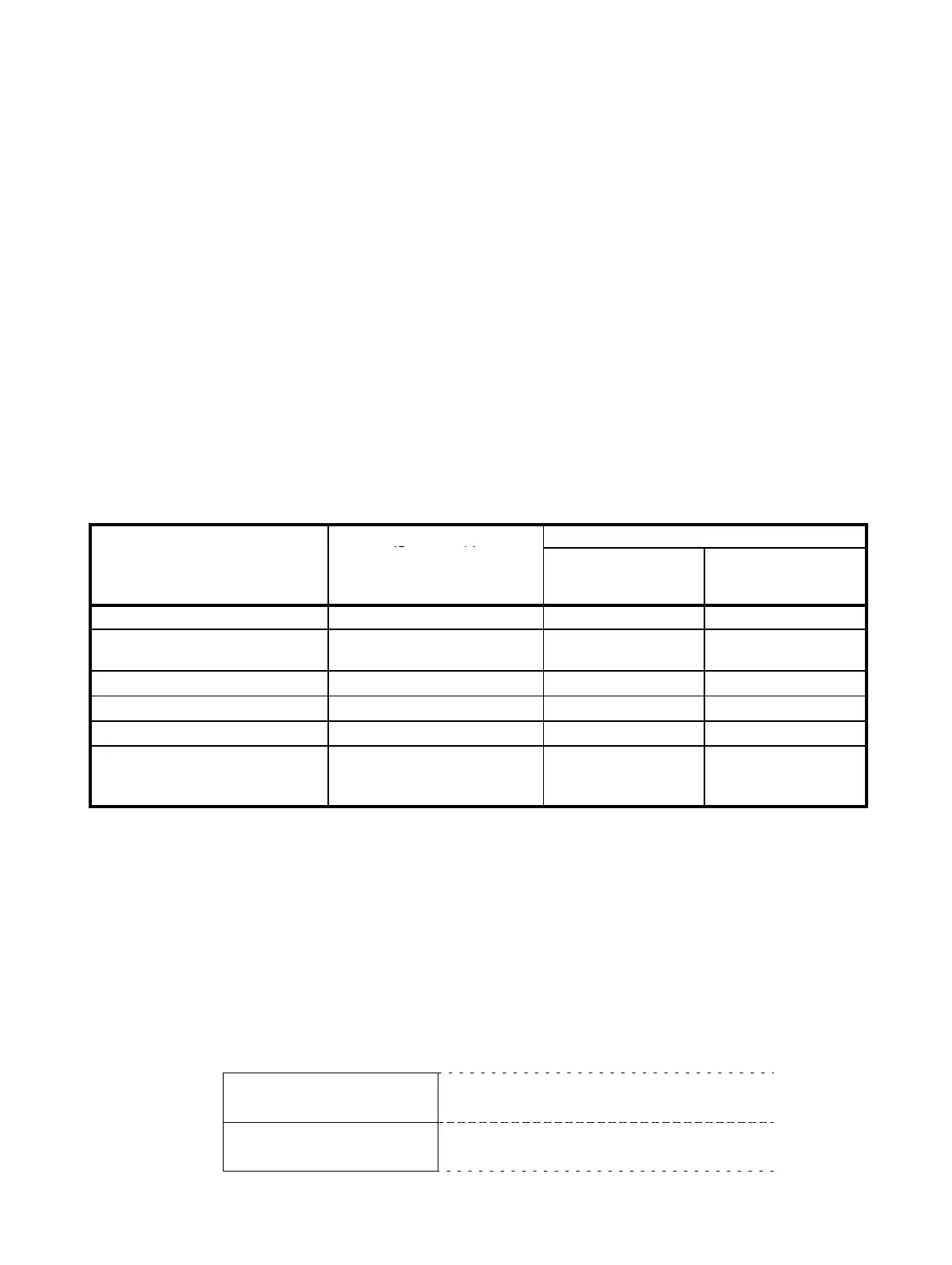
Specifying addresses containing position and speed data using words n+3 and n+4 in the CIO Area is performed in
the way illustrated in the table below.
(n = 2000 + unit number × 10)
Area Address in CS1 PC
Specifying address from CIO Area
(See note 1.)
Data area
n+4, bits 00 to 07
(2 digits BCD)
Beginning word
n+3, bits 00 to 15
(4 digits BCD)
General-purpose DM Area D00000 to D00999 00 0000 to 0999
DM Area for Special I/O Units D20000 to D20999 00 1000 to 1999
(See note 2.)
I/O Area CIO 0000 to CIO 0255 01 0000 to 0255
Data Link Area CIO 1000 to CIO 1063 02 0000 to 0063
Holding Area 1 H000 to H099 03 0000 to 0099
Holding Area 2 H100 to H127
Note: H101 cannot be
specified.
04 0000 to 0027
Note: 0001 cannot be
specified.
Note 1. Only the CS1-series PC addresses given in the above table can be specified.
2. When specifying an address in the DM Area for Special I/O Units (D20000 to D20999), do not specify a
number in the range 20000 to 20999. Use the range 1000 to 1999 (as if specifying an address for a
C200HX/HG/HE, C200HS, or C200H PC).
Data Configuration
Allocated CIO Area
(n = 2000 + unit number × 10)
Bit
n
to
n+4
n+5
to
n+9
Commands from the CPU Unit
PCU status
15
0 Contents Direction
START, ORIGIN SEARCH, initial
positioning action number,
TRANSFER DATA, etc.
CPU Unit → PCU
PCU→ CPU Unit
Present position, zones, error
flags, etc.












 To Next Page