17
OneScreen
HL7
11.3 Screen Gestures
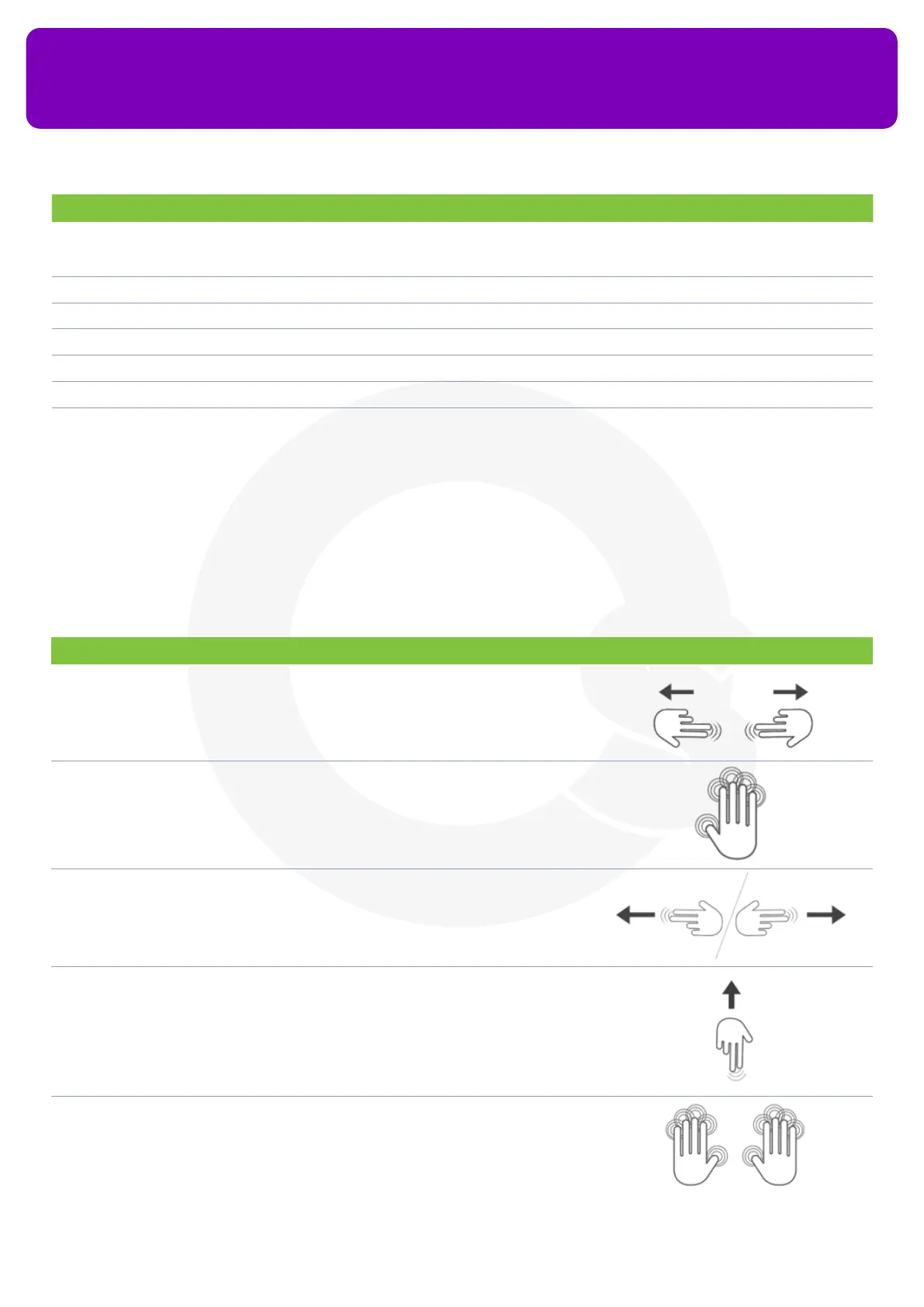
The OneScreen HL7 supports the following gesture inputs:
Gesture Input Action Illustration
Pinch in or out with both hands using two ngers
of each hand simultaneously on any part of the
screen
Takes a screenshot
Hold ve ngers for three seconds Device goes to sleep / wakes up
Swipe from left or right side of the panel towards
its center with two ngers
Go Back
Swipe up using two ngers from the bottom of the
screen
Shows background applications
Hold 10 ngers for 3 seconds Exits Kiosk Mode
No. Description Function
5. Files Can be used to access the storage of your OneScreen Android or any connected devices like USBs
or External Hard Drives. All your downloads, documents, videos, pictures etc. are stored and can be
accessed from here
6. Browser You may use it to surf the internet or access websites
7 Apps To access all the applications installed on your OneScreen HL7’s Android Side
8 Menu To access the ‘Common Settings’ of your screen for switching to dierent sources like HDMI, VGA etc
9 Annotate To use the on-screen annotation tool for annotation over documents and dierent sources
10 Capture To take screenshots on your display
11 Navigation Toolbar To access additional tools such as timer, stopwatch, spotlight, screen recorder, OneScreen Class etc


 To Next Page