29
OneScreen
HL7
12.9 OneScreen QuizWiz
Creating and conducting assessments or quizzes are very essential and common to classrooms and
sometimes even boardrooms. With the growing need to generate quizzes quickly, OneScreen has introduced
an AI based Quiz generation platform - QuizWiz. QuizWiz allows users to intelligently generate multiple
choice-based quiz directly through content. Users can simply copy and paste the content into QuizWiz and
click on generate quiz to create questions. These can either be copied to the clipboard or can be exported in a
pdf le which can then be opened on any platform including OneScreen Write. The ease of use and simplicity
of this software helps users/teachers make it part of their regular use to help drive better results.
QuizWiz can be accessed through the following link on any device: https://quizwiz.ai You can also access it
using the QuizWiz shortcut present on the browser widget of your OneScreen Homepage.
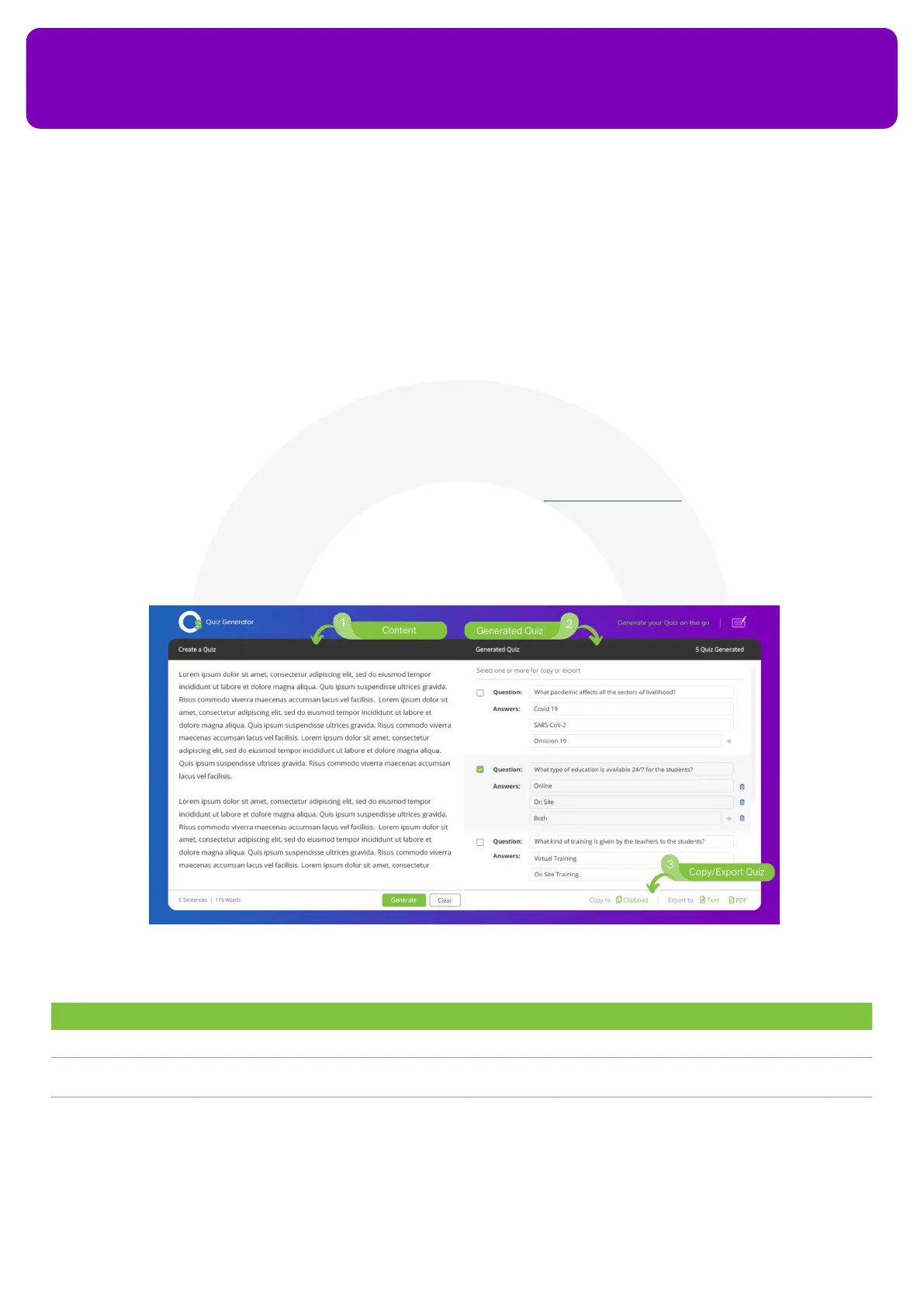
No. Description Function
1. Content Enter the text that you would like to generate the quiz from and press the “Generate” button
2. Generated Quiz View all the questions and multiple-choice answers that the software generated automatically. You can
also add/delete answer options here
3. Copy/Export Quiz You can copy the quiz to the clipboard or export it as a Text/PDF le


 To Next Page