26
OneScreen
HL7
On the registration page, you will be asked to assign yourself a username such as admin@xyz. The word after
‘admin@’ is your domain name i.e., in case if your username is admin@xyz your domain name will be ‘xyz’.
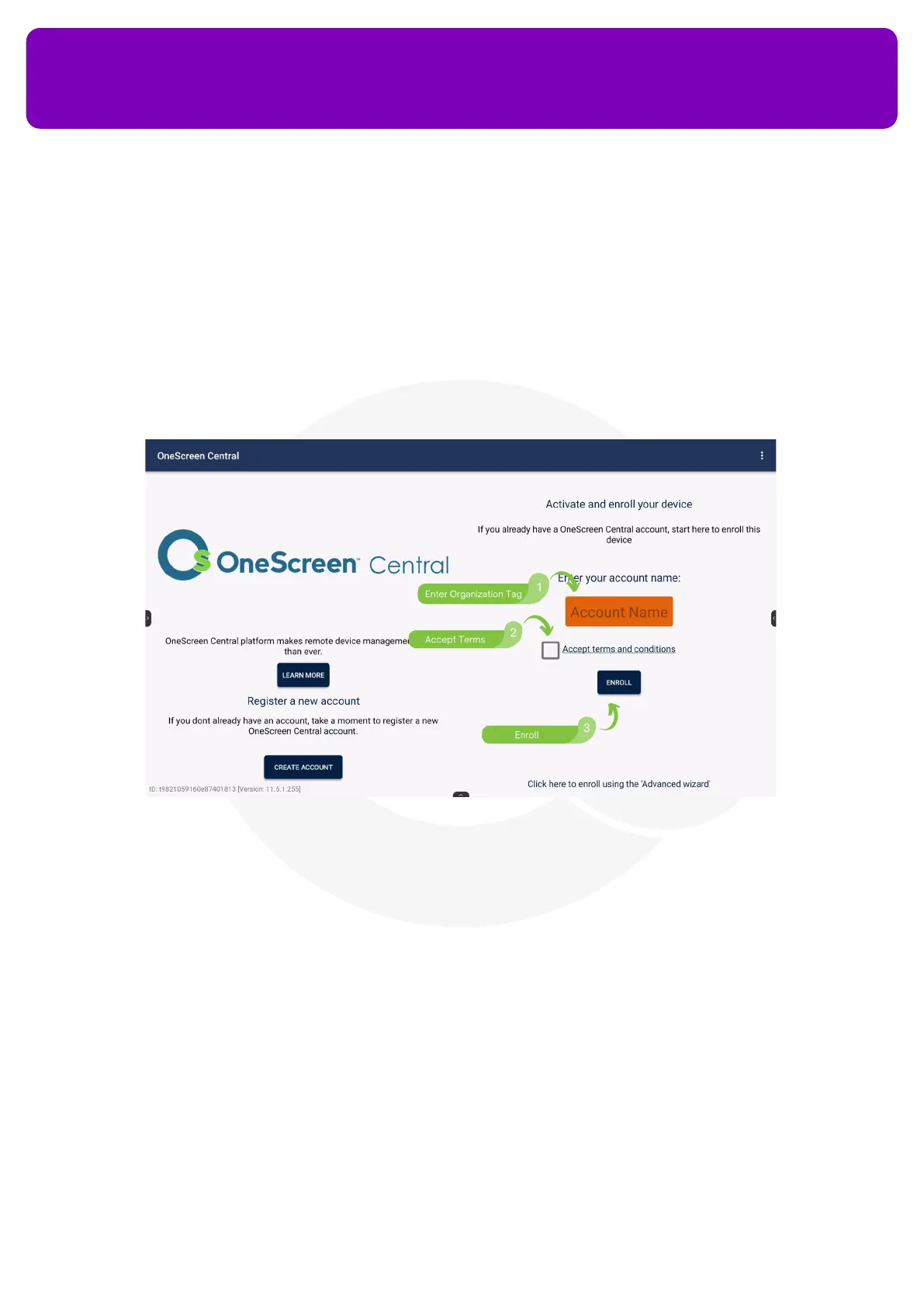
You may also use the advance wizard option to name your OneScreen HL7 and add tags to it on device’s
Central Platform. Central comes pre-installed in your OneScreen. Follow the steps below to enroll your panel
with your central account.
Guide for setting up your OneScreen Central Account.
12.7 OneScreen Hype
OneScreen Hype is an easy-to-use software that you can use to host and attend online meetings in a
collaborative environment. It has all the features you would want in a video conferencing software,
supporting multi-point video/audio call with up to 50 participants in a meeting, the ability to share screens
and pass control of the screens to meeting participants, Interoperability with SIP and PSTN as well as the
ability to invite guest users via email. Hype comes with free online training and support which is just one click
away from the Screen Skills Guru team. Apart from being functional on the web browser, the software has a
standalone application for Windows, Mac, Android and iOS.


 To Next Page