31
OneScreen
HL7
13 Settings
Settings allow you to control your OneScreen and all its features. You can access settings by pressing the
Settings Icon on the Quick Access Toolbar present on your OneScreen Homepage or you can tap on the Wi-Fi
or Hotspot icon on the top right corner of your screen to access the hotspot as well.
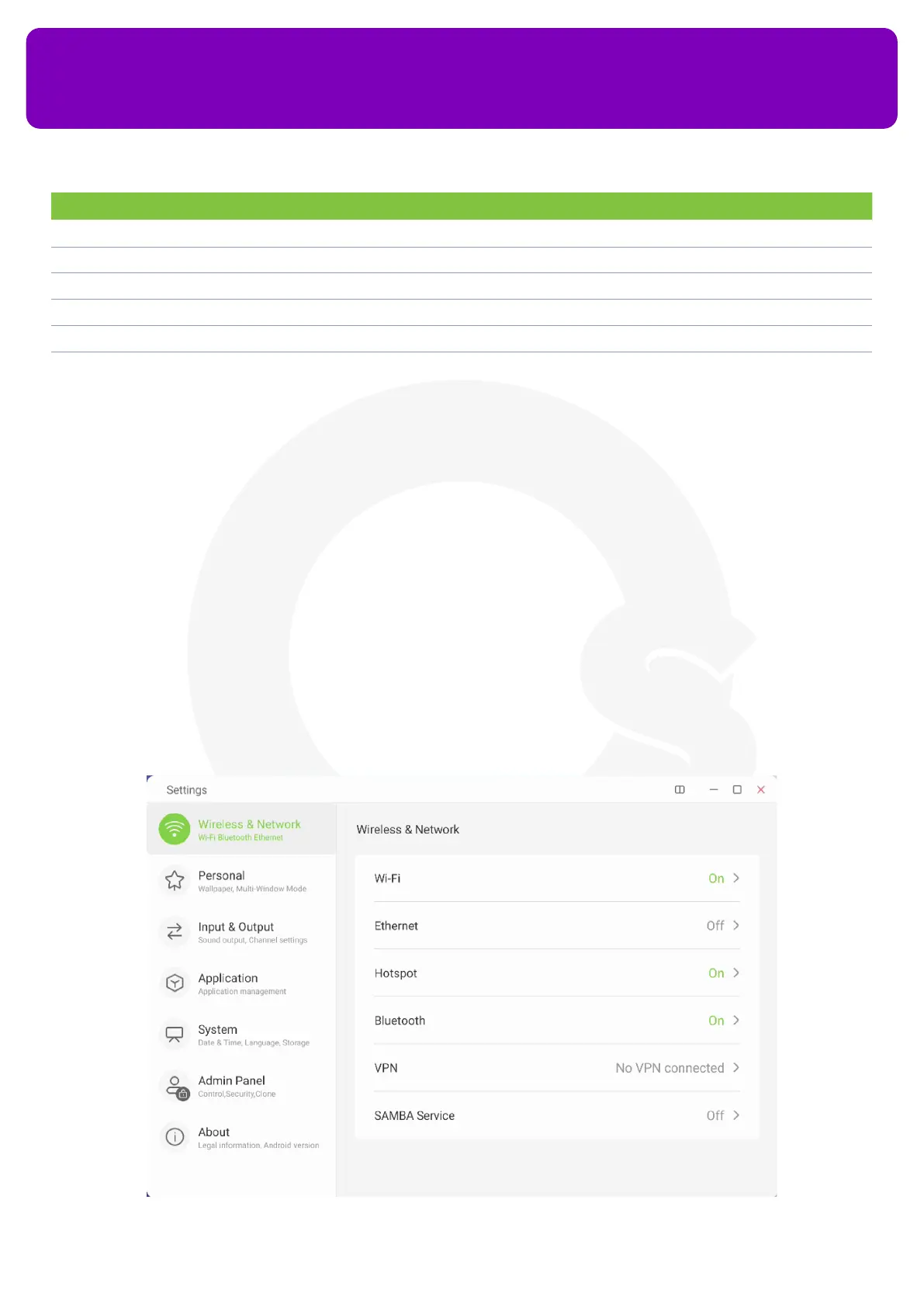
13.1 Wireless & Network
You can congure your network connectivity settings from here. It allows you to congure settings for your
Wi-Fi, Ethernet, Bluetooth, VPN and SAMBA Service (Remote File Sharing).
No. Description Function
1 Voter Start a single/multiple-choice answer poll and see all the students who have joined the class
2 Responder Allow only a specic student to answer
3 Selector Select one or more students randomly
4 Message Allow/disallow students to send messages to the teacher
5 Manage Display/hide QR code or website link and code that the students can use to join the class
6 Exit End the class for everyone


 To Next Page