33
OneScreen
HL7
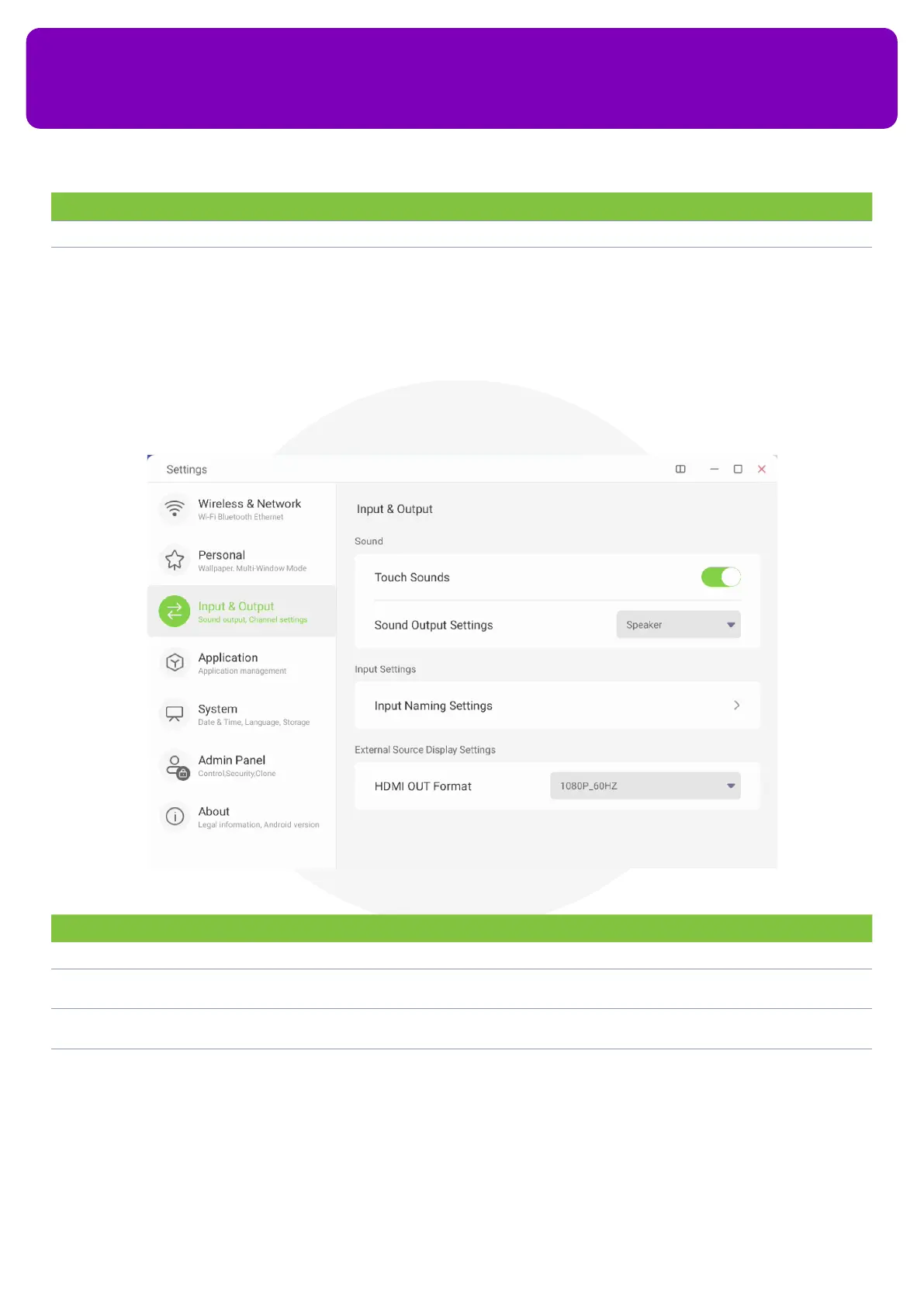
13.3 Input & Output
Input and output settings allow you to congure all the inputs and outputs of your OneScreen like changing
screen output resolution, disabling touch sounds, renaming sources etc.
No. Description Function
4 Window Control Bar Allows you to control the location of the control bar on your app window
5 Show Multi-window
Tips
You can toggle this button o to disable tips on using the multi-window on your OneScreen HL7
No. Description Function
1 Touch Sound You can toggle o this button to disable the system sounds of your screen when in use
2 Sound Output
Settings
You can congure your OneScreen HL7’s audio playback device from here. You can choose between
OneScreen HL7’s speakers or your connected sound output device as your audio playback device
3 Input Name Settings You can rename your input sources by using this menu. To do so, simply tap on the Input Naming
Settings, toggle on the ‘Input Alias Switch’ and rename your desired source
4 HDMI OUT Format You can congure the HDMI OUT format and display resolution using this option. You can select the
drop-down menu to choose from the available options
13.4 Applications
You can go to the applications section to see all the installed application son your OneScreen HL7. It allows


 To Next Page