24
OneScreen
HL7
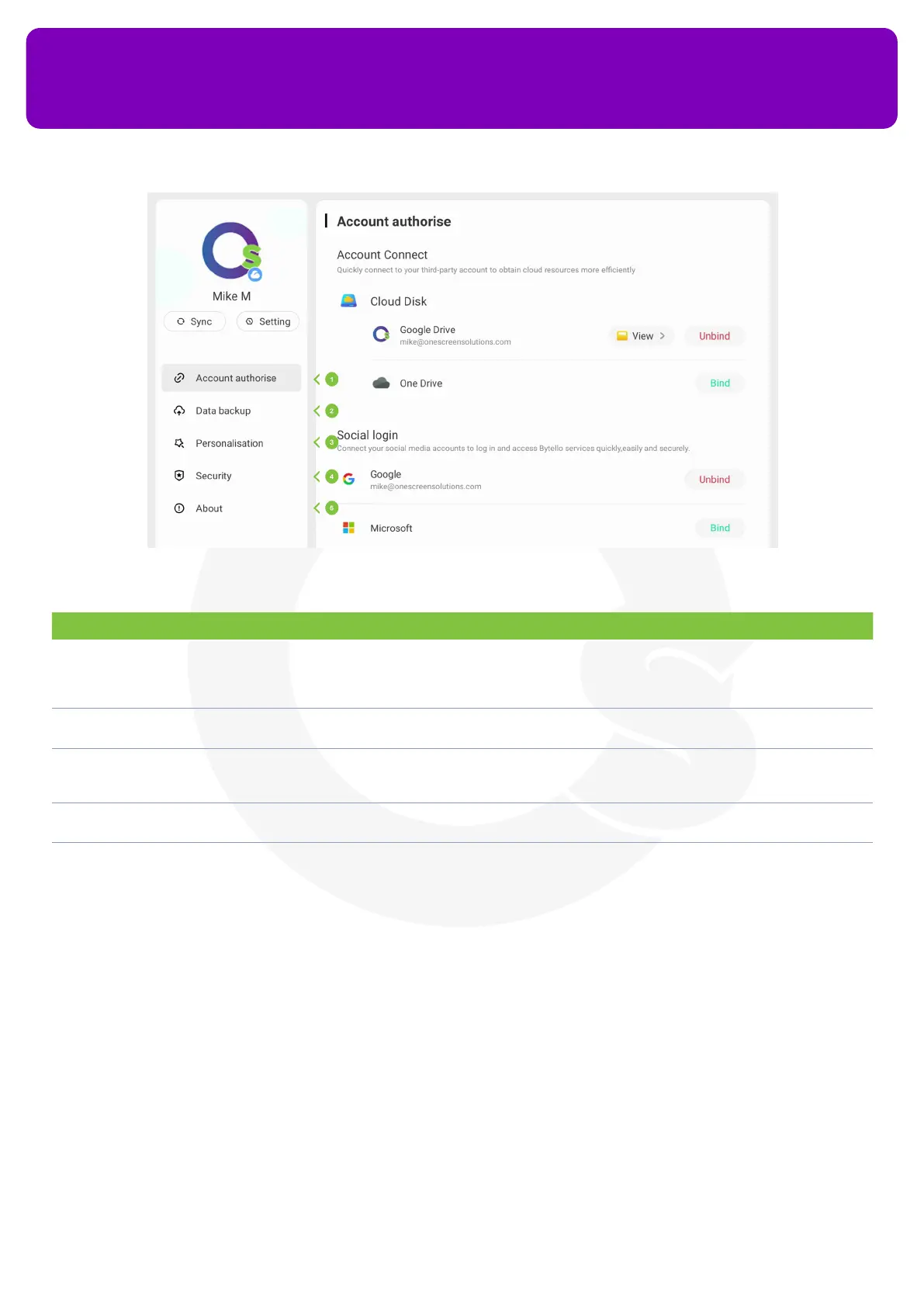
No. Description Function
1 Account Settings In the ‘Account authorize’ tab, you can instantly connect your third-party accounts to get cloud
resources more eciently. You can bind your Google Drive or Microsoft OneDrive accounts here. Once
you have your Google Drive or Dropbox logged in, you may access all the les stored in your drives
through the ‘Finder’ application on your OneScreen
2 Data backup Allows you to select the storage location on your OneScreen device where you want to back up the data
from your device
3 Personalization It allows you to customize your home screen by changing its wallpapers, widgets etc. Once you have
a home screen set up for your Account, the home screen for every OneScreen HL7 will automatically
change to your home screen once you log in
4 Security You can congure your account’s password and put up a screen lock on the device with your account
logged in from here
5 About You can nd the legal information about the app and provide feedback from the about section
12.5 OneScreen Store
OneScreen Store is your online store to download any application that you would want to use on your
OneScreen HL7. It has all the applications available for the android of your OneScreen HL7. You can access
it through the Apps icon of your Navigation Toolbar on your OneScreen HL7. It has all types of apps that you
would want to use on your OneScreen HL7 such as your video conferencing tools, learning apps, games etc.


 To Next Page