23
OneScreen
HL7
your drive storages like Google Drive and OneDrive. Once you have your OneScreen Account all set up, you
can then simply sign in or scan the QR to get all your settings and personalization synced up to any other
OneScreen HL7 that you use. It is a smart way to use your drive storage with OneScreen. You can save your
annotations, documents, and teaching material directly to your drive and access it on OneScreen HL7 and
vice versa.
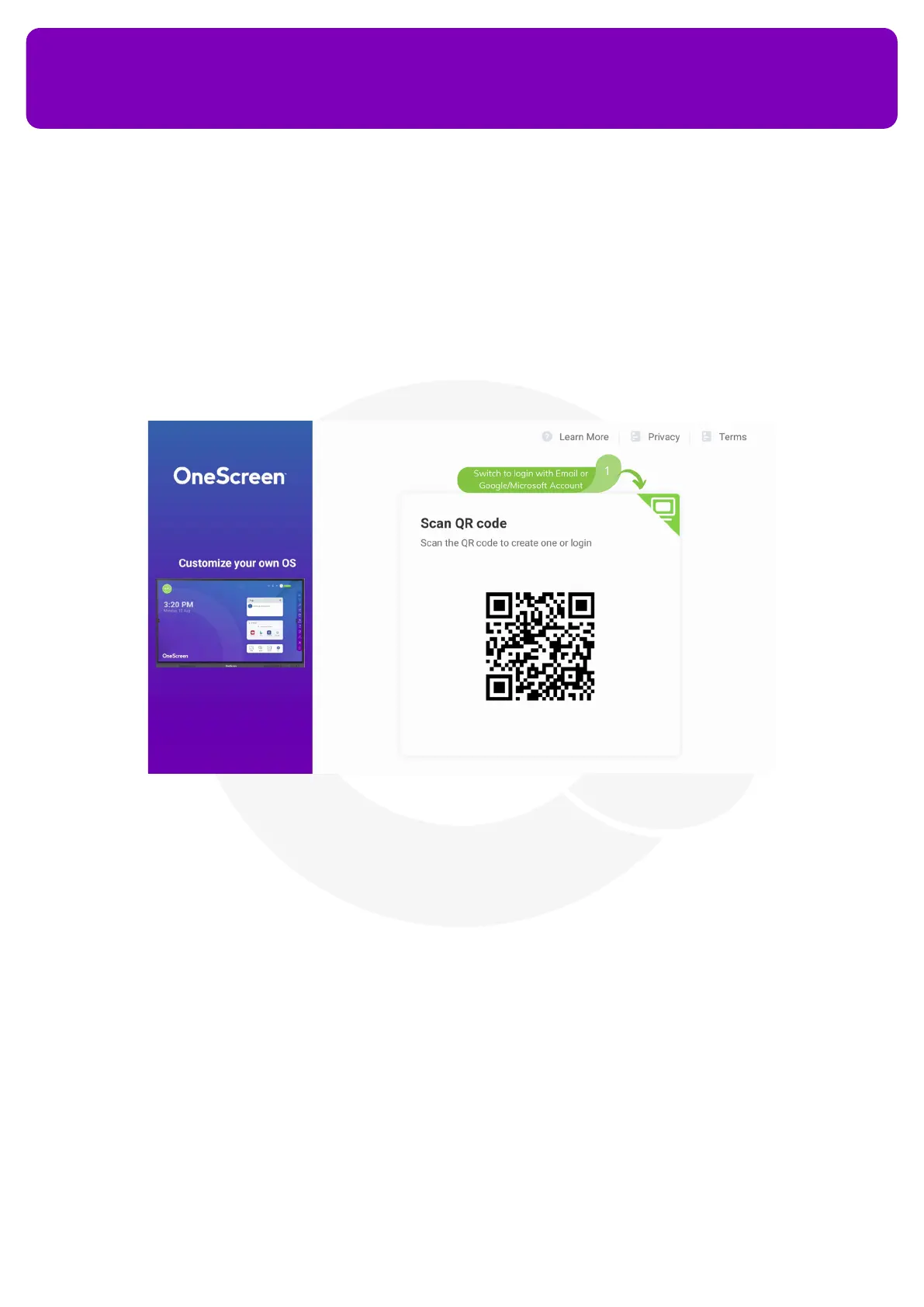
To open OneScreen Account on your HL7, press the prole or ‘Sign in’ button on the top right corner of your
OneScreen homepage. Once you open the app, you can either create an account by singing up or you can log
in if you already have your account created. You may also use the QR Code option by scanning the QR Code
and using your phone to type in your credentials for logging in to your OneScreen. You can press the monitor
icon (as mentioned in the above image) to login using the OneScreen device itself. Once logged in, you will
start to see your prole icon at the home screen and layout on the device will change according to your
OneScreen Account’s personalized settings.


 To Next Page