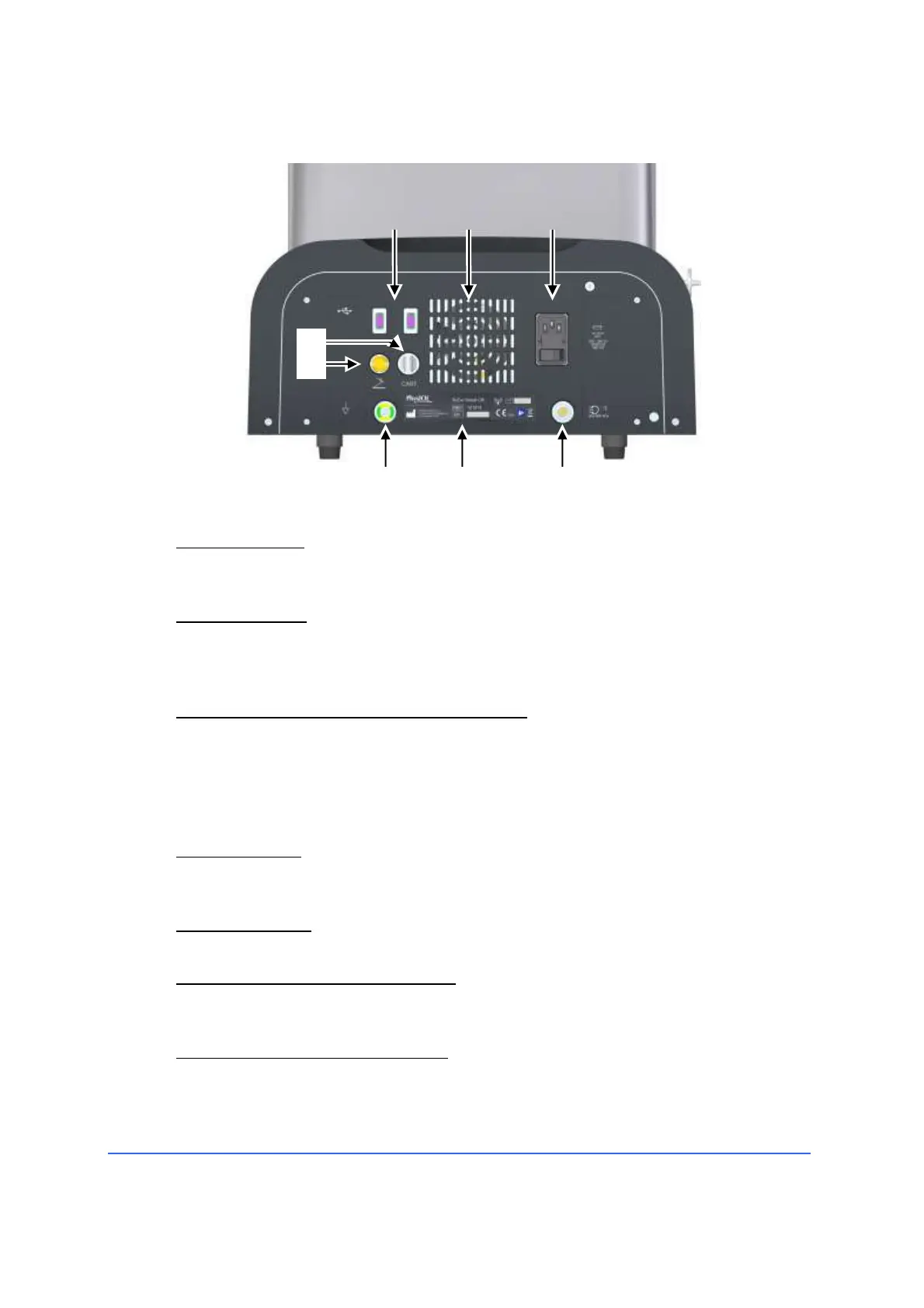
4.2.4 Back panel connectors and control elements
1 USB connectors
A USB pendrive for updating software or for importing/exporting user
programs can be connected to these sockets.
2 Ventilation grid
Air inlet of the internal ventilation system of the instrument. When placing
the instrument in the operating room, be careful not to obstruct the
ventilation grid.
3 Power switch, fuse holder and power plug
The power switch is used to turn the Medical Device on and off.
Once turned on by this switch, the device goes into stand-by status, to put
it into operational status, press the "Power on" key on the front panel.
Connect the Medical Device only to an outlet provided with a protective
earth conductor.
4 Cart connector
Connect the optional equipment cart to this socket. The connection allows
the electric irrigation bottle pole, integrated in the trolley, to be operated.
5 Pedal connector
The pedal connector is connected to this socket.
6 Connector of the earthing system
This connector can be used to connect the R-EVO SMART CR to the system
earth connection.
7 Identification and marking Label
Contains data such as manufacturer, serial number of the instrument, year
of manufacturing of the Medical Device, etc.



 To Next Page