Version 1.1.1 - 2021-1-25 33Translation of original instruction
MB4 EN
MB4_GB_4.fm
4.12 Thread tapping
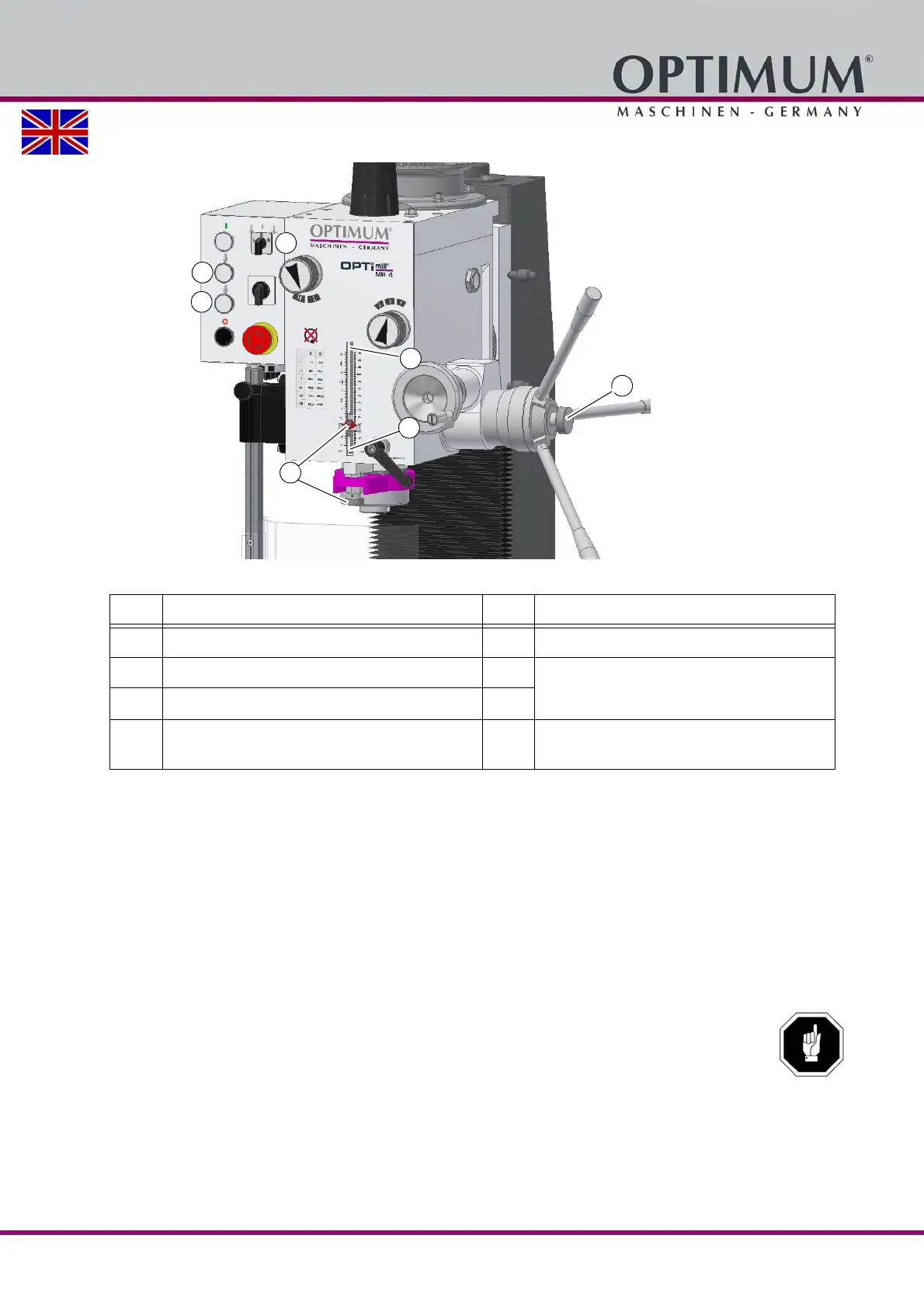
Img.4-7: Thread tapping
Set the operating mode selector switch (19) to threading.
Set the depth stop (25) to the desired depth.
Select the lowest speed. Changing the speed range on page 28
Switch the rotation of the spindle on. Note the correct direction of rotation (16) or (17).
Move the sleeve downward with the sleeve lever until the machine tap cams in the work-
piece.
The machine tap turns into the workpiece. As soon as the preset depth is attained, the spindle
reverses the direction of rotation at the switch point (23). The machine tap turns out of the work-
piece. When the sleeve is completely entered up to the switch point (22) the rotation of the
spindle is stopped. Then it is possible to proceed another threading operation.
ATTENTION!
Before proceeding another threading cycle, the sleeve must be completely entered in order to
trigger the switch point (22).
The activation of fine adjustment of spindle sleeve (7) must be disabled.
Item Designation Item Designation
22
Cycle end limit switch
19
Operating mode selector switch
23
Turning direction reversal switch
16
Spindle rotation direction push button
25
Depth stop
17
7
Activation of fine adjustment of spindle
sleeve




 To Next Page