Modular audio matrix
with IP connection
5.1. CAN Bus transmission speed configuration
Using a PC equipped with a network card and connected to the COMPACT unit
through a switch or directly using a network cable. The PC must have the c software
installed.
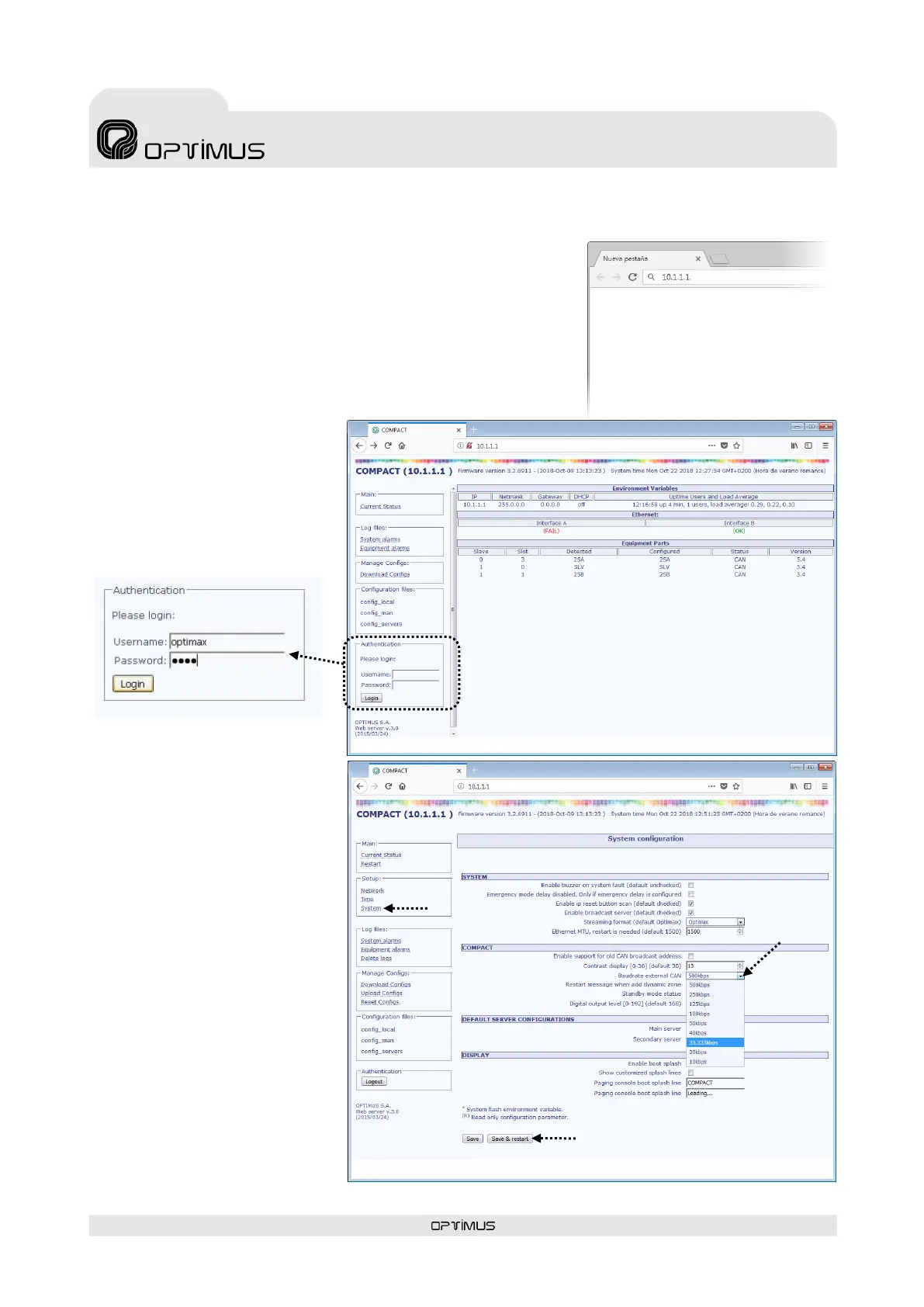
1. From the PC, open a browser, enter the IP address for the unit and press INTRO.
By default the IP address is 10.1.1.1. Warning: The range of IP addresses for the
unit and the PC must match. Otherwise, the network settings of the PC or the
COMPACT must be changed in order to be in the same range (for example, the
PC could have an IP address of 10.1.100.152). See section 12.1. Configuration of
the COMPACT network addresses.
2. Enter the user name optimax, the
password 1933 and click on the Login
button.
3. Click on System.
4. Modify the Baudrate external CAN
parameter. If the COMPACT communi-
cates with a COMPACT-E slave unit, set
the speed to 500 kbit/s (factory setup).
If the COMPACT device communicates
with other peripherals (MD-30C, ME-
200C, NS-CAN ...) modify the speed to
33.333 kbit/s.
5. Click Save & restart button. Changes
will be saved and The COMPACT unit
will reboot automatically.



 To Next Page