Modular audio matrix
with IP connection
SW1
CONFIGURATION OF THE OUTPUT CONTACTS
CONTACT B
REFERENCED TO
GROUND
7. UMX-C16
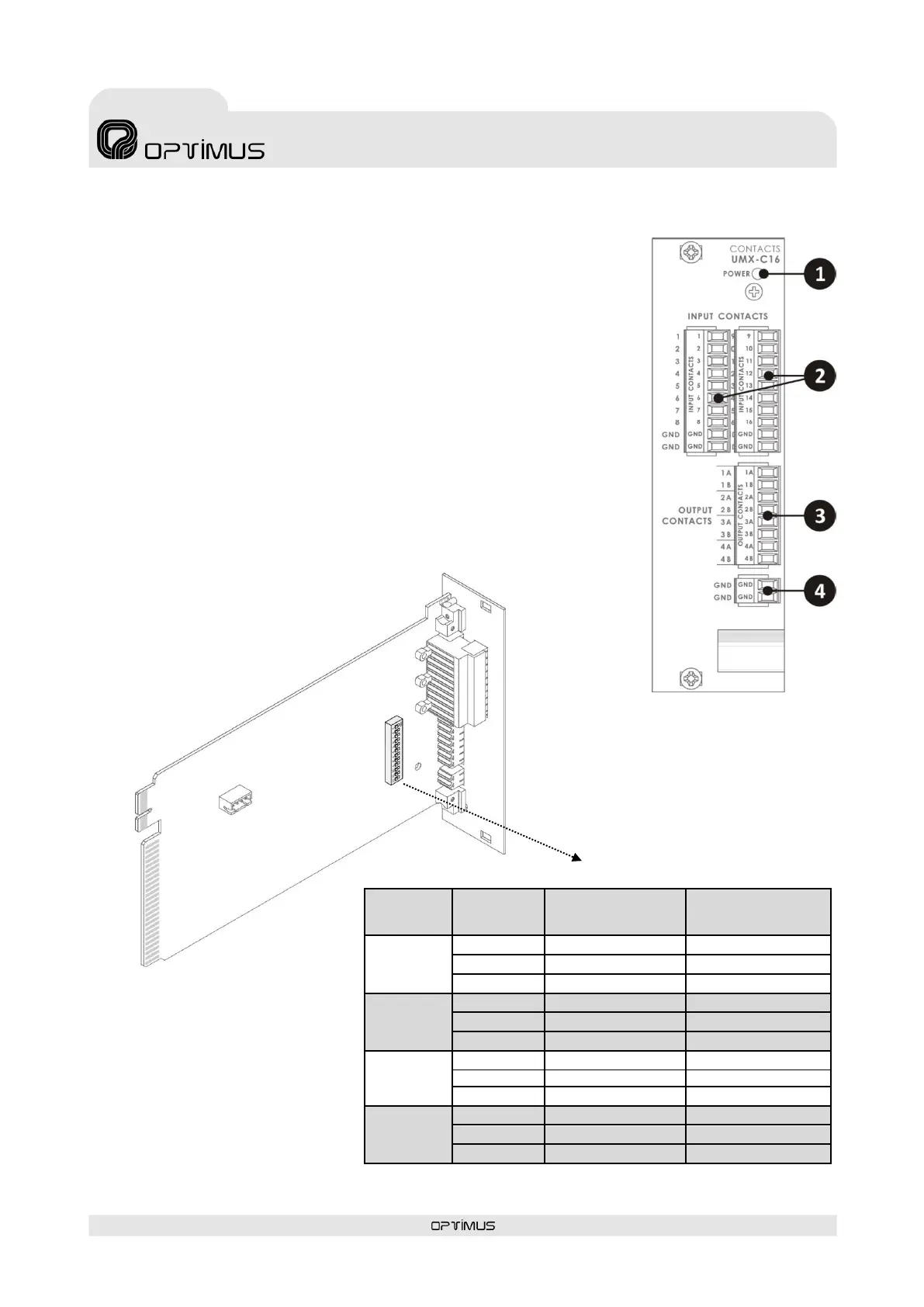
Card with 16 input contacts and 4 output contacts. Occupies slot 1 in the COMPACT.
Additional UMX-C16 cards may be inserted in slots 3 to 10.
1) POWER indicator light
Power LED indicator. Do not remove the card when it is lit.
2) INPUT CONTACTS
Input contacts 1 to 16. They may be used in evacuation systems (as activation contacts,
reset...) or as general purpose input contacts. The functionality is configured through
the Call Point software.
They may be monitored (the system detects short-circuits or open lines).
The detection time of the activation pulse of the input contacts is configurable through
the Call Point software (0-50-100-200-300-400-500-1000-1500-2000 milliseconds).
3) OUTPUT CONTACTS
The card has 4 independent output contacts. Each output has two contacts (A and B)
that are configurable using internal dipswitches (dry contacts or referenced to ground).
To configure see section 7.1. The functionality is configured through the Call Point
software.
4) GND (ground) Contacts
7.1. UMX-C16 Internal settings



 To Next Page