26 | Ottobock B600
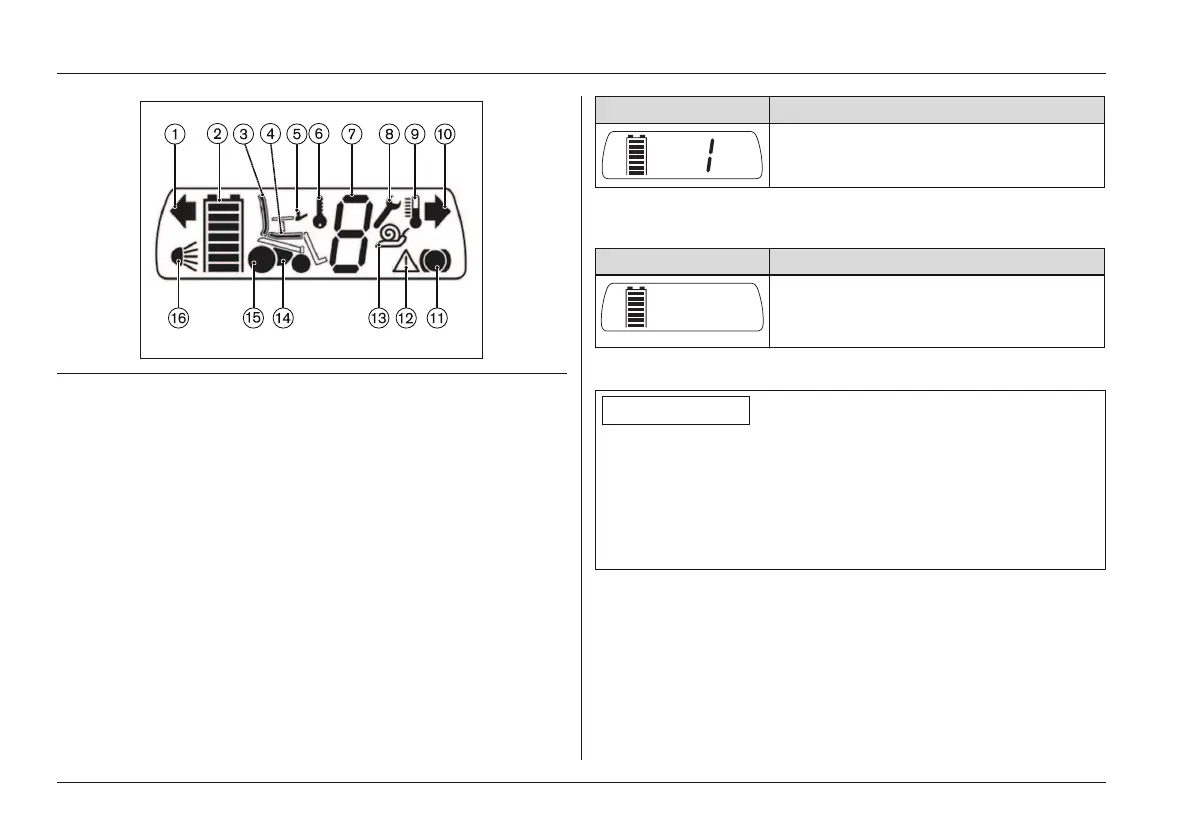
Fig. 16 LCD display with all symbols
1 Direction indicator, left 9 Excess temperature
2 Battery capacity 10 Direction indicator, right
3 Power backrest 11 Drive wheel brake
4 Power seat tilt 12 Warning
5 Control Panel 13 Creeping speed
6 Drive-away lock 14 Power module
7 Speed level 15 Drive motor
8 Open-end wrench 16 Light
Selected speed level (LCD display)
After turning the wheelchair on, the LCD display indicates
the selected speed level and battery capacity in the Driving
menu:
Display Information
Right: Selected speed level = 1
Left: Battery capacity
If an LCD monitor is used, only the battery symbol is dis
played:
Display Information
Battery capacity (additional informa
tion is only shown on the LCD monit
or: see Page54)
Battery capacity (LCD display)
INFORMATION
At temperatures of < 0° the battery capacity drops by up to
35% in relation to the capacity for an outside temperature
of 20°. This shortens the range of the power wheelchair
accordingly. Moreover at low temperatures the battery
capacity displayed on the control panel can differ more sig
nificantly from the actual battery capacity.
The 'Battery Capacity' LCD display (see Fig.16, item 2) is
divided into seven segments which indicate the current bat
tery capacity:
• Immediately after the power wheelchair is switched on,
the battery indicator shows the battery charge level that
was saved before the wheelchair was last switched off.
Usage















 To Next Page