Ottobock | 55B600
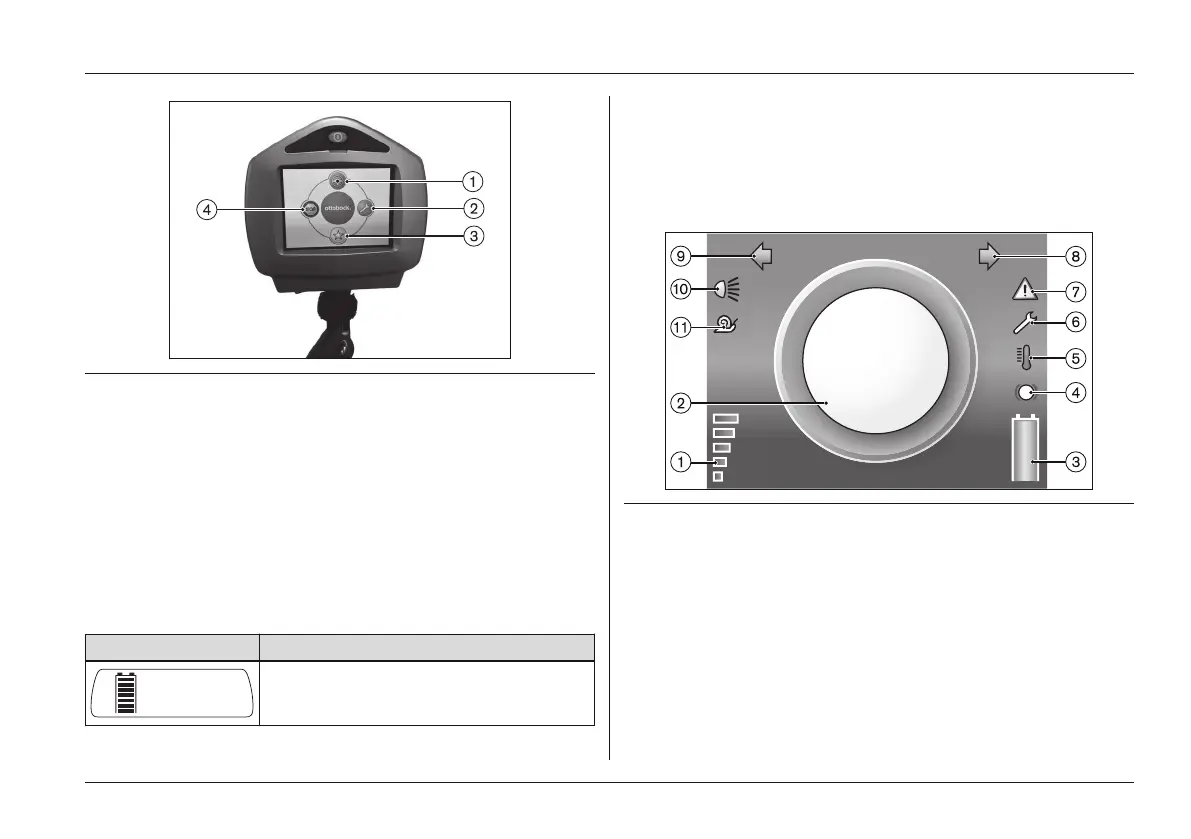
Fig. 32 LCD module with main menu
1 Driving menu interface 3 Favourites menu interface
2 Functions menu interface 4 Stop functions interface
Turning the power wheelchair on
• After turning the power wheelchair on with the [On/Off]
button on the control panel, the Driving (see Fig.33)
menu is shown on the LCD monitor.
• The battery symbol is shown on the control panel LCD
display:
Display Information
Driving information is only shown on
the LCD monitor
• The speed level is increased (see Fig.14) by briefly
pressing the [Mode] button on the control panel (Select
ing the speed levels).
• Moving the joystick causes the power wheelchair to
begin driving in that direction (Driving).
Fig. 33 Driving menu
1 Speed level 7 Warning
2 Driving speed 8 Direction indicator, right
3 Battery capacity 9 Direction indicator, left
4 Drive wheel brake 10 Light
5 Excess temperature 11 Creep speed
6 Open-end wrench
Usage















 To Next Page