probe to 10X (see "Probe Attenuation Coefficient Setting" in P9), and connect
with CH1. If a hook probe is used, make sure it is in close contact with the
probe. Connect the probe tip to the signal output connector of the probe
compensator, and connect the reference wire clamp to the ground wire
connector of the probe compensator, and then press the Auto key on the front
panel.
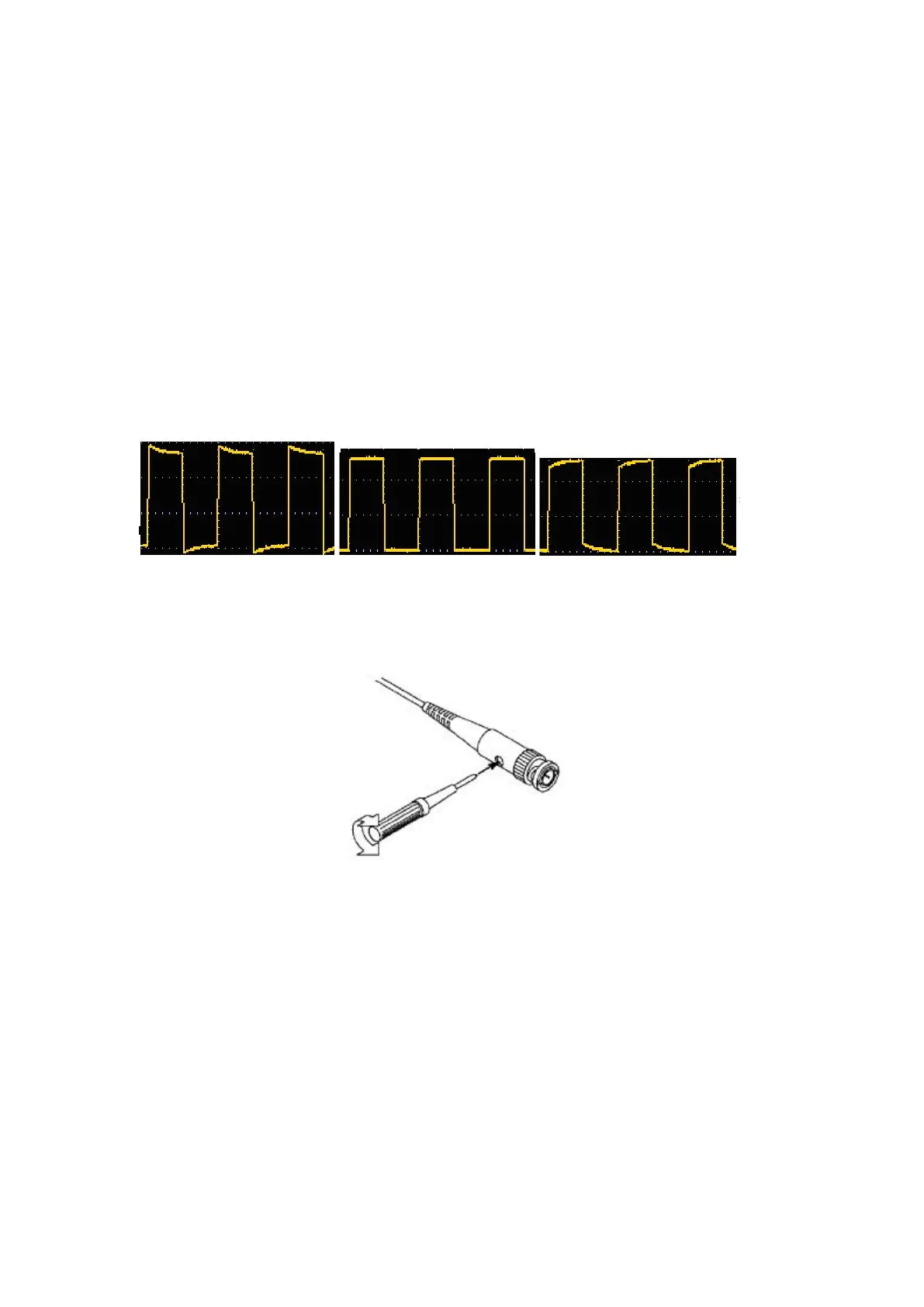
2. Check the displayed waveform and adjust the probe until the compensation
is correct. See Figure 3- 5 and Figure 3- 6.
Overcompensation Correct compensation Under-compensation
Figure 3- 5: Display Waveform of Probe Compensation
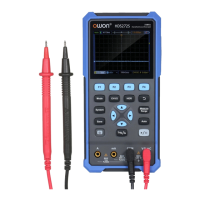
3. Repeat the steps if necessary.
Figure 3- 6: Probe Adjustment
Probe Attenuation Coefficient Setting
The probe has a variety of attenuation coefficients, which will affect the vertical
position factor of the oscilloscope.
To change (check) the set value of probe attenuation coefficient in the
oscilloscope menu, please follow the steps below:
(1) Press the CH1/CH2 key to switch the channel to be used.
(2) Press the F3 to select the desired attenuation coefficient. This setting is


 To Next Page