103
Instruments and controls
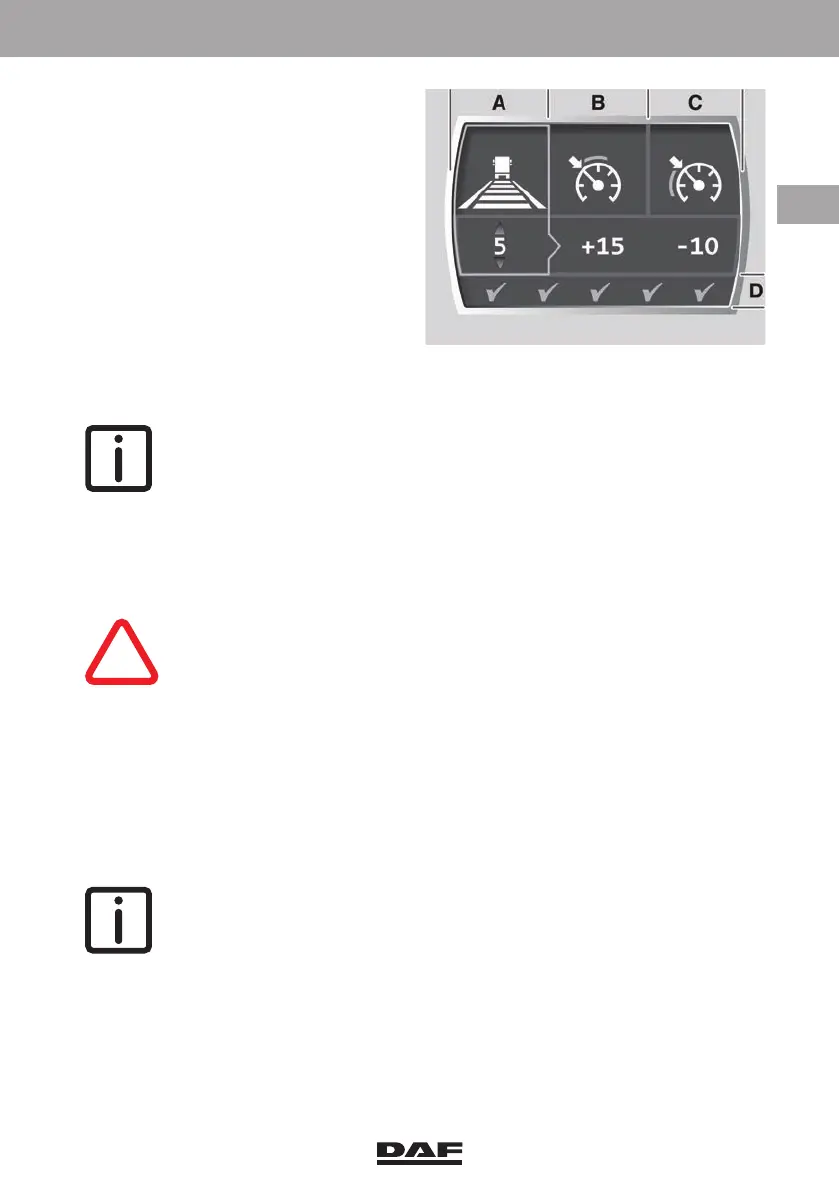
A ACC distance setting
B PCC and DSC overshoot (+
value) setting
C PCC undershoot (- value)
setting
D Fuel economy score
Setting A is preselected and by
pressing switch 3 again, the settings B
and C can be selected (toggle function).
With switches 5 and 6 or 1 and 2 the
selected setting can be changed. When
for a short delay no changes are made,
the advanced vehicle speed menu is
closed.
NOTE: New settings are accepted after a short delay time. After the contact
is switched off, the settings return to the standard settings.
Setting ACC following distance
– Press switch 3, setting A is selected.
– Use switches 5 and 6 or 1 and 2 to change the following distance or to switch ACC
off.
CAUTION: When ACC is re-engaged after being switched off, the
smallest following distance (one bar) to the preceding vehicle is
selected. When the traffic situation does not allow this smallest
distance, a larger distance must be selected within the delay time.
DSC setting
– Press switch 3 twice, setting B is selected.
– Use switches 5 and 6 or 1 and 2 to change the DSC setting.
PCC setting
– Press switch 3 three times, setting C is selected.
– Use switches 5 and 6 or 1 and 2 to change the PCC setting.
NOTE: The illustrated settings are the (default) maximum settings for each
vehicle speed function with the Eco Mode switched on. The fuel economy
score with these settings is four green tick marks.
The fuel economy score is a result of the chosen advanced vehicle speed
settings. The bigger the difference between the plus value and the minus
value, the better the score.
This score is not used for calculating the driver performance assistance
score.
Minimum settings with Eco Mode on.
D005155-2
DW63246305.book Page 103 Friday, March 22, 2019 4:54 PM






 To Next Page