116
Instruments and controls
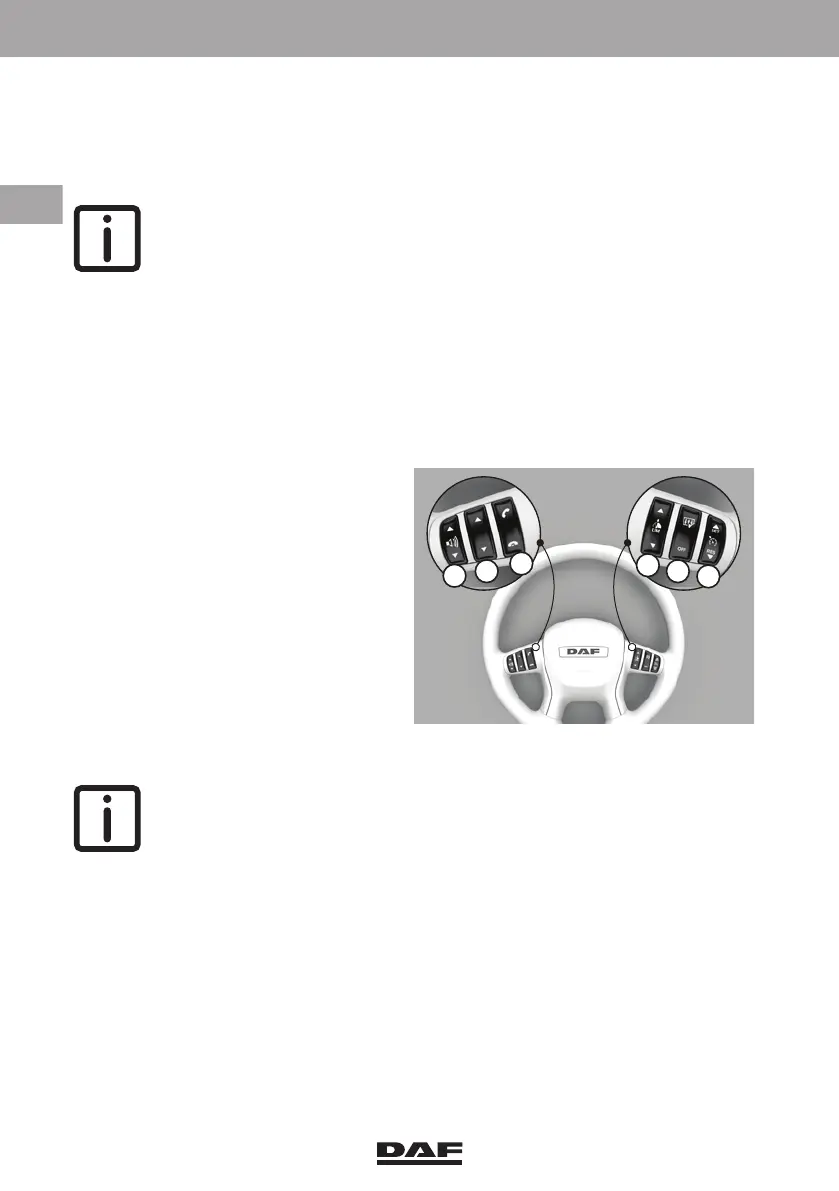
Press the 'pick-up call' key (top of switch C) to answer the call, and press the 'end call'
key (bottom of switch C) to end or reject the call.
Outgoing calls
Selecting a telephone
NOTE: This section is only valid when multiple telephones are connected.
– Press the 'pick-up call' key (C) to see the connected telephones.
– Press the 'scroll' key (B) to select a telephone.
– Then press the 'pick-up call' key (C) again to use the selected telephone.
Telephone numbers, previously dialled numbers or missed calls can be accessed from
the selected telephone.
Selecting a telephone number from the telephone book
– Press the 'pick-up call' key (C) to
access the selected telephone.
– Press the 'pick-up call' key (C) to
open the telephone book of the
selected telephone.
– Press the 'scroll' key (B) to select
the telephone number or person
from the list.
– Press the 'pick-up call' key (C) to
make the call.
– Press the 'end call' key (C) to end or
abort the call.
Selecting a previously dialled telephone number or missed call
NOTE: It is only possible to select one of the last ten numbers dialled or to
view missed and received calls.
– Press the 'pick-up call' key (C) to access the selected telephone.
– Press the 'scroll' key (B) to access the missed call, dialled numbers or received
calls.
– Press the 'pick-up call' key (C) to access the selected option.
– Press the 'scroll' key (B) to access the telephone number or person from the list.
– Press the 'pick-up call' key (C) to make the call.
– Press the 'end call' key (C) to end or abort the call.
If the 'end call' key is pressed with a master display screen active, the master display
goes back one screen at a time.
If no key is pressed for 60 seconds, the information disappears from the master display.
D005094
A
B
C
D
E
F
DW63246305.book Page 116 Friday, March 22, 2019 4:54 PM






 To Next Page