124
Instruments and controls
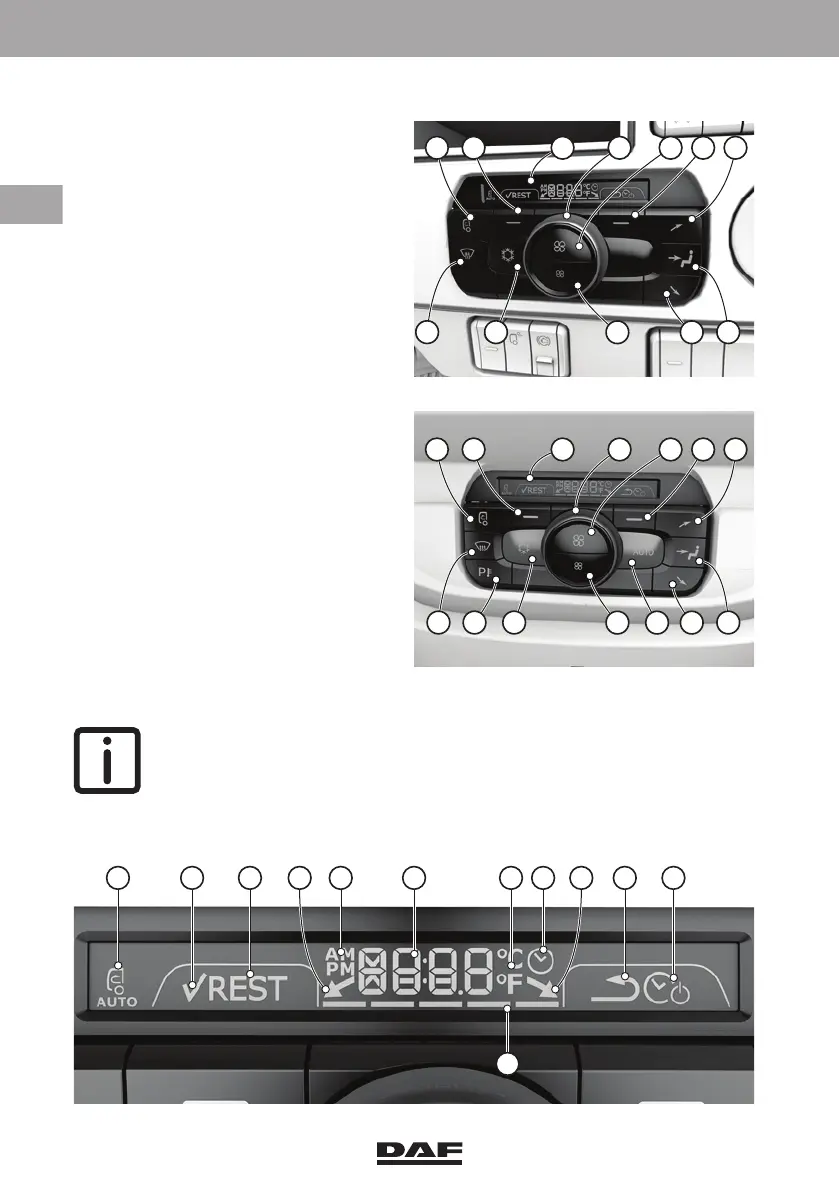
Climate Control Panel (CCP)
1Display
2 Rotary switch (desired
temperature setting and/or
(timer) adjustment
3 Increasing the fan speed
4 Soft key to activate the timer or
go back one step in the settings
(timer not available on vehicles
equipped with ADR or SLP)
5 Air distribution to upper outlet
openings ('C' in the air
distribution overview)
6 Air distribution to the middle air
vents ('A' in the air distribution
overview)
7 Air distribution to the bottom
outlet openings ('B' in the air
distribution overview)
8'AUTO' mode on
9 Decreasing the fan speed
10 Air conditioning on / off
11 Auxiliary heater
12 De-fog mode
13 Recirculation mode
14 Soft key to activate rest heat or,
if activated by soft key (4), for
timer settings
NOTE: Whenever a
function is switched on the
key icon turns green.
Climate Control Panel display
D005095
1 432 51413
7
6
8
11
12 10
9
A B C E F G I J
K
H
D D
DW63246305.book Page 124 Friday, March 22, 2019 4:54 PM






 To Next Page