312
Air suspension
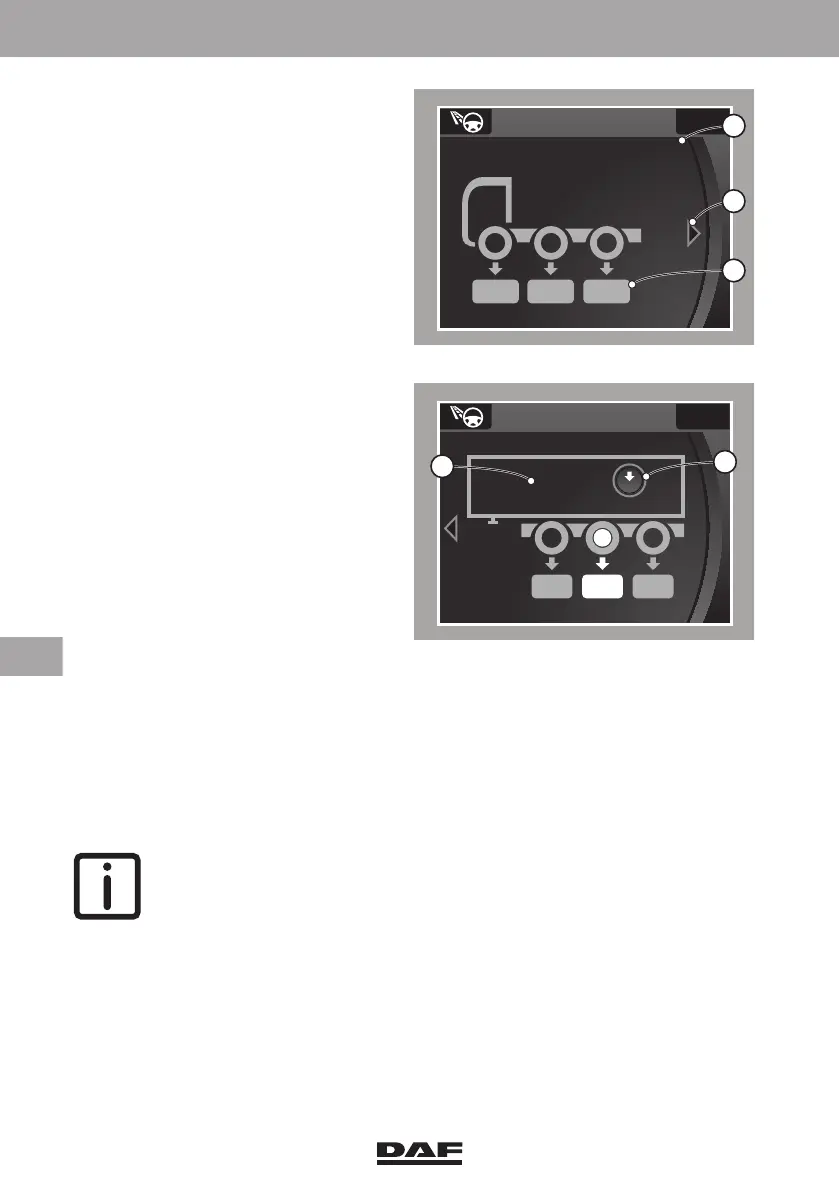
The Axle Load Monitoring menu in the
master display contains:
– Gross combination weight (A).
– More than one display in case of a
combination (B).
– Axle load (C).
– Payload reference (D).
– Reset payload function (E).
Axle load
Tractor
In the menu 'Driving support', select 'Axle load' to display the axle loads. The displayed
axle load (C) is the overall weight on the axle (load + vehicle's own weight). The
displayed axle load (C) on a vehicle with a leaf-sprung front axle is a calculated value.
When a small arrow (B) is shown to the left or right side of the display, the Menu Control
Switch can be used to retrieve more information.
NOTE: The axle loads are only shown when the vehicle is at standstill.
Semi-trailers
Select the small arrow (B) using the MCS to open the screen with semi-trailer
information.
To display the axle load on a semi-trailer, the following conditions must be met:
– The semi-trailer must have an EBS brake system, or
– The semi-trailer must have an air suspension version that supports Axle Load
Monitoring.
D001735
Axle load info
7.5 6.1 5.0
x 1000 kg
Total 45.7
A
B
C
D001736
Axle load
6.39.56.3
x 1000 kg
Total 45.7
Reset
+15.7
0
E
D
DW63246305.book Page 312 Friday, March 22, 2019 4:54 PM






 To Next Page