Digital Video Recorder
47
Fan Error will be highlighted when the cooling fan to the left of the power cord on the rear panel is not working for
more than four seconds.
eSATA Disconnected will be highlighted when the eSATA device is disconnected.
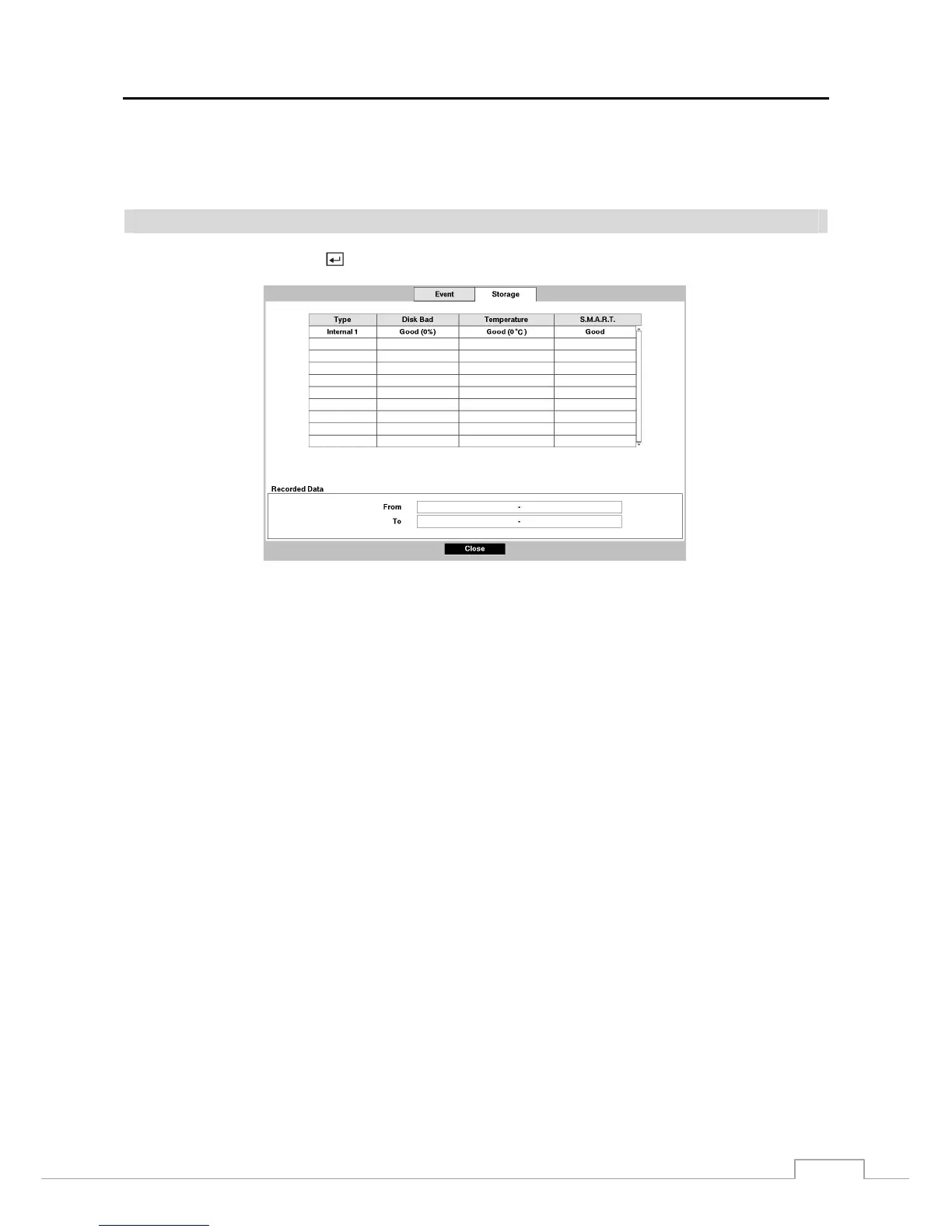
Storage
Highlight Storage and press the
button, and the Storage setup screen appears.
Figure 38 : Status – Storage setup screen.
The Type column displays the type of storage device.
The Disk Bad column displays the percentage of bad sectors. Not formatted indicates the device is not formatted.
The Temperature column displays the temperature of the storage device.
The S.M.A.R.T. column displays “Good”, “Bad” or “N/A”, depending on storage conditions.
Good – The storage condition is normal.
Bad – Data cannot be written on or read from the storage device.
N/A – Storage conditions are normal, however, the S.M.A.R.T. monitoring is not working or supported.
NOTE: When the storage condition is “Bad”, the Event Status – Storage screen displays and you can check
the storage condition for details. Once the “Bad” message displays, replacing the hard disk drive is
recommended, usually within 24 hours.
Temperature and S.M.A.R.T. information will be available only for internal hard disk drives supporting
the SMART (Self-Monitoring Analysis and Reporting Technology) monitoring program.
The box beside Recorded Data – From / To displays the time information of recorded data.



 To Next Page