- 77 -
≥ The following USER button function can also be set from the menu.
j [HISTOGRAM] (l 174)
j [DRS] (l 139)
j [INFRARED REC] (l 164)
j [LEVEL GAUGE] (l 173)
j [EVF/LCD DETAIL] (l 45)
j [FLASH BAND COMPENSATION] (l 140)
j [PRE-REC] (l 163)
j [WFM] (l 155)
j [FAST ZOOM] (l 41)
j [AUTO IRIS LEVEL] (l 60)
j [ZEBRA] (l 155)
j [O.I.S.] (l 151)
j [SCENE FILE] (l 131)
j [AF AREA WIDTH] (l 47)
j [VFR MODE] (l 131)
j [FOCUS MACRO] (l 154)
j [i.Zoom] (l 41)
j [LCD/EVF OUTPUT] (l 24)
≥ Register “Focus Assist” to a USER button. (l 74)
You can set the Focus Assist. (l 48)
≥ Reg
is
ter “Backlight Compensation” to a USER button. (l 74)
Switches to automatic iris control to compensate the backlight.
This makes the image brighter to prevent darkening of a backlit subject.
≥ appears when it is set.
≥ It will return to standard Auto Iris Mode ( ) when it is canceled. (l 59)
≥ This item cannot be set during Freeze Frame. (l 81)
≥ Register “Spotlight” to a USER button. (l 74)
Switches to automatic iris control for spotlight.
Very bright object is recorded clearly.
≥ appears when it is set.
≥ It will return to standard Auto Iris Mode ( ) when it is canceled. (l 59)
≥ This item cannot be set during Freeze Frame. (l 81)
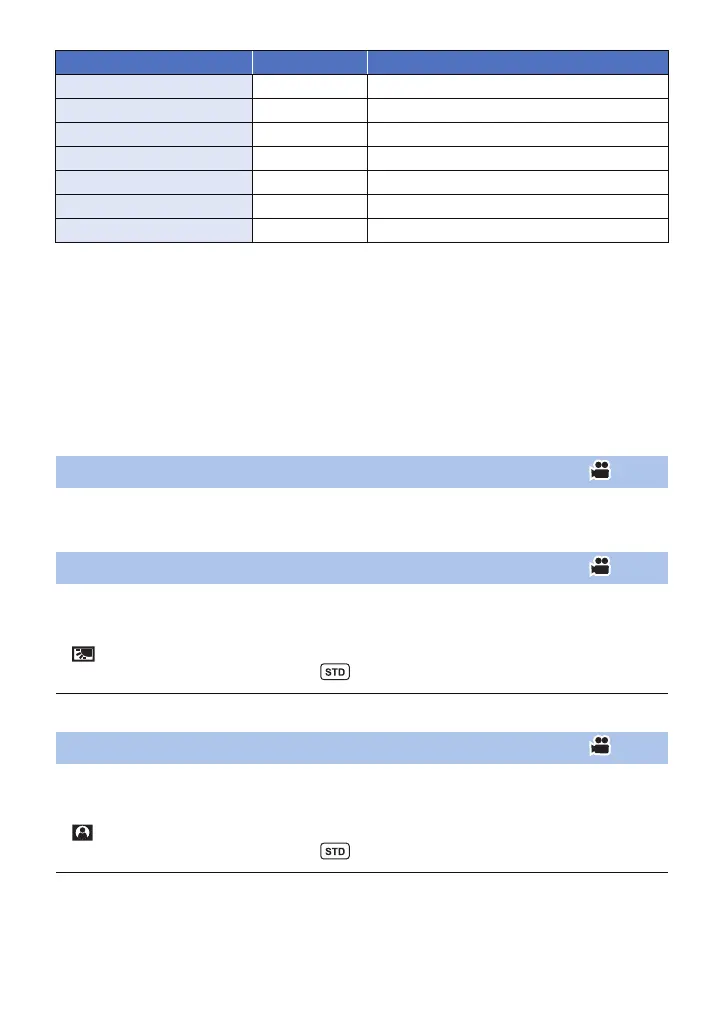
Item Icon Function
[AF AREA] [AF Area] AF area width adjustment
[VFR] [VFR] Variable Frame Rate Mode
[FOCUS MACRO] [F.Macro] Focus Macro
[i.ZOOM] [i.Zoom] i.Zoom
[LOG VIEW ASSIST] [LogView] Log View Assist
[LCD/EVF OUTPUT] [LCD/EVF] LCD/EVF Output
[MENU] [MENU] Menu
Focus Assist
Backlight Compensation
Spotlight



 To Next Page