150
DP-8032/8025
2008Ver.1.2
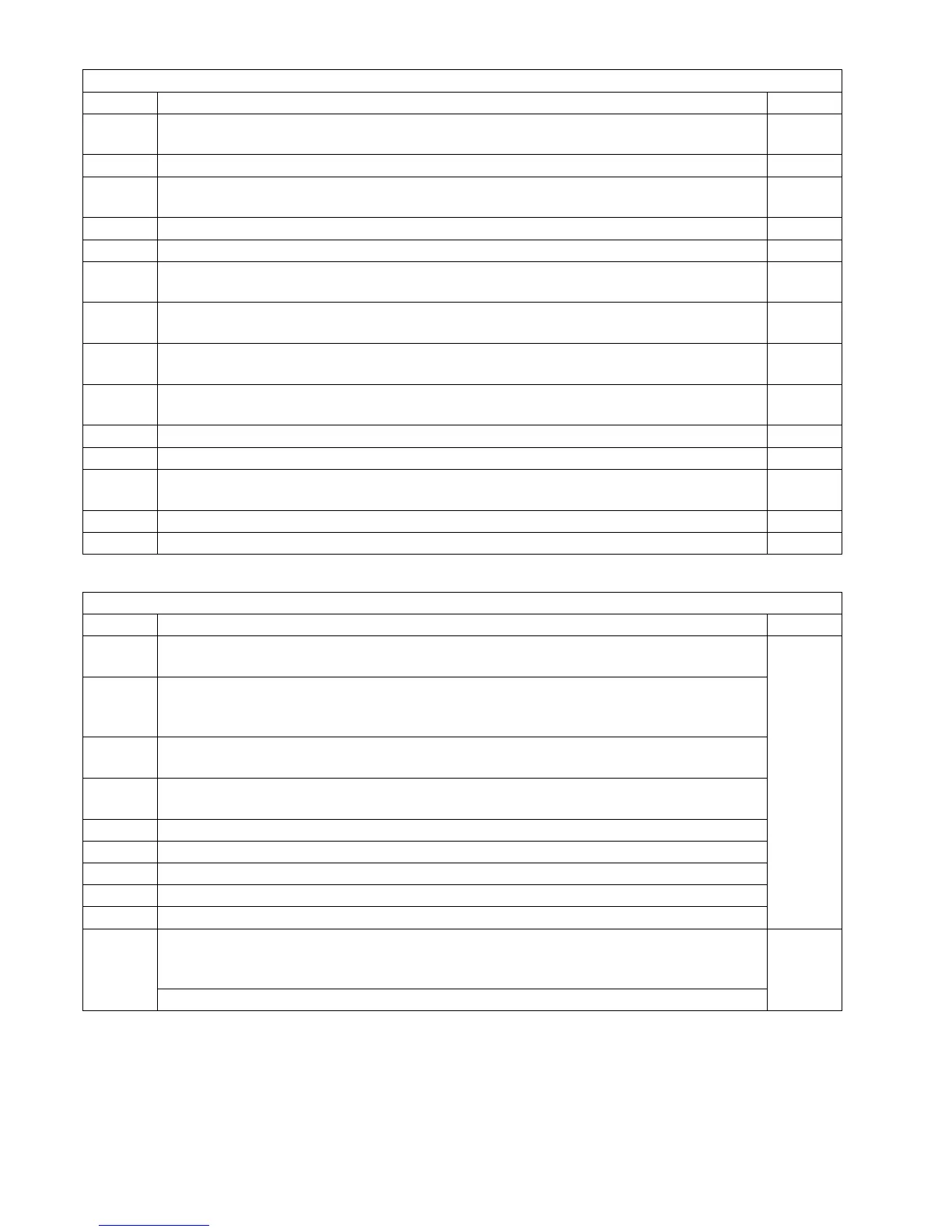
<J70~79, 92, 93 and 94 Codes>
J62 The Finisher Registration Sensor does not go off within a predetermined time after
the Sensor is activated.
A
J63 The Finisher Registration Sensor detects paper at the time of the initials. A
J64 The Finisher Exit Sensor does not detect paper within a predetermined time after the
Fuser Registration Sensor is activated.
A
J65 The Finisher Exit Sensor keeps detecting paper after a predetermined time. A
J66 The Finisher Exit Sensor keeps detecting paper at the time of the initials. A
J80 The Automatic Duplex Unit Sensor 1 does not detect paper within a predetermined
time.
B
J82 The Automatic Duplex Unit Sensor 4 does not detect paper within a predetermined
time after Automatic Duplex Unit Sensor 1 is activated.
C
J83 The Automatic Duplex Unit Sensor 1 does not go off within a predetermined time
after the Sensor is activated.
C
J85 The Automatic Duplex Unit Sensor 4 does not go off within a predetermined time
after the Sensor is activated.
C
J87 The Automatic Duplex Unit Sensor 1 detects paper during non-printing mode. C
J88 The Automatic Duplex Unit Sensor 2, 3 or 4 detects paper during non-printing mode. C
J97 After passing the Registration Sensor (Roller), the Paper does not clear the sensor
within a predetermined time period.
C
J98 The VRDY Signal is not ON after a predetermined time has lapsed. C
J99 No VSYNC Signal within a predetermined time after VRDY Signal is activated. C
Jam Error Codes (J Code) Table
Code Contents Section
J70 Read Point Sensor does not detect paper within a predetermined time in the ADF.
(Information Code 030 is printed on the Transaction Journal instead.)
E
J71 Read Point Sensor keeps detections paper after a predetermined time in the ADF.
Original was longer than 78.7 in (2m).
(Information Code 031 or 032 is printed on the Transaction Journal instead.)
J72 Eject Sensor does not detect paper within a predetermined time after the Read Point
Sensor is activated.
J73 1. Eject Sensor keeps detecting paper after a predetermined time.
2. Eject Sensor keeps detecting paper after the Read Point Sensor is deactivated.
J76 The Duplex Eject Sensor does not detect paper during 2-Sided Scanning.
J78 The Duplex Eject Sensor keeps detecting paper during 2-Sided Scanning.
J79 Read Point Sensor keeps detecting paper in the ADF.
J92 The Original was pulled out when feeding an original.
J93 The Original remained in the ADF.
J94 Abnormal Timing (Paper Jam):
1. The Original was too small.
2. Duplex Eject Sensor detects Original during paper ejecting.
E
The ADF does not go off after the predetermined time.
Jam Error Codes (J Code) Table
Code Contents Section









 To Next Page