Getting Started
22 For assistance, please visit http://www.panasonic.com/phonehelp
While you are at a hotel room
You can use the handset while you are away by accessing the Internet at a hotel room.
The hotel you are staying in may give you specific instructions as to what Internet
connection type you should select. In that case, follow their instructions. Otherwise, you
are suggested to select [DHCP] mode when you set Internet Connection Type in
Initialization Wizard (page 27).
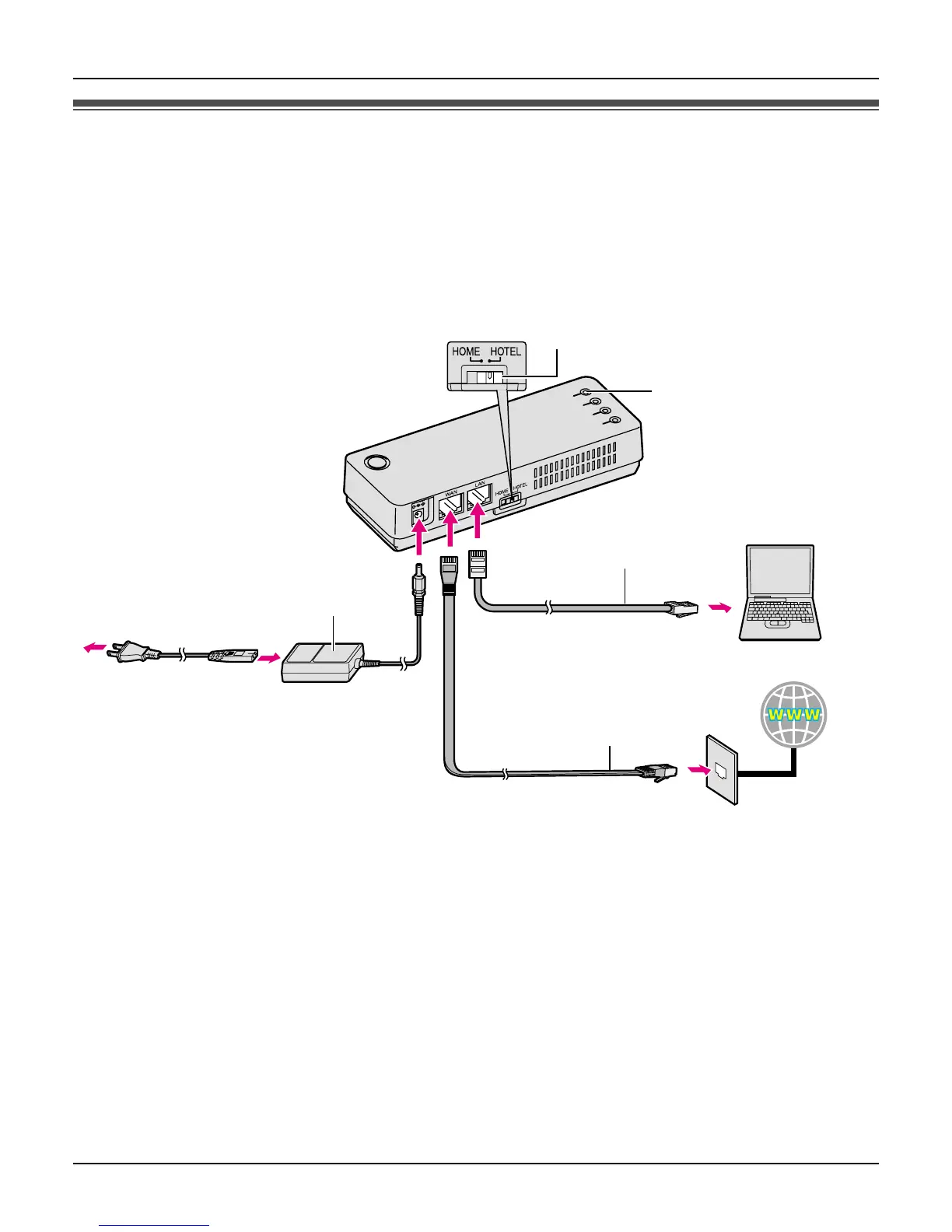
1 Switch the Mode selector to “HOTEL”.
2 Make sure the base unit is left unplugged. Connect the included Ethernet cable to the
“WAN” port on the base unit and the Ethernet port (RJ45 jack) in the hotel room.
3 Connect the existing Ethernet cable to the “LAN” port on the base unit and the Ethernet
(LAN) port on your computer.
1
WAN indicator
Base unit
AC adaptor
To AC outlet
(120 V AC, 60 Hz)
To LAN port
To WAN port
Ethernet cable
(not included)
Ethernet cable
(included)
Computer
Internet
To Ethernet port
(RJ45 jack)
AC cord
Mode selector
4
2
3













 To Next Page