Getting Started
24 For assistance, please visit http://www.panasonic.com/phonehelp
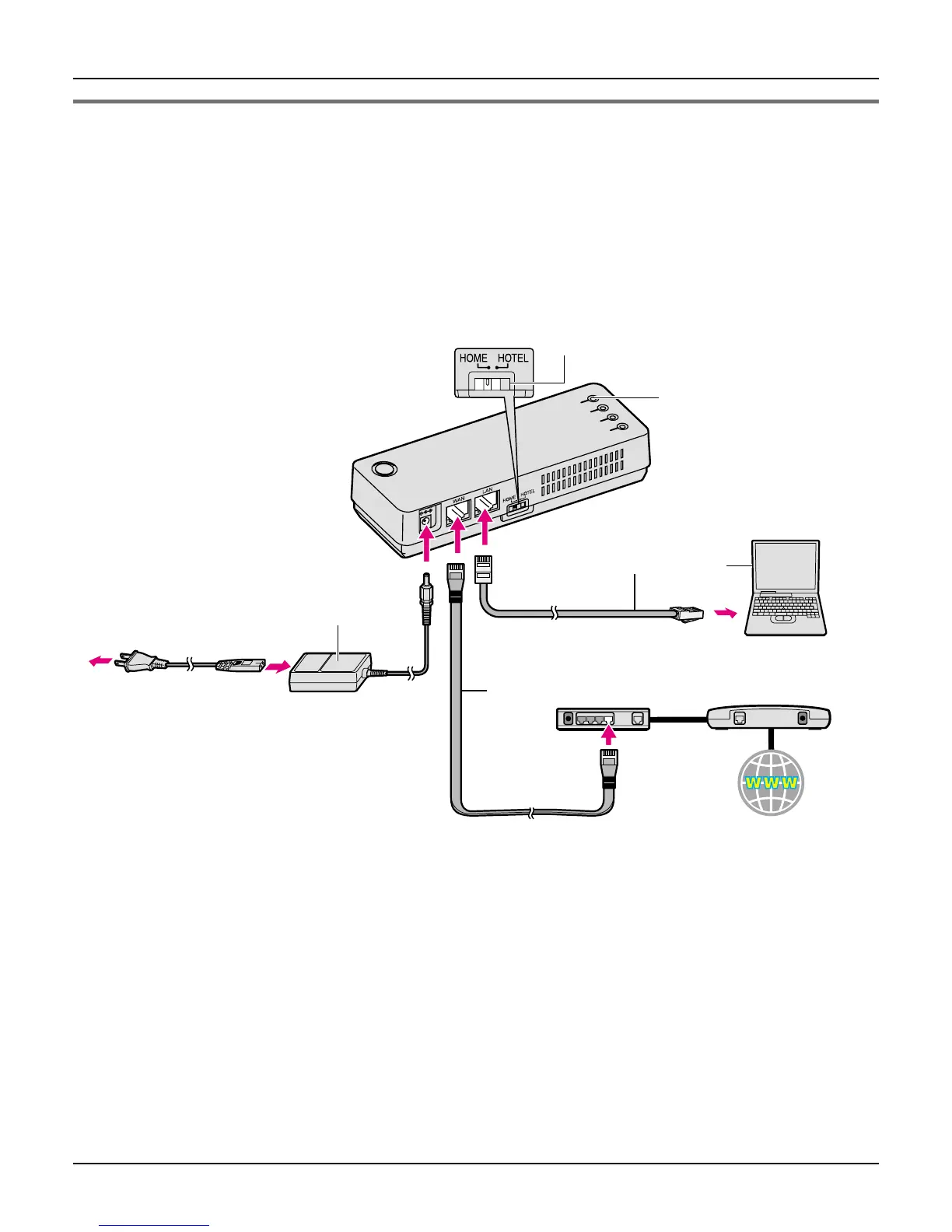
AP (Bridge) mode - With an EXISTING ROUTER or MODEM with a
built-in ROUTER
If you install the base unit with your existing router or modem with a built-in router, the base
unit operates in AP (Bridge) mode. Select [AP (Bridge)] mode for your Internet
connection type in Initialization Wizard (page 27). In AP (Bridge) mode, the base unit
connects wireless devices to one another and to the LAN, and allows wireless devices to
use DHCP server on the LAN.
1 Switch the Mode selector to “HOME”.
2 Turn off your computer properly. Unplug any cable connecting your existing router (or
modem with a built-in router) to your computer. However, your existing router (or
modem with a built-in router) needs to remain connected to your cable or DSL modem.
3 Make sure the base unit is left unplugged. Connect the included Ethernet cable to the
“WAN” port on the base unit and an unused Ethernet (LAN) port on your existing router
or modem with a built-in router.
1
WAN indicator
Base unit
Mode selector
3
5
2
AC adaptor
To AC outlet
(120 V AC, 60 Hz)
To LAN port
To WAN port
Ethernet cable (not included)
Existing router
Cable or
DSL modem
Ethernet cable (included)
Computer
Internet
AC cord
4













 To Next Page