95
[Setting]
Servo Parameter
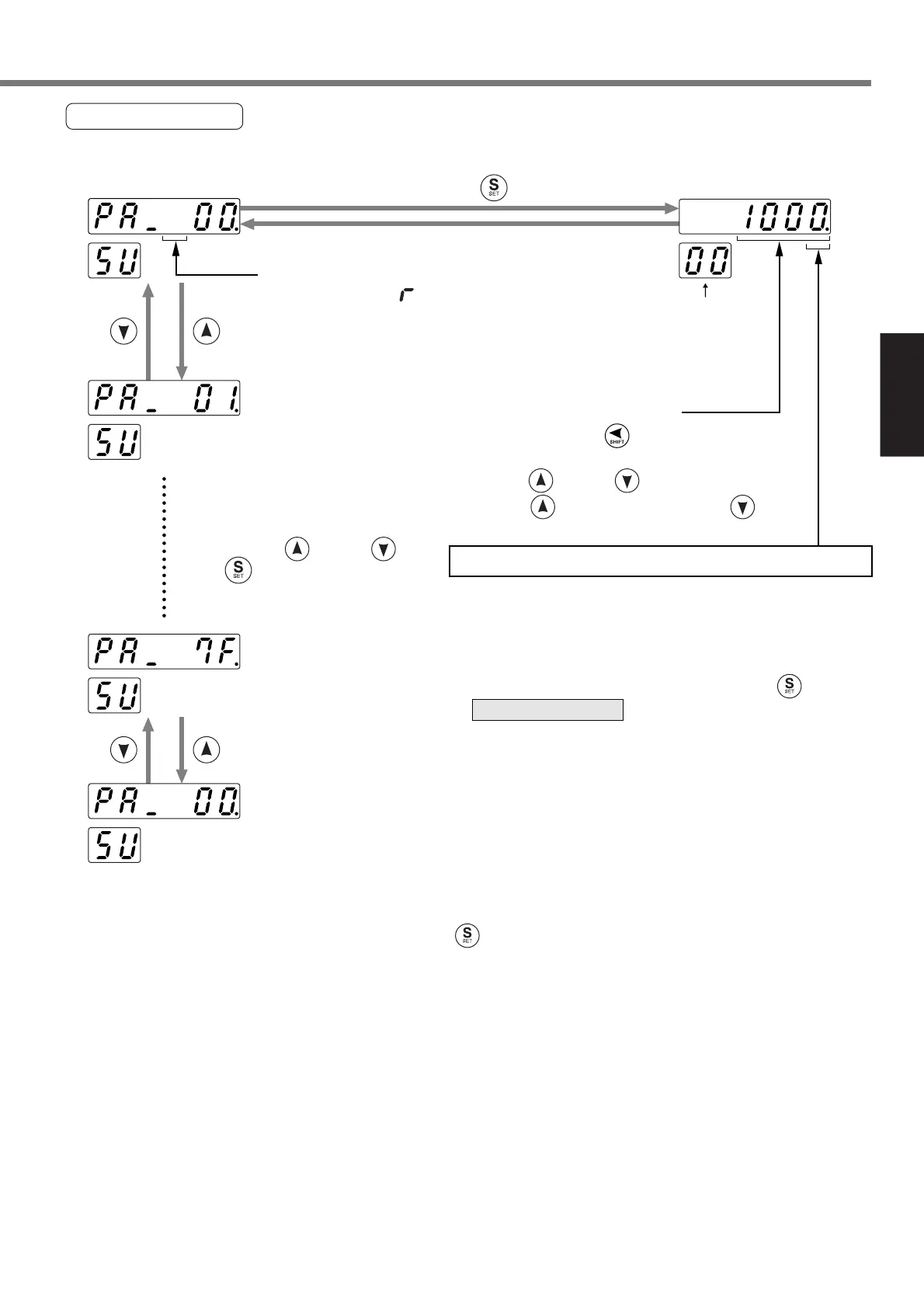
Servo parameter can be set. For the details of parameter, refer to “Parameter Setup” on page 56.
<Remarks>
When you change a parameter value and press , the change is reflected in the control. Modify
gradually a value of parameter (especially, velocity loop gain, position loop gain, etc.) which exerts an
influence on the motor operation, not changing it extremely at a time.
* When you have set the parameters, write the parameters into EEPROM. If you turn the power supply
off before writing the parameters into EEPROM, those parameters are cleared.
Select a target parameter
number, which is to be referred
to and set, by and/or .
Press to set a parameter
value.
(1) Select a digit by to change
a decimal point.
(2) Press and/or to set a parameter
value. increases a value and
decreases.
<Notice>
A parameter that “ ” is displayed on this
position is enabled after writing a set value in
EEPROM and resetting the system.
A digit next to the blinking decimal point can be modified.
<Notice>
Movement to a high order position is limited per
parameter.
When you have set the parameters, press to return
to .
.....SV.Pr01
.....SV.Pr00
.....SV.Pr7F
How to set a parameter value
Press .
Selected
SV.PrNo.
SELECTION display






 To Next Page