Front Panel Controls and Functions
(continued)
L
DECK 1
Cassette deck section
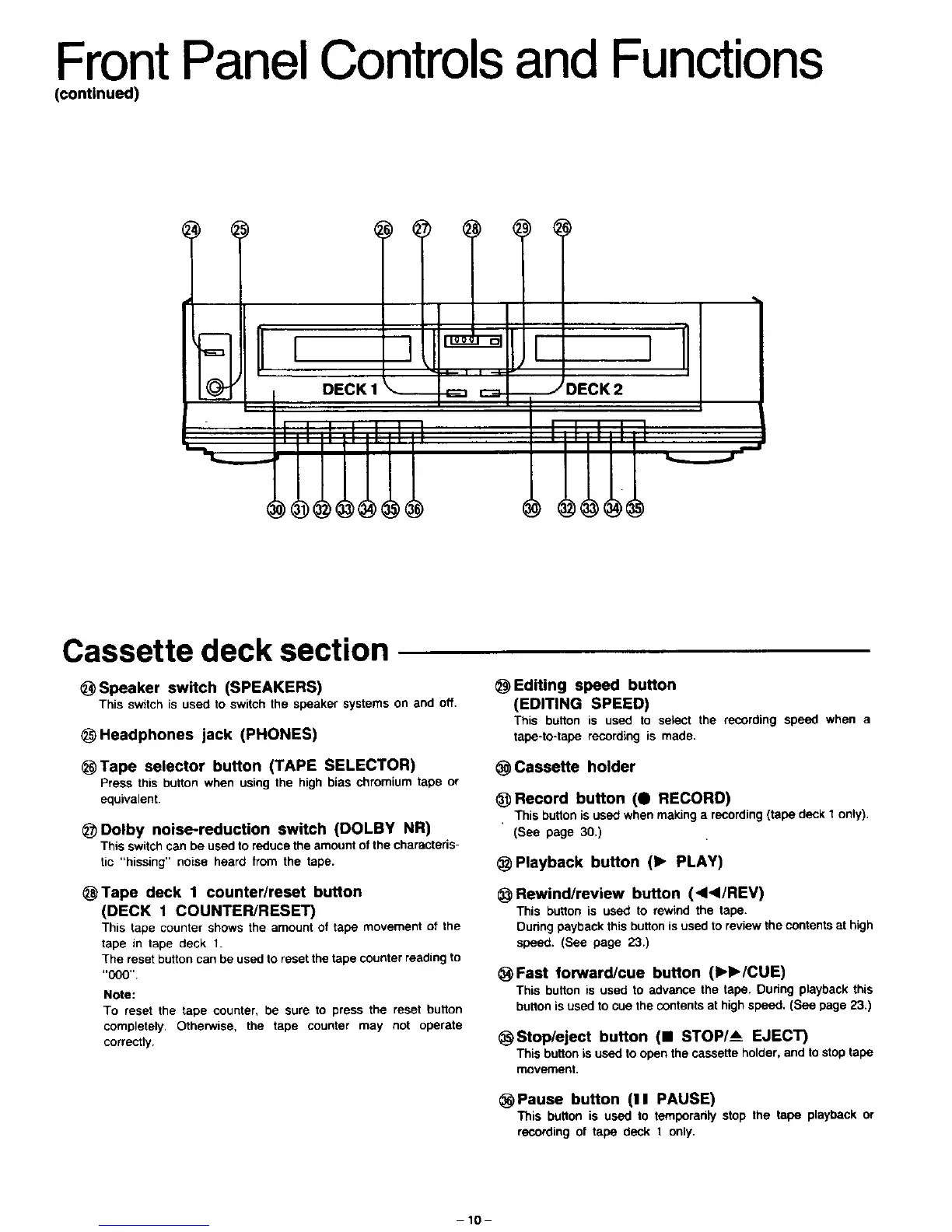
Speaker switch (SPEAKERS)
This switchis used to switchthe speaker systemson and off,
Headphones jack (PHONES)
Tape selector button (TAPE SELECTOR)
Press this button when using the high bias chromium tape or
equivalent.
Dolby noise-reduction switch (DOLBY NR)
This switch can be used to reduce the amount of the characteris-
tic "hissing" noise heard from the tape.
@Tape deck 1 counter/reset button
(DECK 1 COUNTER/RESET)
This tape Counter shows the amount of tape movement of the
tape in tape deck 1.
The reset button can be used to reset the tape counter reading to
"000"
Note:
To reset the tape counter, be sure to press the reset button
completely, Otherwise, the tape counter may not operate
correctly.
Editing speed button
(EDITING SPEED)
This button is used to select the recording speed when a
tape-to-tape recording is made.
Cassette holder
Record button (e RECORD)
This buttonisusedwhen makinga recording(tape deck1 only),
(See page 30,)
Playback button (1_, PLAY)
_Rewind/review button (<<I/REV)
This button is used to rewind the tape.
During payback this button is used to review the contents at high
speed. (See page 23.)
_Fast forward/cue button (I_I_/CUE)
This button is used to advance the tape. During playback this
button is used to cue the contents at high speed. (See page 23.)
_Stop/eject button (11 STOP/_ EJECT)
This button is used to open the cassette holder, and to stop tape
movement.
Pause button (I I PAUSE)
This button is used to temporarily stop the tape playback or
recording of tape deck 1 only.
-10-



 To Next Page