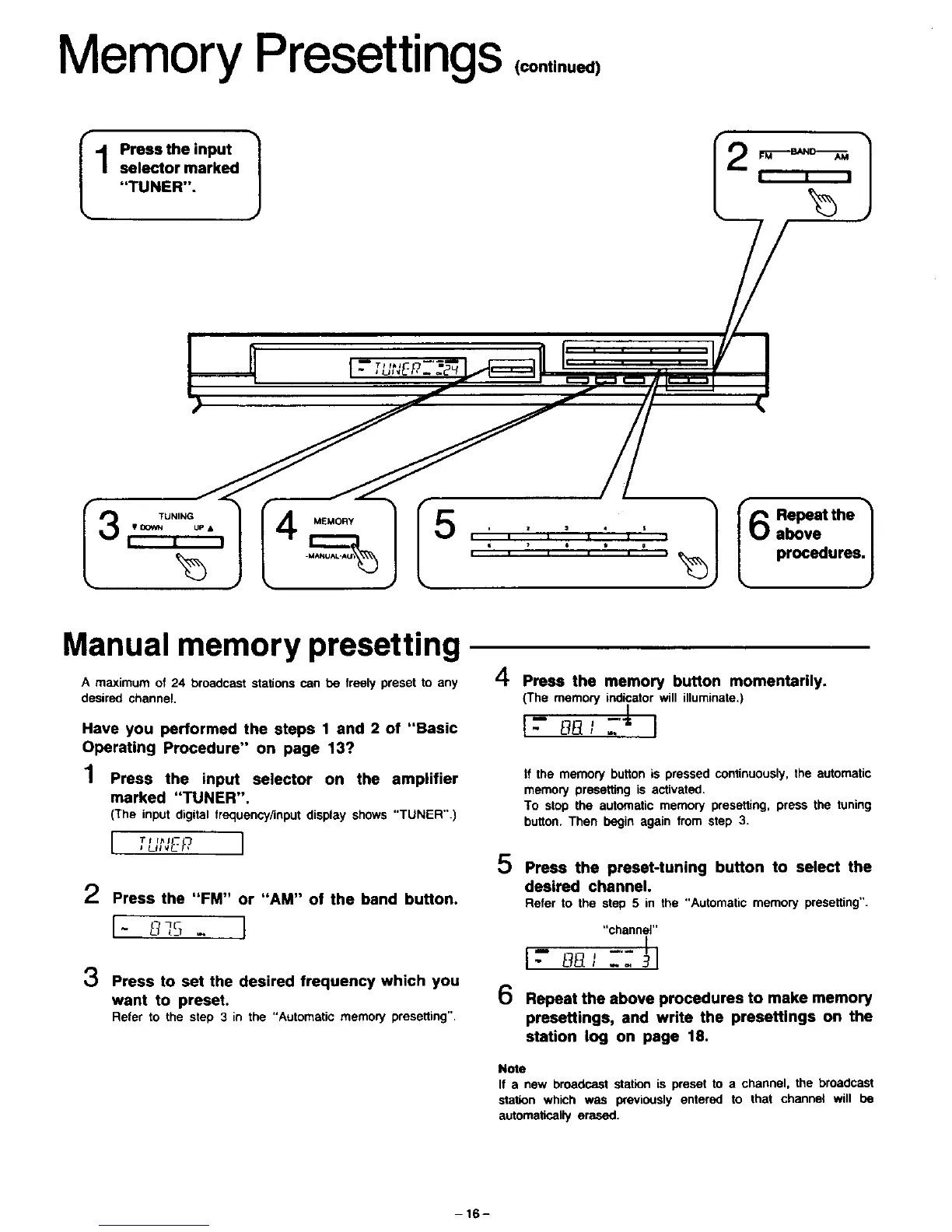
Memory Presettings ,oon,,.ue,,
II--'he'n"I 1
selector marked = , ,
"TUNER".
TUNING MEMORY
• DOWN UP&
I = I
I6 Repeat the _
above
procedures.
J
Manual memory presetting
A maximum of 24 broadcast stations can be Ire.sly preset to any
desired channel,
Have you performed the steps 1 and 2 of "Basic
Operating Procedure" on page 13?
1 Press the input selector on the amp,tier
marked "TUNER".
(The input digital frequency/input display shows "TUNER".)
I '_uNE_7I
2 Press the "FM" or "AM" of the band button.
I- L__,:_ I
3 Press to set the desired frequency which you
want to preset.
Refer to the step 3 in the "Automatic memory presetting",
A
Li" Press the memory button momentarily.
{The memory indicator will illuminate.)
l- L]_]JTJ' I
If the memory button is pressed continuously, the automatic
memory presetting is activated.
To stop the automatic memory presetting, press the tuning
button. Then begin again from step 3.
5
6
Press the preset-tuning button to select the
desired channel.
Refer to the step 5 in the "Automatic memory presetting".
Repeat the above procedures to make memory
presettings, and write the presettlngs on the
station log on page 18.
Note
If a new broadcast station is preset to a channel, the broadcast
station which was previously entered to that channel will be
automatically erased.
-16-





 To Next Page