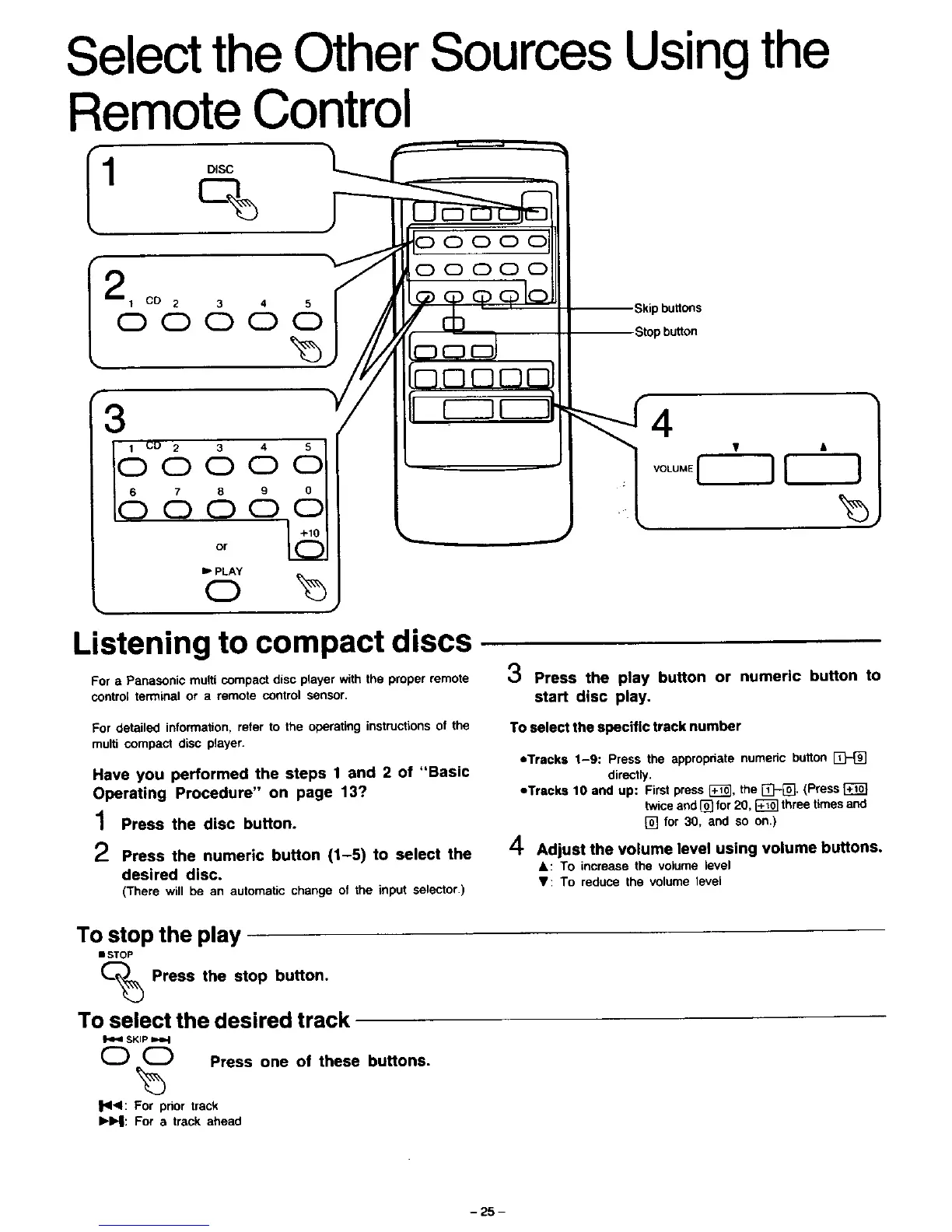
Select the Other Sources Using the
Remote Control
I DISC
1 F--
3
oo6,66
0r _
I_ PLAY
r
_OOCDC
buttons
Stop button
Listening to compact discs
For a Panasonic multi compact disc player with the proper remote
control terminal or a remote control sensor.
3 Press the play button or numeric button to
start disc play.
For detailed information, refer to the operating instructions of the
multi compact disc player.
Have you performed the steps 1 and 2 of "Basic
Operating Procedure" on page 13?
1 Press the disc button.
_) Press the numeric button (1-5) to select the
desired disc.
(There will be an automatic change of the input selector.)
To select the specific track number
eTracks 1-9: Press the appropriate numeric button [_
directly.
eTrecka 10 and up: First press [_], the []-[]. (Press
twice and [] for 20, _ three times and
[] for 30, and so on.)
4 Adjust the volume level using volume buttons.
&: To increase the volume level
V: To reduce the volume level
To stop the play
• STOP
Press the stop button.
To select the desired track
SKIP
0 0 Press one of these buttons.
I'11<1: For pnor track
IHHI: For a track ahead
- 25-



 To Next Page