Edit-Recording
To record from one tape to another
EST--II--TE,1
1 2 3 ,,..L,c,o. 4 .oo. ,o
= ]
r-- , _"_'--,----,
Have you performed the steps 1 and 2 of "Basic
Operating Procedure" on page 13?
Have you pressed the input selector marked
"TAPE"?
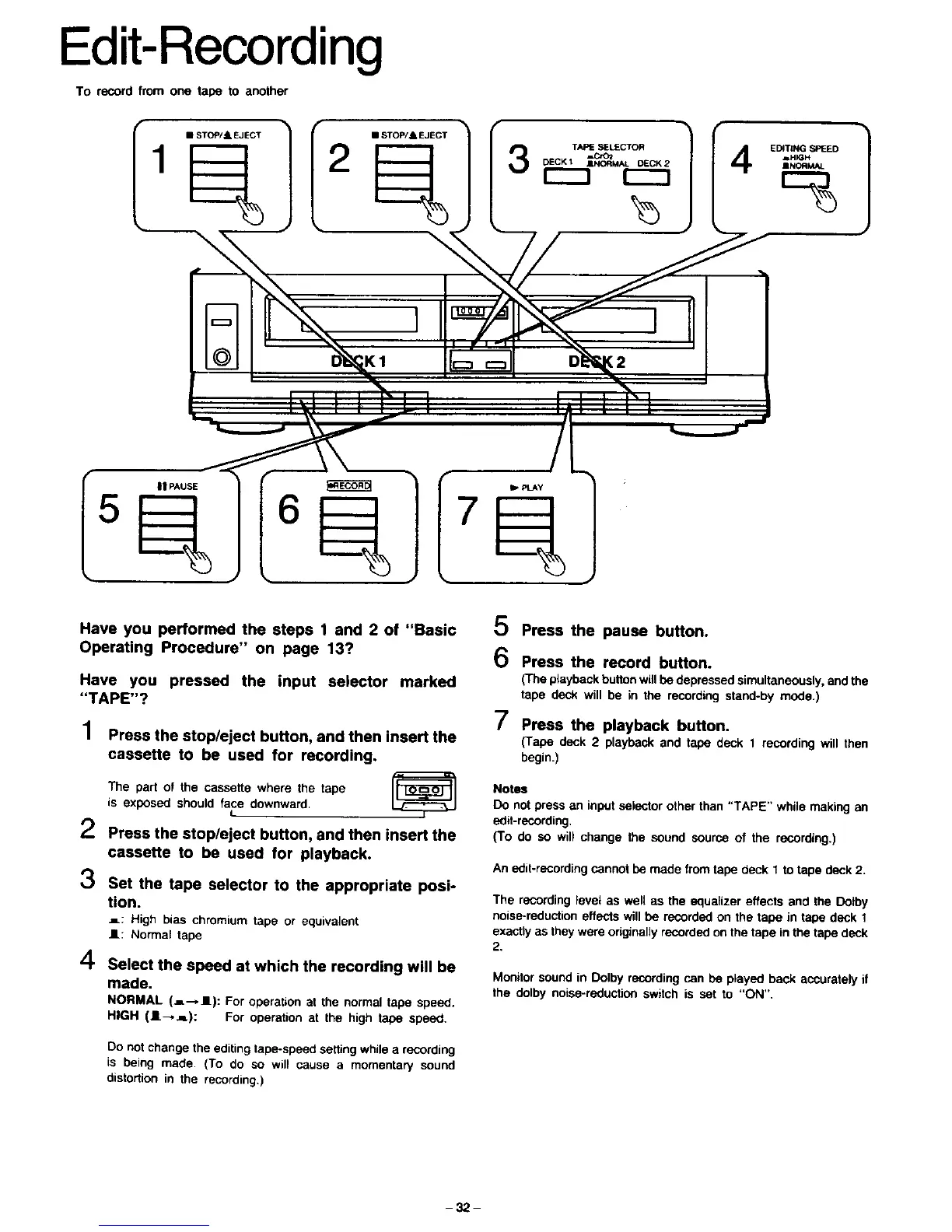
1 Press the stop/eject button, and then insert the
cassette to be used for recording.
The part of the cassette where the tape
is exposed should face downward.
t
2 Press the stop/eject button, and then insert the
cassette to be used for playback.
3 Set the tape selector to the appropriate posi-
tion.
_: High bias chromium tape or equivalent
I1: Normal tape
4 Select the speed at which the recording will be
made.
NORMAL (=--,1): For operation at the normal tape speed.
HIGH (I-,j=): For operation at the high tape speed.
Do not change the editing tape-speed setting while a recording
is being made. (To do so will cause a momentary sound
distortion in the recording,)
0 Press the pause button.
6 Press the record button.
(The playback button will be depressed simultaneously, and the
tape deck will be in the recording stand-by mode.)
7 Press the playback button.
(Tape deck 2 playback and tape deck I recording will then
begin.)
Notes
Do not press an input selector other than "TAPE" while making an
odit-recording.
(To do so will change the sound source of the recording.)
An edit-recording cannot be made from tape deck 1 to tape deck 2.
The recording level as well as the equalizer effects and the Dotby
noise-reduction effects will be recorded on the tape in tape deck 1
exactly as they were originally recorded on the tape in the tape deck
2.
Monitor sound in Dolby recording can be played back accurately if
the dolby noise-reduction switch is set to "ON",
-32-







 To Next Page