Select the Other Sources Using the
Remote Control (oont,no..)
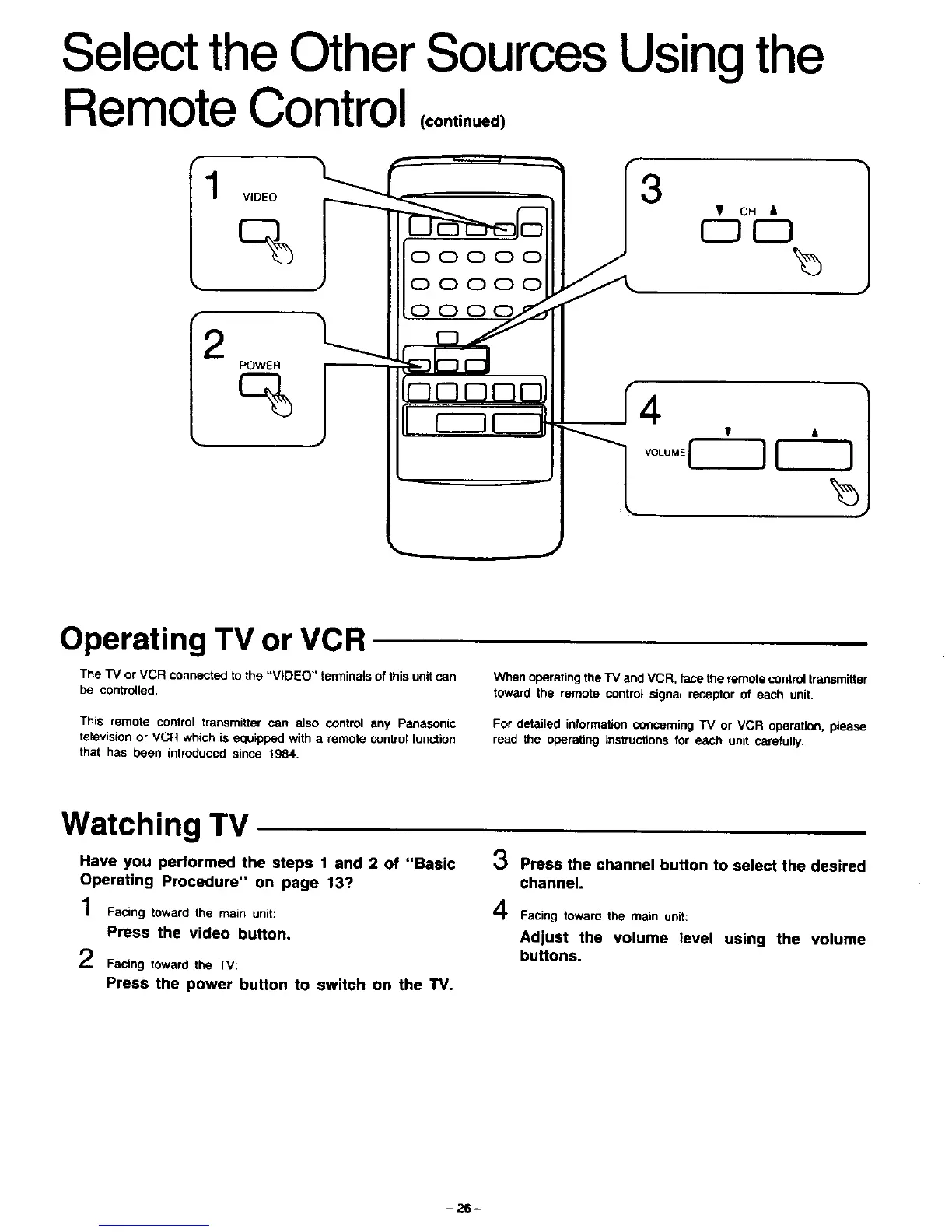
1 "L.. 3
VIDEO
%
2
POWER
%
4
Operating TV or VCR
The TV or VCR connected to the "VIDEO" terminals of this unit can
be controlled.
This remote control transmitter can also control any Panasonic
television or VCR which is equipped with a remote control function
that has been introduced since 1984.
When operating the "IV and VCR, face the remote control transmitter
toward the remote control signal receptor of each unit.
For detailed information concerning TV or VCR operation, please
read the operating instructions for each unit carefully.
Watching TV
Have you performed the steps 1 and 2 of "Basic
Operating Procedure" on page 13?
Facing toward the main unit:
Press the video button.
_) Facing toward the TV:
3 Press the channel button to select the desired
channel.
Facing towardthe mainunit:
Adjust the volume level using the volume
buttons.
Press the power button to switch on the TV.
-26-





 To Next Page