Listening to Tapes
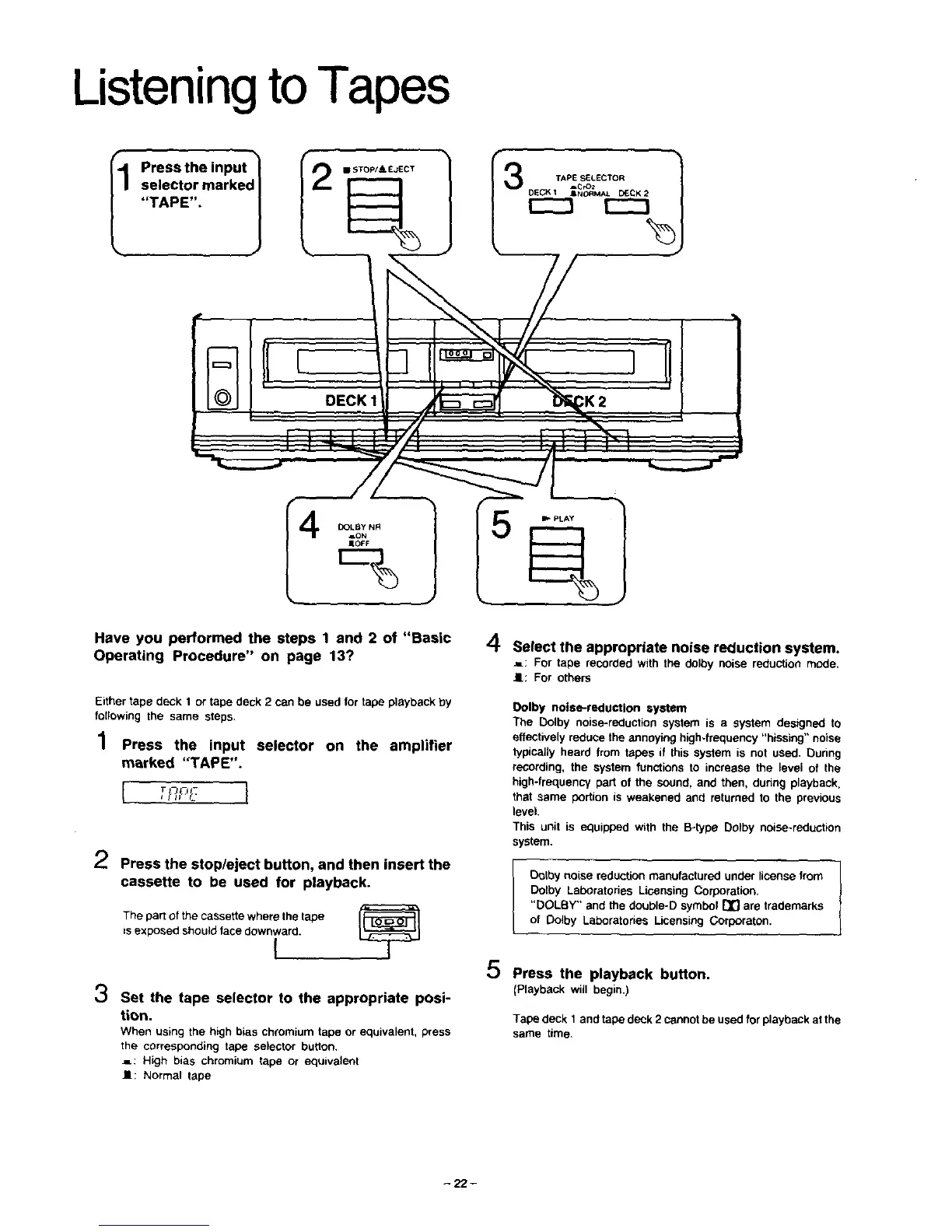
I1 Press the input
selector marked I
"TAPE". 1
TAPE SELECTOR
ACrOz
DECK I mNORMAL SECK 2
I---1
. DECK 111 .#
DOLBY NR
AON
JI*OFF
Have you performed the steps 1 and 2 of "Basic
Operating Procedure" on page 13?
Either tape deck 1 or tape deck 2 can be used for tape playback by
following the same steps.
.4
/ Press the input selector on the amplifier
marked "TAPE".
T_ I-
2 Press the stop/eject button, and then insert the
cassette to be used for playback.
The part of the cassette where the tape I_
=sexposed should face downward.
I
3
Set the tape selector to the appropriate posi-
tion.
Whenusingthe highbiaschromiumtape or equivalent,press
the correspondingtape selector button.
.=: High bias chromiumtape or equivalent
I1: Normal tape
4 Select the appropriate noise reduction system.
•=: For tape recorded withthe dalbynoise reductionmode.
I.: For others
Dolby noise-reduction system
The Dolby noise-reduction system is a system designed to
effectively reduce the annoying high-frequency "hissing" noise
typically heard from tapes if this system is not used. Ourthg
recording, the system functions to increase the level of the
high-frequency part of the sound, and then, during playback,
that same portion is weakened and returned to the previous
level.
This unit is equipped with the B-type Dolby noise-reduction
system.
-1
Dolby noise reduction manufactured under license from |
Dolby Laboratories Licensing Corporation,
"DOLBY" and the double-D symbol [_] are trademarks
of Oolby Laboratories Licensing Corporaton.
5 Press the playback button.
(Playback will begin.)
Tape deck 1 and tape deck 2 cannot be used for playback at the
same time.
-22-







 To Next Page