Recording
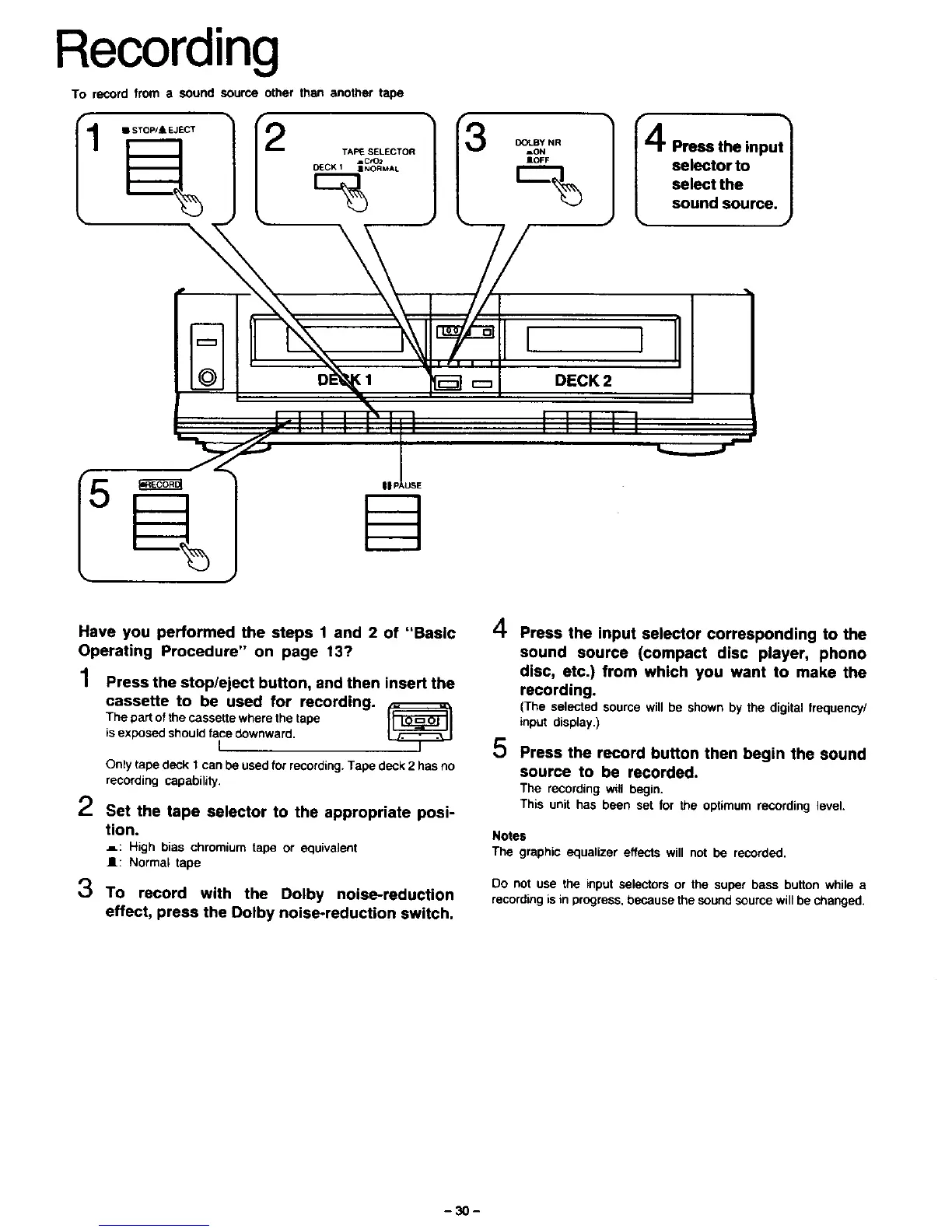
To record from a sound source other than another tape
1
• STOW & EJECT f2
=o_F selector to l
I_--]_ select the |
sound source. J
/
I 1
DECK2
IIIII
||PAUSE
Have you performed the steps 1 and 2 of "Basic
Operating Procedure" on page 13?
1 Press the stop/eject button, and then insert the
cassette to be used for recording.
The part of the cassette where the tape
is exposed should face downward.
I
Only tape deck 1 can be used for recording. Tape deck 2 has no
recording capability.
2
3
Set the tape selector to the appropriate posi-
tion.
_: High bias chromium tape or equivalent
I1: Normal tape
To record with the Dolby noise-reduction
effect, press the Dolby noise-reduction switch.
4
5
Press the input selector corresponding to the
sound source (compact disc player, phono
disc, etc.) from which you want to make the
recording.
(The selected source will be shown by the digital trequency/
input display.)
Press the record button then begin the sound
source to be recorded.
The recording will begin.
This unit has been set for the optimum recording level.
Notes
The graphic equalizer effects will not be recorded.
Do not use the input selectors or the super bass button while a
recording is in progress, because the sound source will be changed.
-30-






 To Next Page