Front Panel Controls and Functions
(continued)
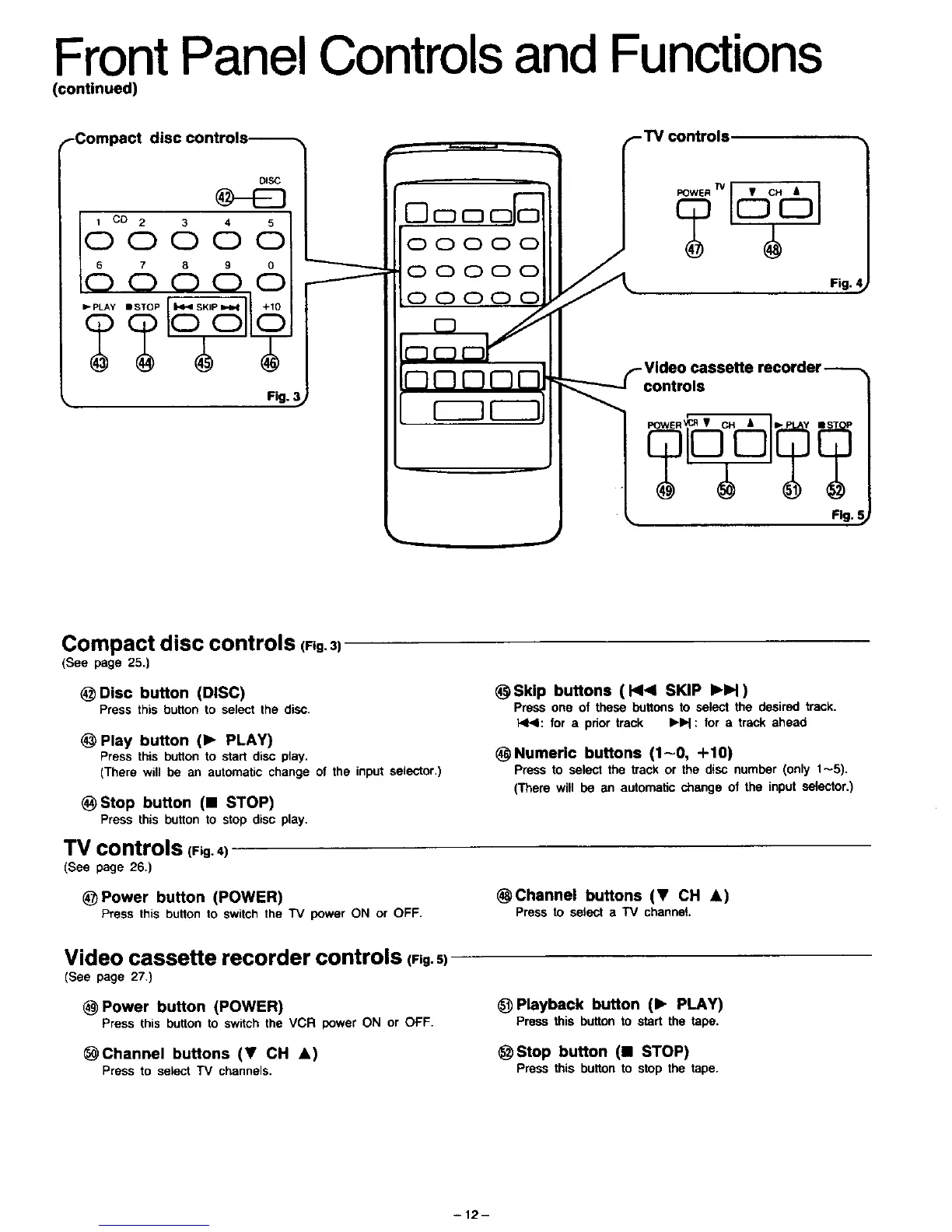
.-Compact disc controis---_.,
DiSC
6°°66 6 6
c5
Fig. :
00000
00000
000
controls
recorder
Compact disc controls (Fig.3)
(See page 25.)
@ Disc button (DISC)
Press this button to select the disc.
@ Play button (1_ PLAY)
Pressthis buttonto start disc play,
(There will be an automaticchange of the input selector.)
_) Stop button (11 STOP)
Press this button to stop disc play.
TV controls (Fig. 4)
(See page 26.)
@P0wer button (POWER)
Press this button to switch the "IV power ON or OFF.
_Skip buttons ( HI< SKIP IHH )
Pressone of these buttonsto select the desired track.
NI4: for a priortrack IHH : for a track ahead
_Numeric buttons (1-0, +10)
Press to select the track or the disc number (only 1-5),
(There will be an automaticchange of the input selector,)
_Channel buttons (T CH A)
Press to select a TV channet.
Video cassette recorder controls (Pig.s)
(See page 27,)
(_ Power button (POWER)
Press this button to switch the VCR power ON or OFF.
_Channel buttons (T CH A)
Press to select TV channels.
@ Playback button (1_ PLAY)
Press this buttonto start the tape.
@ Stop button (U STOP)
Press this button to stop the tape.
-12-



 To Next Page