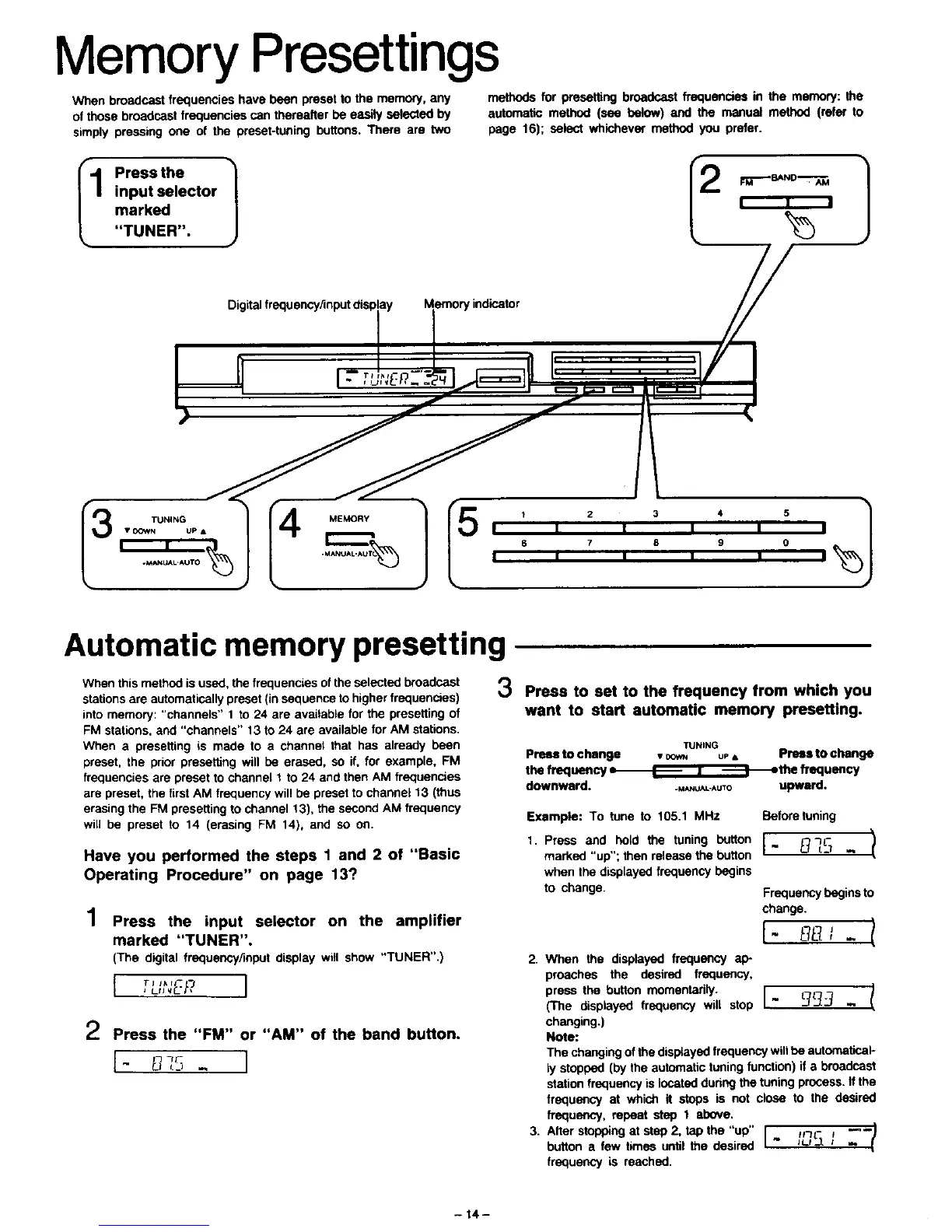
Memory Presettings
When broadcast frequencies have been preset to the memory, any methods for presetting broadcast frequencies in the memory: the
of those broadcast frequencies can thereafter be easily selected by automatic method (see below) and the manual method (refer to
simply pressing one of the preset-tuning buttons. There are two page 16); select whichever method you prefer.
Automatic memory presetting
When this method is used, the frequencies of the selected broadcast
stations are automatically preset (in sequence to higher frequencies)
into memory: "channels" 1 to 24 are available for the presetting of
FM stations, and "channels" 13 to 24 are available for AM stations.
When a presetting is made to a channel that has already been
preset, the prior presetting will be erased, so if. for example, FM
frequencies are preset to channel 1 to 24 and then AM frequencies
are preset, the first AM frequency will be preset to channel 13 (thus
erasing the FM presetting to channel 13), the second AM frequency
will be preset to 14 (erasing FM 14), and so on.
Have you performed the steps 1 and 2 of "Basic
Operating Procedure" on page 13?
1
Press the input selector on the amplifier
marked "TUNER"•
(The digital frequency/input display will show "TUNER".)
I Tj I;*II--
2 Press the "FM" or "AM" of the band button•
1 '_-"- I
3 Press to set to the frequency from which you
want to start automatic memory presetting.
TUNING
Press to
I
Press to
L --
cnange • co_ us, cnenge
the frequency _the frequency
downward
• _._u__-*uTo upward.
Example: To tune to 105.1 MHz Before tuning
1. Press and hold the tuning button I "_c
marked "up"; then release the button " _ _:] -
when the displayed frequency begins
to change. Frequency begins to
change.
[- _ 1
2. When the displayed frequency ap-
preaches the desired frequency,
press the button momentarily. [ !
(The displayed frequency will stop " _ -
changing.)
Note:
The changing of the disptayed frequency will be automatical-
ly stopped (by the automatic tuning function) if a broadcast
station frequency is located during the tuning process. If the
frequency at which it stops is not close to the desired
frequency, repeat step 1 above.
3. Atter stopping at step 2, tapthe"up" I, tL_._. _ _-'-_
button a few times until the desired
frequency is reached.
- 14-



 To Next Page