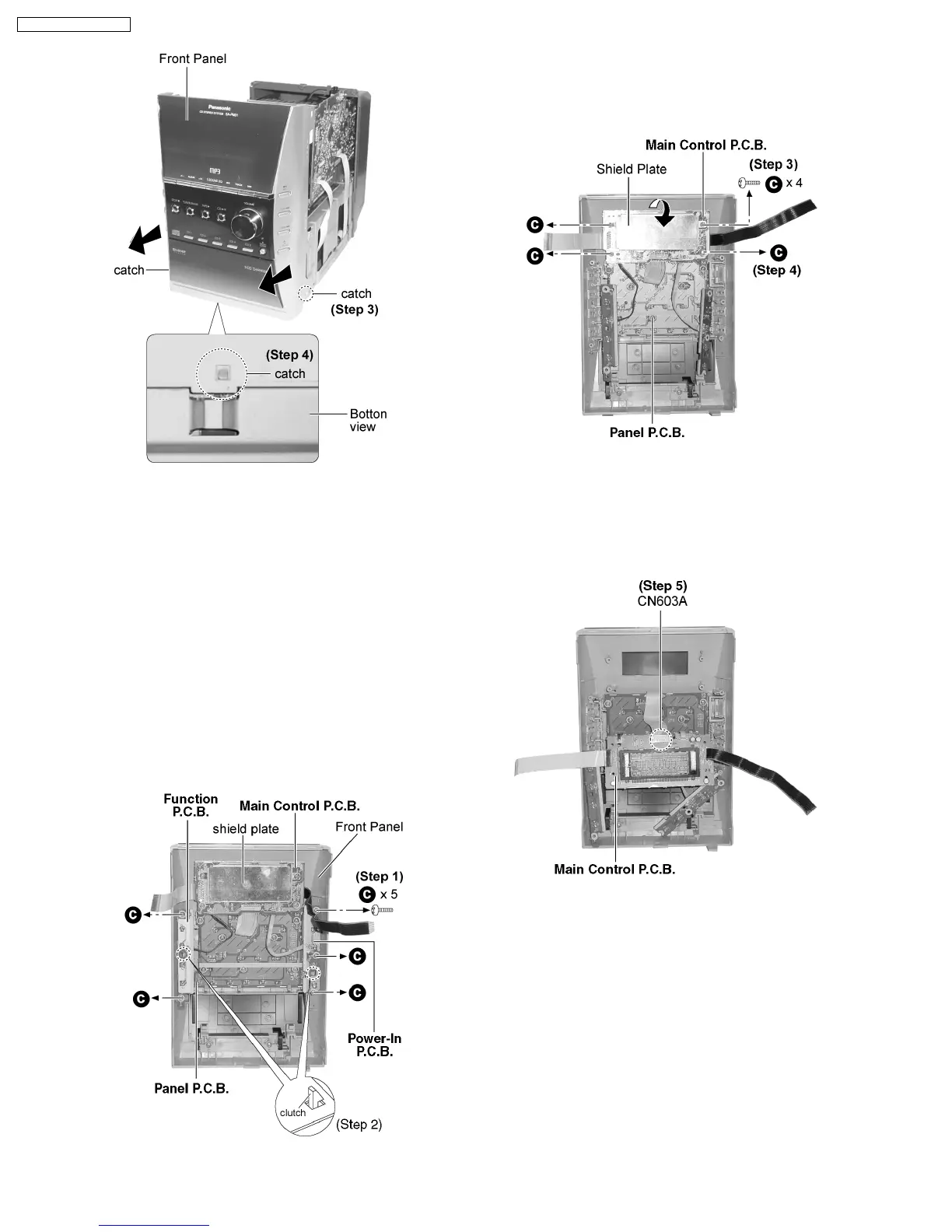
Step 3 : Release 2 catches and remove the front panel as
arrows shown.
Step 4 : Release the catch at the bottom cabinet as shown.
9.6. Disassembly of Main Control
P.C.B., Function P.C.B. and
Power-In P.C.B.
·
Follow the (Step 1) - (Step 6) of Item 9.2.
·
Follow the (Step 1) - (Step 3) of Item 9.3.
·
Follow the (Step 1) - (Step 4) of Item 9.5.
·
Disassembly of Function P.C.B. and Power-In P.C.B.
Step 1 : Remove 5 screws.
Step 2 : Release 2 clutches and remove both Function P.C.B.
and Power-In P.C.B.
·
Disassembly of Main Control P.C.B.
Step 3 : Remove 2 screws to remove the shield plate.
Step 4 : Remove 2 screws and flip the Main Control P.C.B. as
arrow shown.
Step 5 : Detach the connector CN603A.
9.7. Disassembly of Panel P.C.B.
·
Follow the (Step 1) - (Step 6) of Item 9.2.
·
Follow the (Step 1) - (Step 3) of Item 9.3.
·
Follow the (Step 1) - (Step 4) of Item 9.5.
·
Follow the (Step 1) - (Step 5) of Item 9.6.
14
SA-PM31P / SA-PM31PC










 To Next Page