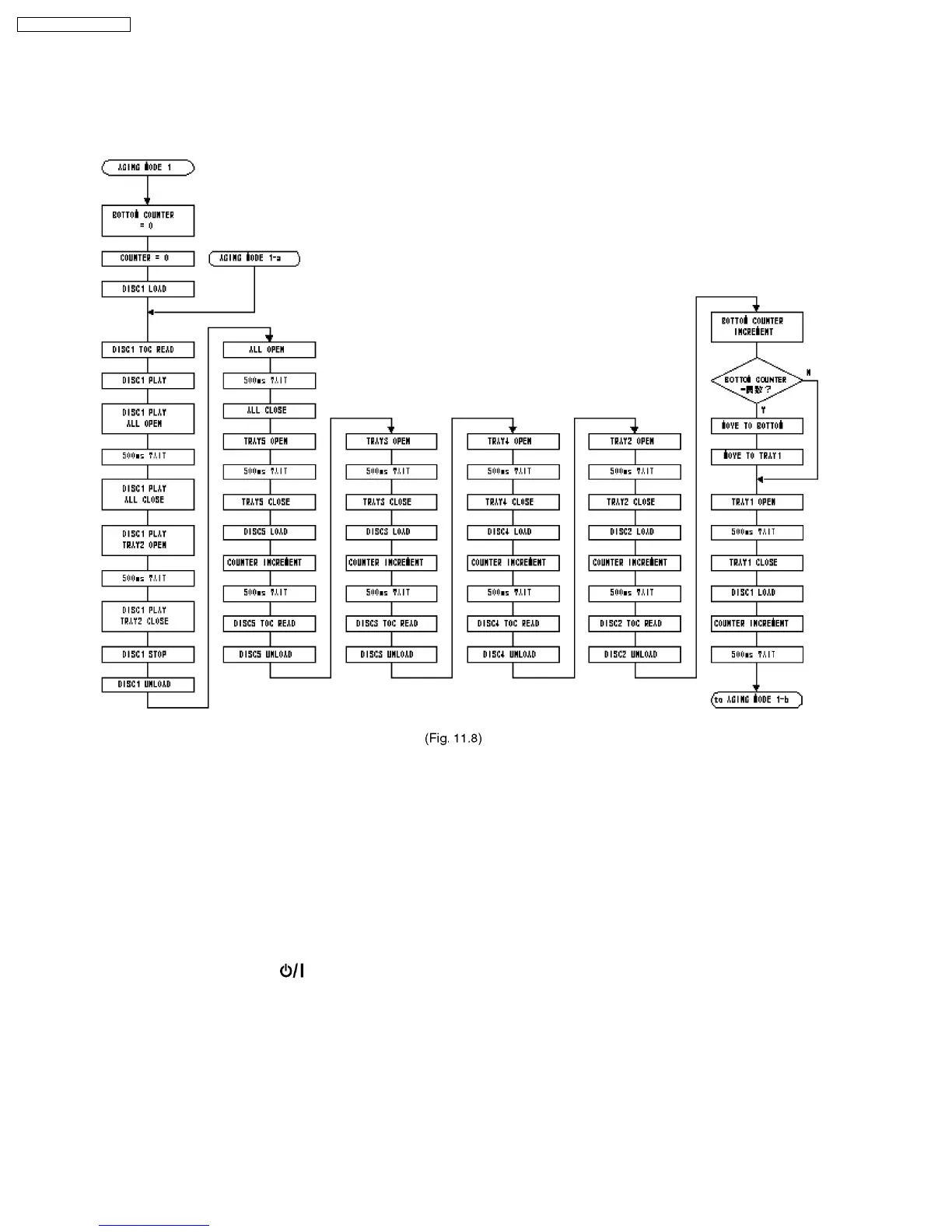
11.8. CR16 Mechanism Ageing Mode
To enter into ageing mode:
1. Enter a Doctor mode.
2. Press [2] button on the remote control. It enters into ageing mode (See Fig. 11.8).
Ageing process:
1. Tray 1 open.
2. It waits for 1 second (Note: Do not put any disc into the tray).
3. Tray 1 close.
4. TOC READ (Reading incomplete).
5. Tray 2 open and repeat process 1 to 4. (Process repeat until Tray 5).
6. Tray check.
7. Whole process complete (Counter on FL increase by 1).
Note: To exit ageing mode, press [
POWER] button. The unit will power down. Do not unplug the power cord until FL display
shows “GOODBYE”. This is to avoid tray jam problem.
Display Example: [00000T3OP] ...TRAY OPEN
[00000T3CL] ...TRAY CLOSE
[00000T3RE] ...TOC READING
[00000T3CH] ...TRAY CHANGING
54
SA-PM31P / SA-PM31PC










 To Next Page