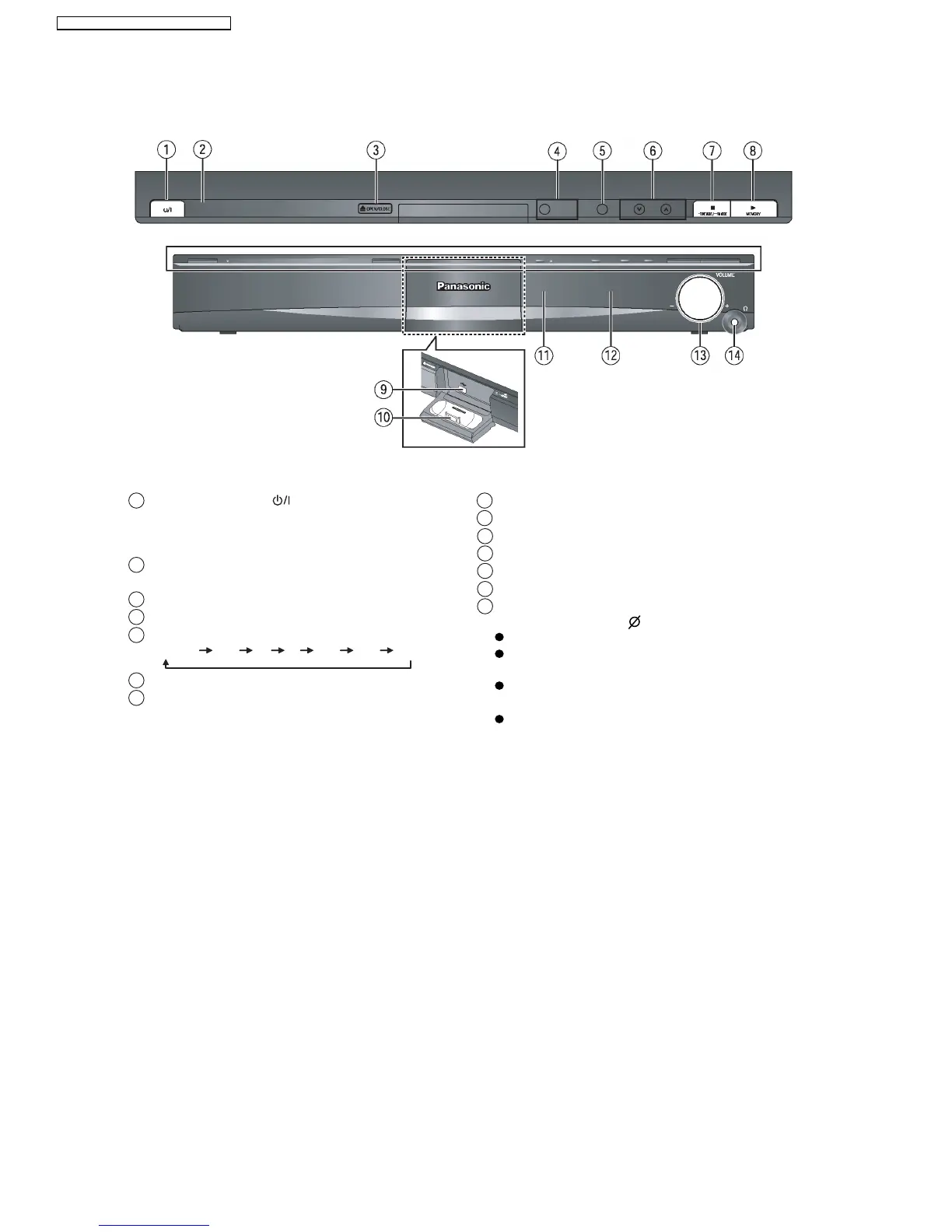
7.2. Main Unit Key Buttons Operations
Press to switch the unit from on to standby mode or
vice versa. In standby mode, the unit is still
consuming a small amount of power.
Standby/on switch [ ]
1
This indicator lights when the unit is connected to the
AC mains supply.
2
Turn Subwoofer Boost on/off4
Open/Close the disc tray3
Skip or slow-search play / Select the radio stations6
Stop playing / Select the tuning mode / Adjust the
FM reception condition
7
Play discs / Memorize the receiving radio stations8
Connect USB device9
Connect iPod
10
Remote control signal sensor
11
Adjust the volume of this unit
13
Display
12
5 Select the source
DVD/CD USB FM AV AUX D-IN IPOD
14
Connect headphones
Reduce the volume before connecting.
Audio is automatically switched to 2-channel
stereo.
To prevent hearing damage, avoid listening for
prolonged periods of time.
Excessive sound pressure from earphones and
headphones can cause hearing loss.
Headphone plug type: 3.5 mm stereo mini plug
16
SA-PT560E / SA-PT560EB / SA-PT560EG







 To Next Page