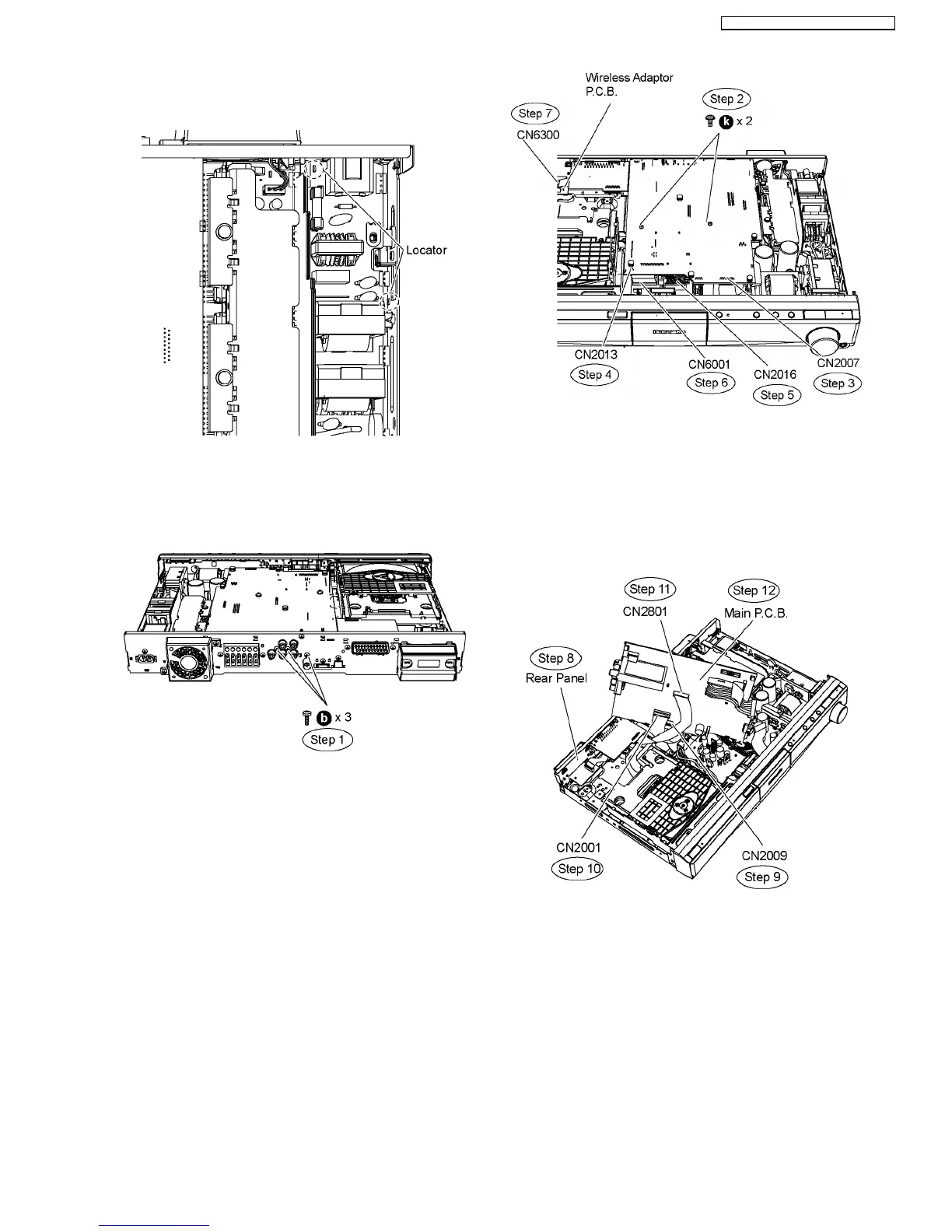
place. Avoid denting it. Place it back during assembling.
Special Note: During reassembling procedures, ensure the
P.C.B. is seated properly at the locators.
9.14. Disassembly of Main P.C.B.
•
• •
• Follow (Step 1) to (Step 3) of Item 9.3.
Step 1 Remove 3 screws at the rear panel.
Step 2 Remove2screwsonMainP.C.B.
Step 3 Detach 17P FFC cable at the connector (CN2007) on
the Main P.C.B.
Step 4 Detach 4P FFC cable at the connector (CN2013) on the
Main P.C.B.
Step 5 Detach 13P cable at the connector (CN2016) on the
Power Supply P.C.B.
Step 6 Detach 28P cable at the connector (CN6001) on the
Power Supply P.C.B.
Step 7 Detach 14P cable at the connector (CN6300) on
Wireless Adaptor P.C.B.
Step 8 Detach Main P.C.B. from the rear panel.
Step 9 Turn over Main P.C.B. to detach 17P FFC cable at the
connector (CN2009) on the Main P.C.B.
Step 10 Detach 50P FFC cable at the connector (CN2001) on
the Main P.C.B.
Step 11 Detach 22P FFC cable at the connector (CN2801) on
the Main P.C.B.
Step 12 Remove Main P.C.B.
Special Note: During reassembling procedures, ensure the
P.C.B. is seated properly at the locators.
49
SA-PT560E / SA-PT560EB / SA-PT560EG







 To Next Page