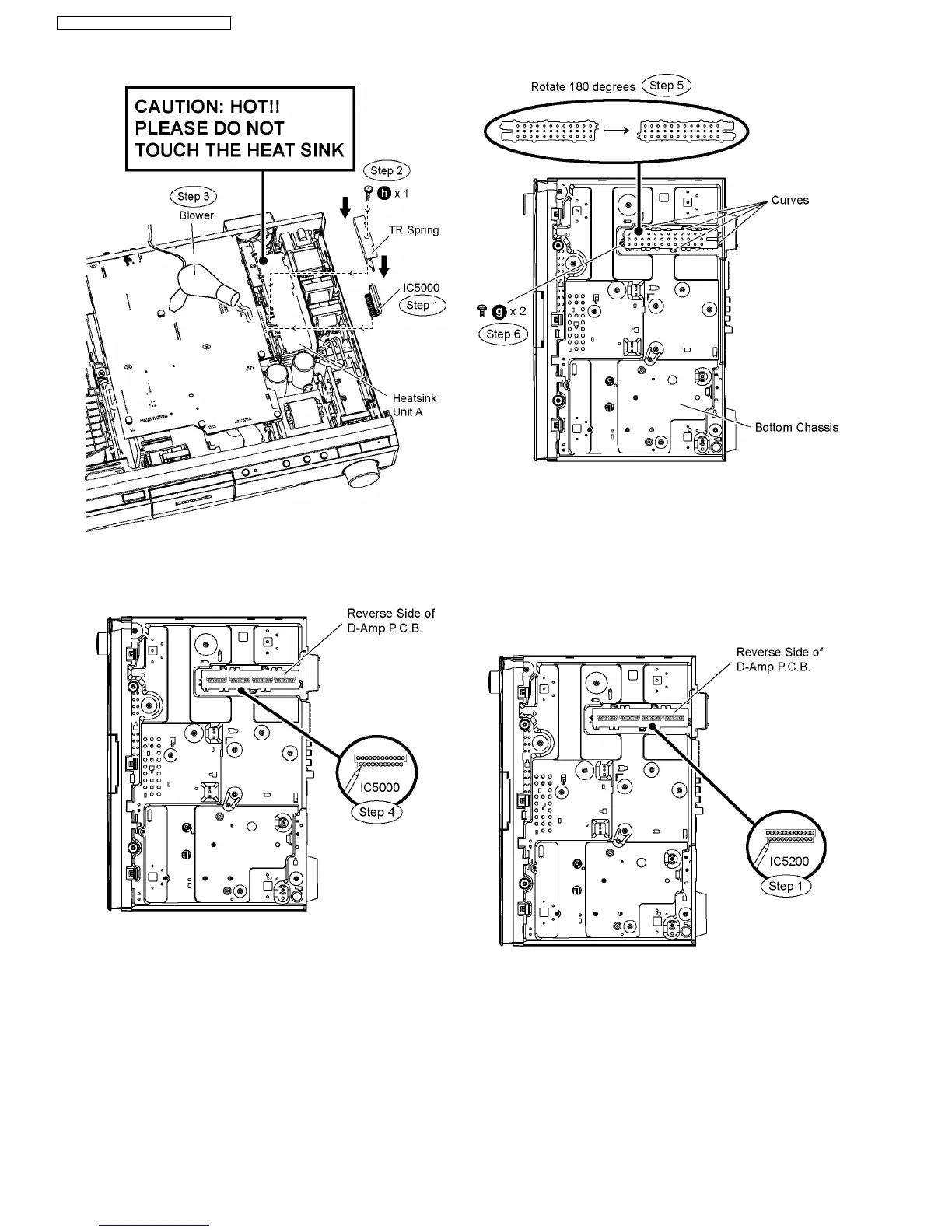
Step 4 Solder pins of the digital amp IC (IC5000) on the
reverse side of D-Amp P.C.B.
Special Note: Ensure pins of the digital amp IC (IC5000) are
properly seated and soldered on D-Amp P.C.B.
Step 5 Position the bottom chassis portion into the curves
according to the diagram shown. (Rotate the part at 180
degrees as compared to its original position)
Step 6 Screw the portion to the bottom chassis.
9.17. Replacement of Digital Amp IC
(IC5200)
•
• •
• Follow (Step 1) to (Step 3) of Item 9.3.
•
• •
• Follow (Step 1) to (Step 2) of Item 9.16.
Step 1 Desolder pins of the digital amp IC (IC5200) on the
reverse side of D-Amp P.C.B.
Step 2 Remove 1 screw.
Step 3 Remove the TR spring in the direction of arrows.
Step 4 Remove the digital amp IC (IC5200) from the heatsink
unit A.
Caution: Handle the heatsink unit A with caution due to its
high temperature after prolonged use. Touching it may
lead to injuries.
52
SA-PT560E / SA-PT560EB / SA-PT560EG









 To Next Page