7.3. Using the VIERA Link “HDAVI Control™”
VIERA Link "HDA VI Control"
VIERA Link "HDAVI Control" is a convenient function that
offers linked operations of this unit, and a Panasonic TV
(VIERA) under "HDAVI Control". You can use this
function by connecting the equipment with the HDMI
cable. See the operating instructions for connected
equipment for operational details.
The TV with "HDAVI Control 2" function enables the
following operation: VIERA Link Control only with TV’s
remote control (for "HDAVI Control 2") .
Preparation
"
AUX
") or OPTICAL IN terminal (for "D-IN")
Whenever the connection or settings are changed,
reconfirm the points above.
You can turn on this unit and the TV, and start playing theXX[
disc with a single press of a button.
When the TV is t urned off, this unit goes into standbyk
mode automatically.
, r
"
AUX
" and "D-IN" works depending on the "TV
AUDIO" setting (
above Setting the TV audio fo
VIERALink "HDAVI Control ).
One touch play
Start disc playback.
Aut o inp ut sw it ching
Power off link
ONE TOUCH PLAY
Setting the TV audio for VIERA Link "HDAVI Co n t r o l "
Select between "
AUX"
and "D-IN" to work with the linked
operations.
Confirm the audio connection to the
AUX
terminal (for
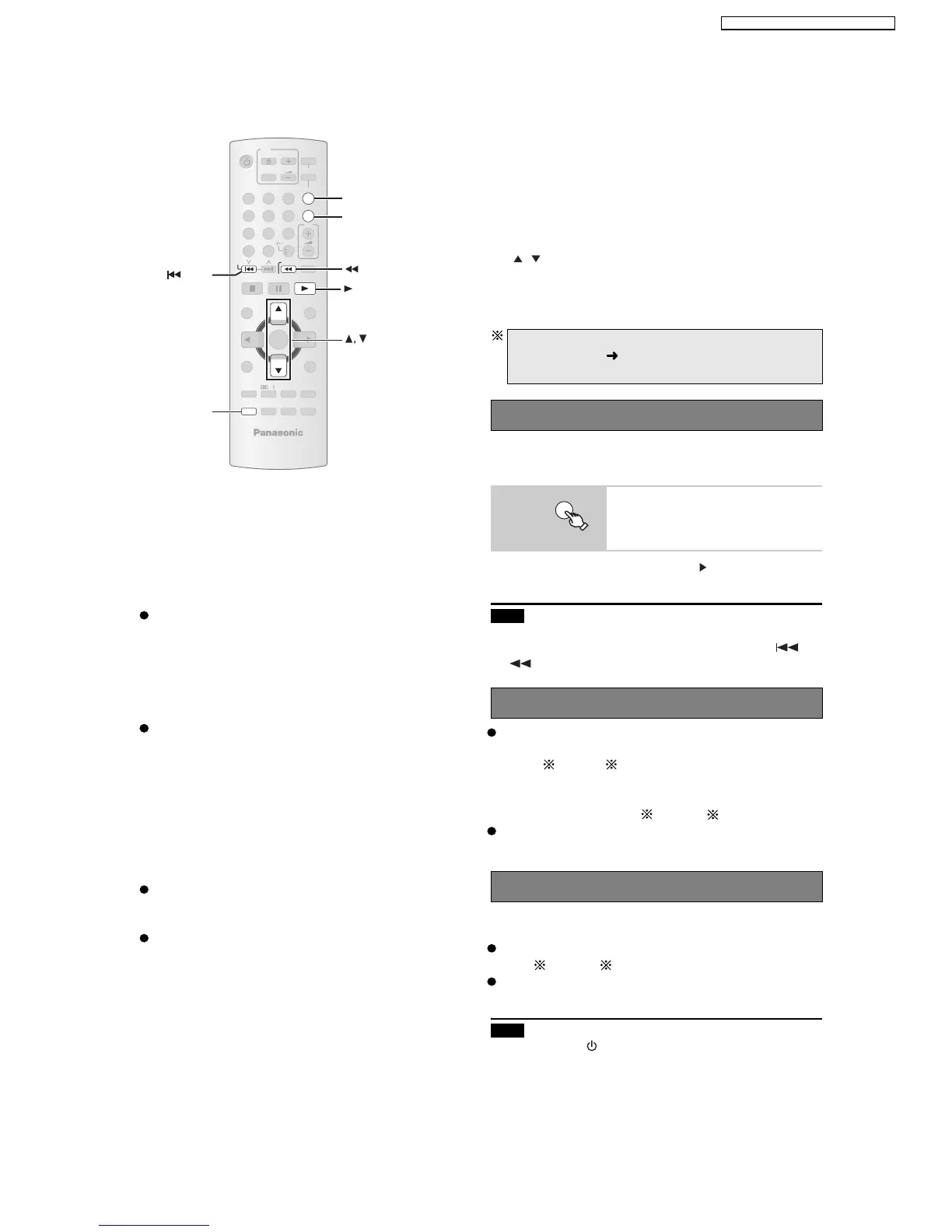
1 Press [FM/EXT-IN] to select "D-IN".
2 Press [SETUP] to select "TV AUDIO ", then press
[ , ] to select
"AUX
" or "D-IN".
unit’ s remote control when this unit is in standby mode.
This function also works if you press [ PLAY] on this
Note
Playback may not be immediately displayed on the TV. If
you miss the beginning portion of playback, press []
or [ ] to go back to where playback started.
When you start disc play, the TV will automatically
switch its input mode for this unit.
When you switch the TV input to:
TV tuner mode, this unit will automatically switch to
HDMI input mode for this unit, this unit will automatically
switch to
"AUX "
or "D-IN" .
"DVD/CD" if it is in "AUX"
or
"
D-IN
" mode.
This function works only when "DVD/CD",
"USB",
When the TV is turned on, this unit does not turn on
automatically. (Power on link is not available.)
"
AU X "
or "D-IN" is selected as the source on this unit.
Note
connected equipment compatible with VIERA Link
"HDAVI Control" stays on.
When you press [ ], only this unit turns off. Other
VIERA Link "HDAVI Control", based on the control
functions provided by HDMI which is an industry
standard known as HDMI CEC (Consumer Electronics
Control), is a unique function that we have developed
and added. As such, its operation with other
manufacturers’ equipment that supports HDMI CEC
cannot be guaranteed.
This unit supports "HDAVI Control 2" function.
"HDAVI Control 2" is the newest standard (current as of
February, 2007) for Panasonic’s HDAVI Control
compatible equipment. This standard is compatible with
Panasonic’s conventional HDAVI equipment.
To complete and activate the connection correctly, turn
on all VIERA Link "HDAVI Control" compatible
equipment and set the TV to the corresponding HDMI
input mode for this unit.
Confirm that the HDMI connection has been
made and the scart cable is not connected.
Set "VIERA Link" to "ON" .
-
SLEEP
-
REPEAT
MUTING
-
FL DISPLAY
-
PLAY MODE
SUBWOOFER
-
CH SELECT
FUNCTIONS
SETUP SOUND
LEVEL
TO P M E N U
MENU
DIRECT
NAVIGATOR
START
PLAY
LIST
RETURN
SLOW/SEARCH
PLAYPAUSESTO P
SKIP
12
3
4
5
6
7
89
0
10
CANCEL
VOL
FM/EXT-I N
TV/AV
VOL
iPod/USB
TV
DVD
-
W.S.
PL
OK
ONE TOUCH PLAY
SETUP
SKIP
FM/EXT-IN
ONE TOUCH PLAY
SLOW/SEARCH
PLAY
17
SA-PT560E / SA-PT560EB / SA-PT560EG







 To Next Page