7.5. USB Connection and Operation
SW
B
O
O
S
T
O
P
E
N
C
L
O
S
E
You can connect and play tracks or files from USB mass
storage class devices.
Devices which are defined as USB mass storage class:
USB devices that support bulk only transfer.
USB devices that support USB 2.0 full speed.
Preparation
Before connecting any USB mass storage device to the
unit, ensure that the data stored therein has been
backed up.
It is not recommended to use a USB extension cable.
The USB device connected using the cable will not
recognised by this unit.
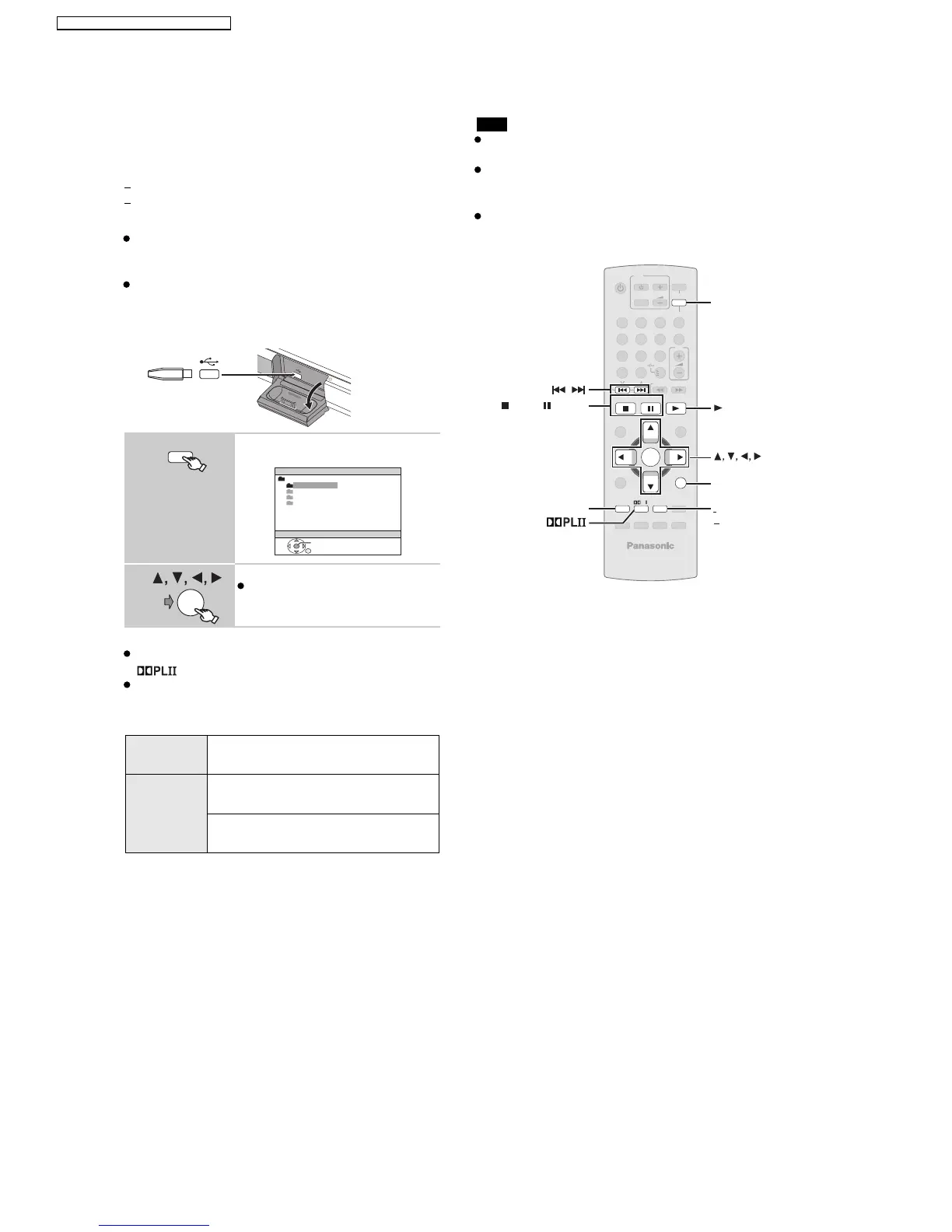
Connect the USB device (not included).
Pla
* For E/EG only
y starts from the selected content.
You can enjoy surround sound effect when you press
[ ] to turn on Dolby Pro Logic II ( 29).
For other operating functions, they are similar to those
described in "Playing discs" ( 14 to 25).
Supported Formats
1
Select "USB".
The menu screen appears.
2
Select an item.
To return to the previous screen,
press [RETURN]
.
Still
pictures
JPEG (Extension: ".jpg", ".JPG", ".jpeg",
".JPEG")
Music MP3 (Extension: ".mp3", ".MP3")
WMA (Extension: ".wma", ".WMA")
*Video MPEG4 (Extension: ".asf", ".ASF")
USB device
This unit
iPod/USB
USB
ROOT
OK
Songs
Concer t_01
Concer t_02
Southern AI
e.g.
OK
OI
OI
Maximum: 256 folders, 4000 files, 12 characters for file/
folder name
Only one memory card will be selected when
connecting a multiport USB card reader. Typically the
first memory card inserted.
Note
When connecting the USB mass storage device, ensure
the iPod has been disconnected.
-
SLEEP
-
REPEAT
MUTING
-
FL DISPLAY
-
PLAY MODE
SUBWOOFER
-
CH SELECT
FUNCTIONS
SETUP SOUND
LEVEL
TOP MENU
MENU
DIRECT
NAVIGATOR
START
PLAY
LIST
RETURN
SLOW/SEARCH
PLAYPAUS ESTOP
SKIP
12
3
4
56
7
89
0
10
CANCEL
VOL
FM/EXT-IN
TV/AV
VOL
iPod/USB
TV
DVD
-
W.S.
PL
OK
ONE TOUCH PLAY
PLAY
REPEAT
PLAY MODE
OK
iPod/USB
RETURN
,
STOP, PAUSE
FUNCTIONS
20
SA-PT560E / SA-PT560EB / SA-PT560EG







 To Next Page