EasyManua.ls Logo

Panasonic SC-CH7 - Page 19

Panasonic SC-CH7
61 pages
Print Icon
To Next Page IconTo Next Page
To Previous Page IconTo Previous Page
Loading...
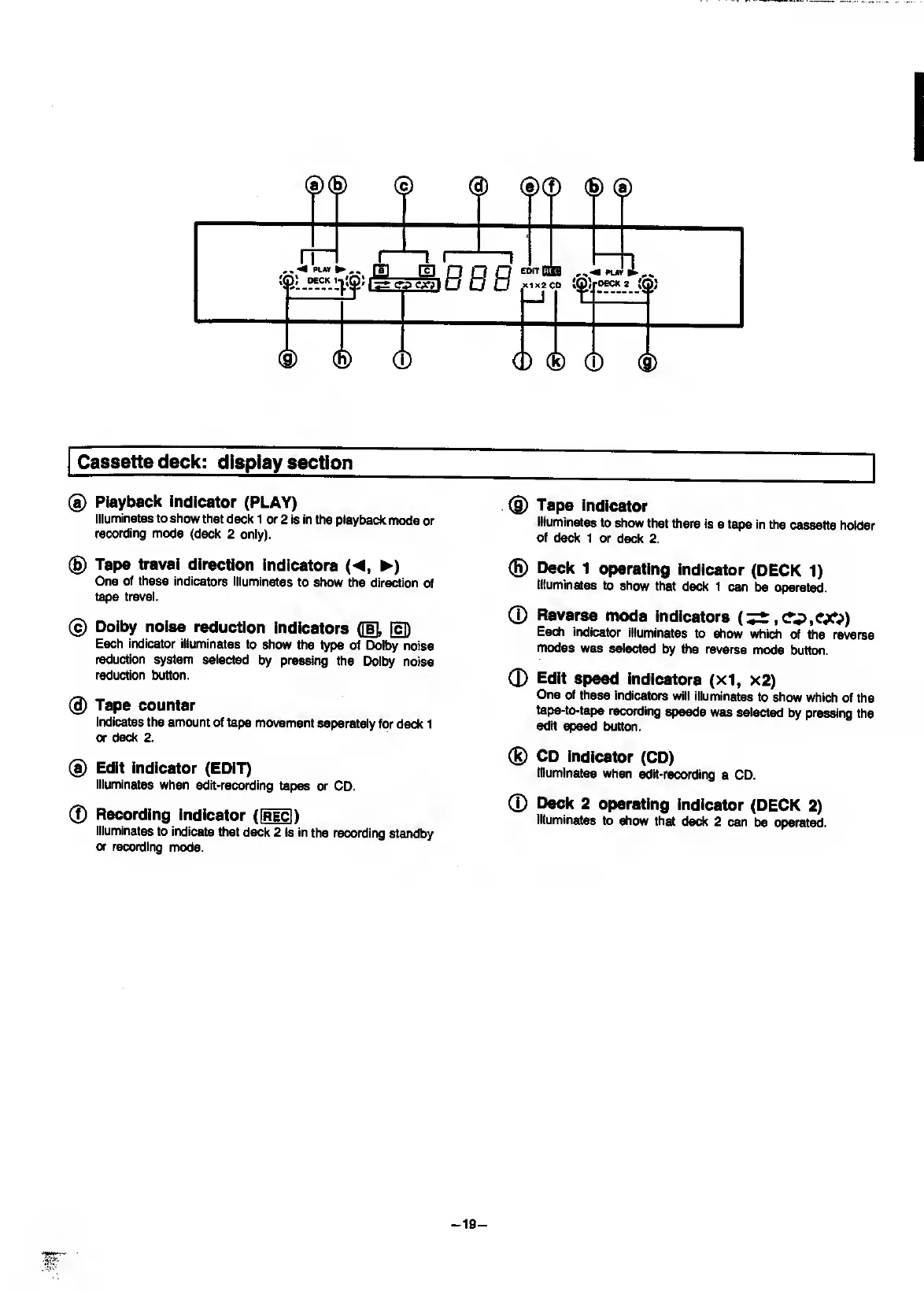
Cassette
deck:
display
section
®
Playback
indicator
(PLAY)
Illuminates
to
show
that
deck
1
or
2
is
in
the
playback
mode
or
recording
mode
(deck
2
only).
(B)
Tape
travel
direction
indicators
(
<,
>
)
One
of
these
indicators
illuminates
to
show
the
direction
of
tape
travel.
®
Dolby
noise
reduction
indicators
([I],
Each
indicator
illuminates
to
show
the
type
of
Dolby
noise
reduction
system
selected
by
pressing
the
Dolby
noise
reduction
button.
(g)
Tape
counter
Indicates
the
amount
of
tape
movement
separately
for
deck
1
or
deck
2.
®
Edit
indicator
(EDIT)
Illuminates
when
edit-recording
tapes
or
CD.
0
Recording
indicator
(Hi)
Illuminates
to
indicate
that
deck
2
is
in
the
recording
standby
or
recording
mode.
(g)
Tape
indicator
Illuminates
to
show
that
there
is
a
tape
in
the
cassette
holder
of
deck
1
or
deck
2.
(H)
Deck
1
operating
indicator
(DECK
1)
Illuminates
to
show
that
deck
1
can
be
operated.
0
Reverse
mode
indicators
(^,ev>,CX?)
Each
indicator
illuminates
to
show
which
of
the
reverse
modes
was
selected
by
the
reverse
mode
button.
0
Edit
speed
indicators
(x1,
x2)
One
of
these
indicators
will
illuminates
to
show
which
of
the
tape-to-tape
recording
speeds
was
selected
by
pressing
the
edit
speed
button.
®
CD
Indicator
(CD)
Illuminates
when
^it-recording
a
CD.
0
Deck
2
operating
indicator
(DECK
2)
Illuminates
to
show
that
deck
2
can
be
operated.
-
19
-
IT
'

Related product manuals