EasyManua.ls Logo

Panasonic SC-CH7 - Cassette Deck Controls and Display

Panasonic SC-CH7
61 pages
Print Icon
To Next Page IconTo Next Page
To Previous Page IconTo Previous Page
Loading...
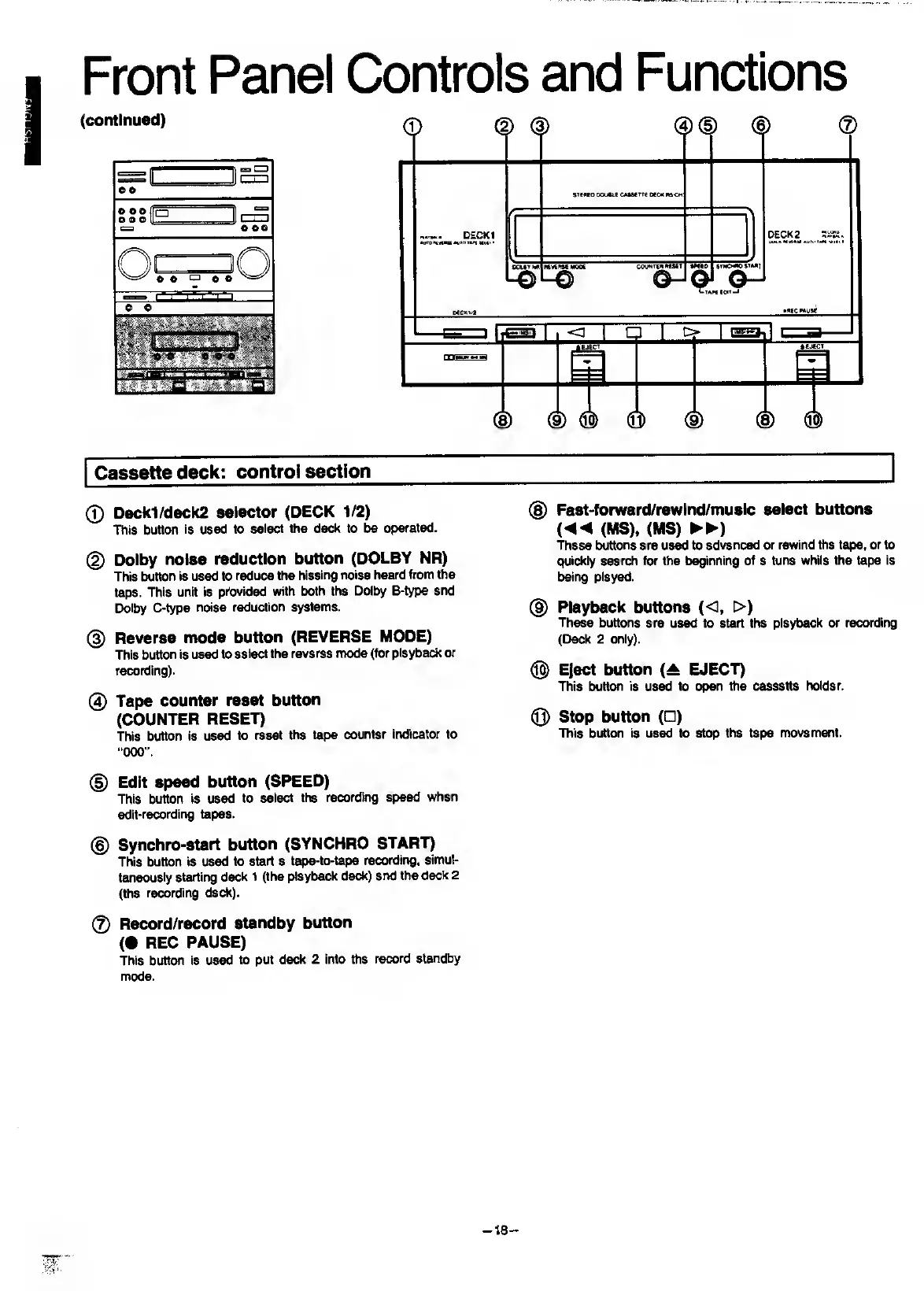
Front
Panel
Controls
and
Functions
Cassette
deck:
control
section
0
Deck1/deck2
selector
(DECK
1/2)
This
button
is
used
to
select
the
deck
to
be
operated.
(2)
Dolby
noise
reduction
button
(DOLBY
NR)
This
button
is
used
to
reduce
the
hissing
noise
heard
from
the
tape.
This
unit
is
provided
with
both
the
Dolby
B-type
and
Dolby
C-type
noise
reduction
systems.
(D
Reverse
mode
button
(REVERSE
MODE)
This
button
is
used
to
select
the
reverse
mode
(for
playback
or
recording).
0
Tape
counter
reset
button
(COUNTER
RESET)
This
button
is
used
to
reset
the
tape
counter
indicator
to
000
”.
0
Edit
speed
button
(SPEED)
This
button
is
used
to
select
the
recording
speed
when
edit-recording
tapes.
®
Synchro-start
button
(SYNCHRO
START)
This
button
is
used
to
start
a
tape-to-tape
recording,
simul¬
taneously
starting
deck
1
(the
playback
deck)
and
the
deck
2
(the
recording
deck).
0
Record/record
standby
button
(•
REC
PAUSE)
This
buttcHi
is
used
to
put
deck
2
into
ttie
record
s^dby
mode.
0
Fast-forward/rewInd/musIc
select
buttons
(MS).
(MS)
►►
)
These
buttons
are
used
to
advanced
or
rewind
the
tape,
or
to
quickly
search
for
the
beginning
of
a
tune
while
the
tape
is
being
played.
0
Playback
buttons
(O.
>)
These
buttons
are
used
to
start
the
playback
or
reconfing
(Deck
2
only).
®
Elect
button
{A
EJECT)
This
button
is
used
to
open
the
cassette
holder.
0
Stop
button
(
)
This
button
is
used
to
stop
the
tape
movement.
-
18
-

Related product manuals