EasyManua.ls Logo

Panasonic SC-CH7 - Page 17

Panasonic SC-CH7
61 pages
Print Icon
To Next Page IconTo Next Page
To Previous Page IconTo Previous Page
Loading...
1
11
8MCE
I
-TSOUNDJOQi
>lpll
1^
li*!®*,
SWCE
ton
I
MAX
-IBB.
llMN
VOL.
MUTMO
l—AU.
MHz
2S0Ht
MHx
«kH<
12.SkHl
®
®
d
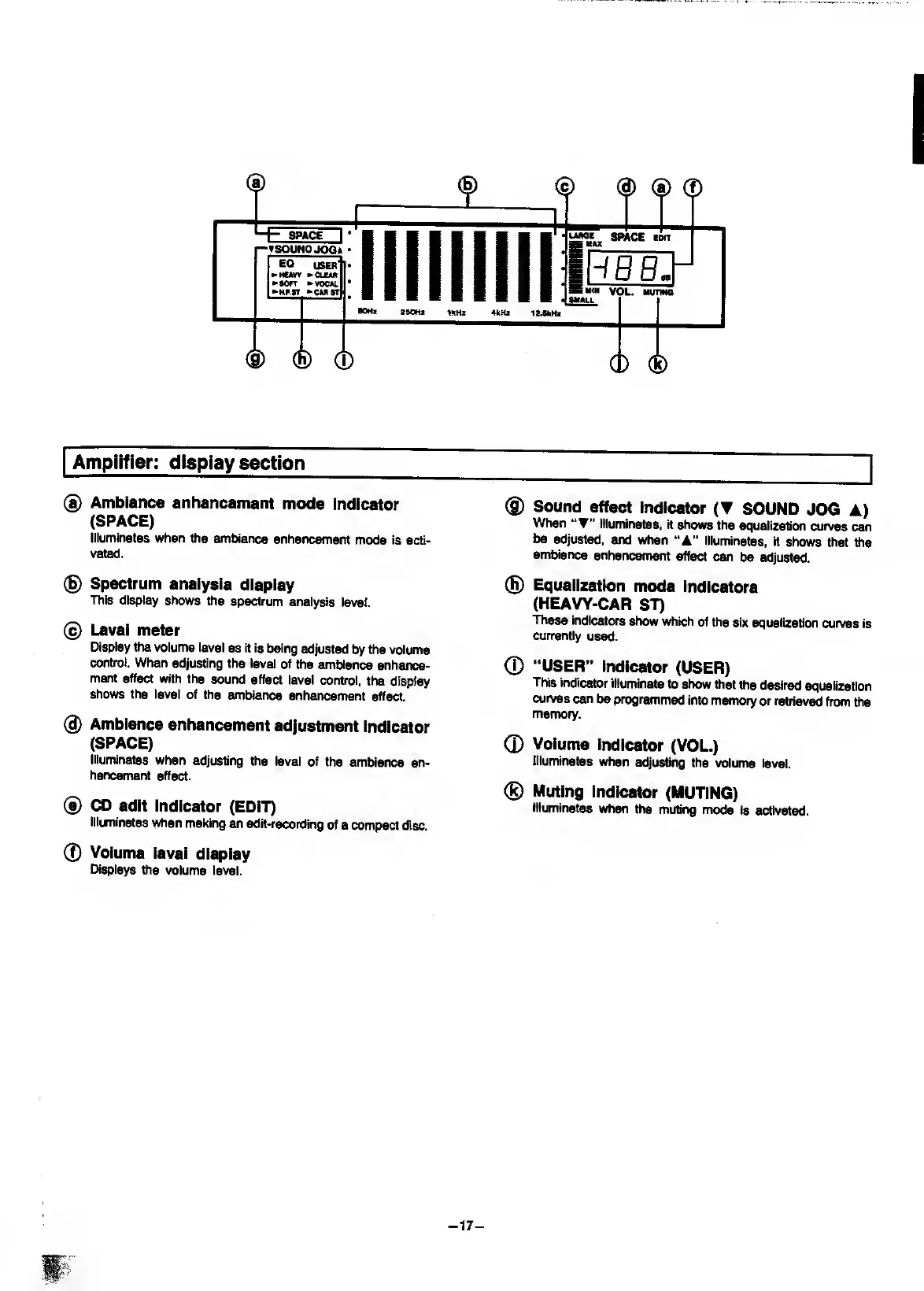
Amplifier;
display
section
®
Ambience
enhancement
mode
indicator
(SPACE)
Illuminates
when
the
ambience
enhancement
mode
Is
acti¬
vated.
(g)
Spectrum
analysis
display
This
display
shows
the
spectrum
analysis
level.
@
Level
meter
Display
the
volume
level
as
it
is
being
adjusted
by
the
volume
control.
When
adjusting
the
level
of
the
ambience
enhsmce-
ment
effect
with
the
sound
effect
level
control,
the
display
shows
the
level
of
the
ambience
enhancement
effect.
(g)
Ambience
enhancement
adjustment
indicator
(SPACE)
illuminates
when
adjusting
the
level
of
the
ambience
en¬
hancement
effect.
®
CD
edit
indicator
(EDIT)
Illuminates
when
making
an
edit-recording
of
a
compact
disc.
0
Volume
level
display
Displays
the
volume
level.
®
Sound
effect
indicator
(
SOUND
JOG
A)
When
illuminates,
it
shows
the
equalization
curves
can
be
adjusted,
and
when
illuminates,
H
shows
that
the
ambience
enhancMf>ent
effect
can
be
adjusted.
(H)
Equalization
mode
Indicators
(HEAVY-CAR
ST)
These
indicators
show
which
of
the
six
equalization
curves
is
currently
used.
0
“USER”
indicator
(USER)
This
indicator
illuminate
to
show
that
the
desired
equalization
curves
can
be
programmed
into
memory
or
retrieved
from
the
menf)ory.
0
Volume
indicator
(VOL.)
Illuminates
when
adjusting
the
volume
level.
®
Muting
indicator
(MUTING)
Illuminates
when
the
muting
mode
is
activated.
-
17
-

Related product manuals